

# Learn Prompt Engineering
We typed "write about climate change" into ChatGPT, the way most beginners start. The reply was five generic paragraphs that could sit in any school textbook. Four small revisions later, the same model returned a titled, five-paragraph persuasive essay written for a specific reader, with three action steps at the end. Same model, different answers. That gap is the reason to learn prompt engineering, and this page is a free path built around closing it. If you want prompt engineering for beginners without the hype, start here.
Start here: If you only read one guide first, make it How to Write Better ChatGPT Prompts. It is the hands-on companion to this hub.
This prompt engineering guide gives you a 4-level learning path, five core skills, ten practice exercises with a success check for each, a simple rubric, the full results of that ChatGPT test, and an honest comparison of free courses. No coding experience is needed, and everything draws on research-backed techniques rather than tricks. The goal is practical: write high-quality prompts that communicate intentions clearly, so every AI interaction gives you accurate, relevant output on real workplace tasks, research and productivity tasks. Clear prompts also make human-computer interaction more predictable and support safe interactions, because the model knows exactly what you asked for.
What Prompt Engineering Means for Everyday Users
A prompt is the input you give an AI model to get a specific response. It can be a single question, a few keywords, complex instructions, code snippets or creative writing samples. Prompt engineering is the practice of designing prompts and optimizing prompts so AI models, especially large language models (LLMs), understand your intent and produce the desired output. When a prompt is vague, AI-generated output drifts. When it is clear, you get the desired responses far more often. Some writers call it an art and science. A simpler way to see it: a good prompt is a roadmap that steers the model toward the answer you have in mind.
Generative AI can create new content such as articles and images. ChatGPT, Gemini, Claude and other LLMs all respond to the same basics: context, examples and a clear instruction. Output quality and relevance depend directly on the prompt, which is why prompt engineering basics matter more than any single tool.
For everyday users, the benefits are concrete:
- Better model performance: accurate outputs, relevant outputs and informative outputs, because the model has clear instructions.
- Less bias and fewer harmful responses: guiding the input reduces inappropriate content.
- More control and predictability: consistent responses that match your goals.
- A better user experience: clearer interactions and more intuitive interactions with AI.
This page keeps the definition short on purpose. The aim here is to practice the fundamentals, not to study theory.
How to Learn Prompt Engineering: A 4-Level Path
The fastest way to learn is in order: Learn, then Frameworks, then System Prompts, then By Channel. Each level builds on the one before it, and each has its own hub on this site.
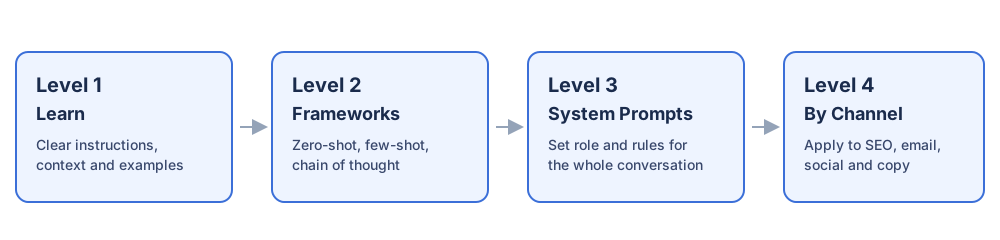
Level 1: Learn (you are here). Start with clear instructions, context and examples. Read How to Write Better ChatGPT Prompts, then work through the exercises below. You will see how AI reads you, which comes down to tokens: models break text into small units, and tokenization fundamentals explain why wording and length change the result.
Level 2: Frameworks. Move to repeatable prompting techniques in the Prompt Engineering Techniques hub. This is where you practice zero-shot prompting (direct prompts), one-shot prompting (one-shot prompts), few-shot prompting (few-shot prompts) and multi-shot prompts, and learn when chain-of-thought prompting helps. Direct prompts work well for idea generation, summarization and translation. CoT prompts ask the model to work step by step through its reasoning steps, and zero-shot CoT prompts simply add that request to a direct prompt, which often gives a well-structured answer to complex reasoning problems. Start with zero-shot vs few-shot prompting and chain-of-thought prompting.
Level 3: System Prompts. Learn how role prompts and persona prompts set behavior for a whole conversation in the System Prompts & Advanced hub. Read what a system prompt is and how a system prompt differs from a user prompt. Multi-turn conversations, structured output, prompt injection awareness and other advanced techniques live here too.
Level 4: By Channel. Apply everything to real jobs in the ChatGPT Prompts by Channel hub: SEO, email marketing, social media and copywriting. Ready-made prompt examples and ChatGPT prompt templates help you compare your work against a known good version.
Prompt Engineering Basics: Five Core Skills to Practice
Most advice, from vendor guides to full courses, comes back to five skills. They are the prompt engineering essentials every AI prompt engineer relies on, and they work the same on GPT models, Gemini and Claude. Practice them one at a time and you are using AI effectively.
1. Specificity
Use precise language and avoid ambiguity. Instead of "write something about climate change," ask for a persuasive essay arguing for stricter carbon rules. Quantify requests: a 500-word essay or a 14-line sonnet is clearer than "a long poem." Start with action verbs, set the length and format, and name the target audience. Clear goals make the model's job specific. Task breakdown matters too: break complex tasks into steps, and split a big task into bite-sized pieces instead of one giant request.
2. Context
Give the model relevant facts, data and key terms. Reference specific sources or documents ("based on the attached report"). Define key terms when the audience is new to them. Context is what turns a generic answer into one that fits your situation, your domain and your specific tasks.
3. Format
The prompt format matters. Some models respond better to natural-language questions, others to direct commands or structured inputs with labeled fields. Learn your model's preferences, because model preferences differ. Then ask for the output format you want: a bulleted list, a table, JSON, or a word limit. Asking for structured output is one of the quickest wins in prompt engineering. Our guide on how to structure AI prompts for consistent, useful output goes further.
4. Examples
Show, don't tell. Few-shot examples, meaning a few input-output examples before the real task, teach the model the style, tone and level of detail you expect. One example is a one-shot prompt; several is few-shot. Examples work better than long descriptions of what you want.
5. Iteration
Your first prompt is a draft. Iterate and experiment: try different phrasings and keywords, adjust the level of detail, and test shorter prompts against longer prompts. Change one thing at a time so you know what moved the output. Adapting a prompt based on feedback and outputs is the habit that separates beginners from people who get reliable results. For hard reasoning, ask for chain-of-thought reasoning: step-by-step reasoning or a logical checklist, so the model shows intermediate steps before the answer.
Ten Practice Exercises, Each With a Success Check
Run each exercise in any chatbot. Do not move on until the success check passes. Exercises 1 to 5 cover text generation and language generation, 6 covers question answering, 7 covers code generation and 8 covers image generation.
- Email rewrite. Email writing is one of the biggest time-savers in generative AI, from replies and edits to cold outreach. You are a CEO writing to a regional manager. Ask for a short email that is humorous but professional, requesting a paper-stock list, a meeting this week and feedback on an AI workshop. Success check: all three requests appear, and it reads like a witty email that stays professional. Then ask the model to match your writing voice or edit emails you already sent.
- Summarization. Paste a news article and ask for a concise summary of key points in five bullets. Success check: every bullet is a fact from the source, nothing invented.
- Translation. Name the source language and target language, and ask the model to keep meaning and tone. Success check: a native speaker or a back-translation confirms the meaning held.
- Creative writing. Specify genre, tone, style and plot points for a 300-word story. Success check: each element you listed is visible in the text.
- Dialogue with a persona. Set the model up as a friendly troubleshooting chatbot and test it with "My computer won't turn on." Success check: it asks a clarifying question before giving steps.
- Question answering. Try open-ended questions (quantum computing explained for a non-technical audience), specific factual questions (a capital city), multiple-choice questions, hypothetical questions and opinion-based questions. Success check: the model labels opinions as opinions and answers facts from the provided text when you give it one.
- Code generation. Ask for code completion, code translation between programming languages, code optimization, and debugging help for a NullPointerException. Success check: the code runs, or the explanation names the exact line causing the error.
- Image generation. Write one prompt each for photorealistic images, artistic images in a named art style or art movement, abstract images built on a concept, color and shape, and image editing (change a background, remove objects or replace objects). Success check: objects, scenery and lighting match what you described.
- Few-shot classification. Give three labeled examples, then ask the model to classify a fourth. Try a simple sentiment analyzer for product reviews. Success check: five new inputs are labeled correctly.
- Chain-of-thought check. For spam detection, ask the model to explain reasoning as it decides whether an email is spam, using clear criteria (known sender, suspicious keywords, an offer too good to be true). Success check: each criterion is addressed before the verdict.
A 4-Point Rubric to Judge Any Prompt
Score each prompt from 0 to 4, one point per question:
| # | Check | Ask yourself |
|---|---|---|
| 1 | Goal | Does it start with an action verb and say what "done" looks like? |
| 2 | Context | Does it include the audience, relevant facts and any source documents? |
| 3 | Format | Does it set length, structure and tone for the output? |
| 4 | Proof | Does it include an example or a way to check the answer? |
A 4/4 prompt is not always long. It is complete. Use the rubric before you send a prompt, and again when the output disappoints you, to find which point was missing.
Worked Example: One Beginner Prompt, Four Revisions
We ran this test on November 5, 2026, in the ChatGPT web app on a Free plan with the default model (the interface did not name the model version). Each version ran in a fresh chat, so earlier answers could not shape later ones. Each version keeps everything from the one before and adds one rubric point.
| Version | What we added | What came back | Score |
|---|---|---|---|
| Original | Nothing: "write about climate change" | Five generic paragraphs (causes, effects, a passing line on Pakistan, solutions, conclusion). No reader, no argument, no length. | 0/4 |
| Revision 1 | Goal: "Write a persuasive essay arguing that governments should adopt stricter carbon emission regulations." | A clear argument, but seven paragraphs of general points (warming, health, jobs, future generations, a counterargument) with no local detail. | 1/4 |
| Revision 2 | Context: readers are high school students in Pakistan with basic science but no economics; use the 2022 Pakistan floods; define technical terms | Opened on a flood scene, defined greenhouse gases and emission regulations in plain words, and cited 33 million people affected. Six paragraphs, length still open. | 2/4 |
| Revision 3 | Format: a title, exactly 5 paragraphs, about 500 words, then 3 actions students can take this month | Followed the structure exactly: title, five paragraphs, three bulleted actions, and the names of its sources for the flood figures. | 3/4 |
| Revision 4 | Proof: a sample opening line for tone, plus a self-check that each paragraph makes one point in words a 15-year-old knows | Same structure with plainer sentences, one point per paragraph, and a new fairness argument about Pakistan's small share of emissions. It did not copy the sample line. | 4/4 |
What moved the output most: Revision 1 fixed the purpose, Revision 2 made it relevant, Revision 3 made it usable, and Revision 4 made it consistent. One honest note: our Revision 2 prompt lost its first letter while typing ("rite a persuasive essay"), and the model understood it anyway. The raw outputs for all five versions are kept on file.
Free Prompt Engineering Courses Compared
If you want structured lessons alongside this hub, these are the options worth knowing. Each free prompt engineering course has a different strength. Course details below were checked on each course page on November 5, 2026, and can change.
| Course | Format | Length | Certificate | Best for |
|---|---|---|---|---|
| Codecademy: Learn Prompt Engineering | 3 lessons, 3 projects, 4 quizzes | About 3 hours | Yes, on paid Plus plan or Pro plan | Guided projects |
| Learn Prompting | Open-source written guide, beginner to advanced | Self-paced | Paid courses separately | Depth and research |
| Great Learning: Prompt Engineering for ChatGPT | 8 video modules | About 3 hours | Yes, with a certificate fee | LLM background |
| Coddy | 3 sections, 69 lessons, 53 challenges, 365 quiz questions | Self-paced | Free certificate | Hands-on practice |
| Vendor guides (OpenAI, Anthropic, Google Cloud) | Free documentation | Short reads | No | Model-specific tips |
Codecademy
Its beginner level course runs about 3 hours, with a suggested prerequisite, Learn How to Use ChatGPT. It teaches zero-shot, one-shot, few-shot and chain-of-thought prompting, crafting effective prompts with clear steps and reusable prompts, controlling tone, style and complexity, and prompt engineering patterns for organizing input, controlling output and diagnosing problems. It also introduces Retrieval Augmented Generation (RAG) for working with custom data. Projects include Crafting Effective Prompts (from a root prompt to reusable templates), the Prompt Engineering Patterns Lab (structure information, refine responses and build templates in practical scenarios), and Sentiment Analysis. Learning features include an AI learning assistant with personalized feedback, real-world projects (guided projects and independent projects for a portfolio), assessments, a job-readiness checker and an interview simulator. The certificate of completion can go on a resume or LinkedIn.
Learn Prompting
One of the earliest guides, first released in October 2022, before ChatGPT. It reports more than 3 million users and citations from Google, Microsoft, Wikipedia, O'Reilly and Salesforce. It serves non-technical beginners while keeping depth for advanced readers. Its modules cover Basics, Applications, Intermediate (research-based techniques), Applied Prompting, Advanced Applications, Reliability (LLM reliability), Image Prompting (text-to-image models such as DALL-E and Stable Diffusion), Prompt Hacking and security, Tooling and IDEs, Prompt Tuning with gradient-based techniques, plus Agents, Models, RAG and Language Model Inversion. It is open source, led by Sander Schulhoff, an NLP researcher and RL researcher from the University of Maryland, and built by a community of researchers, translators and hobbyists. Its teaching rests on practicality, accessible examples and collaborative learning through a Discord community where you can find learning partners. A difficulty rating marks each article Beginner (no programming), Easy (basic programming), Intermediate (programming plus domain knowledge) or Advanced (programming expertise). It argues for accessible AI, explained clearly and objectively, without jargon.
Great Learning
An introductory course for non-technical readers and beginners, about 3 hours long, with 8 modules: LLM training and inference, OpenAI history and GPT training, LLM tokenization, model deployment and tokens, operationalizing generative AI (monitoring, scalability and business use), an introduction to prompt engineering, ChatGPT 4.5, o1 and o3-mini, and sample prompt execution across those models. It covers GPT architecture, prompt design core principles, refining outputs for accuracy, and structuring complex queries. Enrolling is free with free access to course content. Once enrolled, you get lifetime access and self-paced learning at your own pace; the industry-recognized certificate for professional channels carries a non-refundable fee. It suits AI enthusiasts, content creators, marketers and developers improving LLM interactions.
Coddy
A free online course and interactive course where you write AI prompts against real LLM outputs. Sections move from the AI Era and How AI Reads You through Writing Your First Prompts, then Show Don't Tell, Structure Your Prompt, Structured Output, Conversations and Final Challenges, and finally AI as a decision step: Let the AI Decide, Two Answers, How Sure Is It and Decisions in an App. You test live LLM responses in the browser with no API keys and no setup, and AI hints explain a failed prompt so you build intuition. It adds audio narration, quizzes, streaks and leaderboards on iOS, Android and web.
Vendor guides
Model makers publish free guidance for their own models. OpenAI's prompt engineering guide covers message roles, structuring prompts and adding context for coding and reasoning tasks. Anthropic's prompt engineering overview explains when prompting is the right fix and links to interactive tutorials for Claude. Google Cloud's prompt engineering overview covers prompt format, context and examples (such as the tone or theme for a story), fine-tuning and adapting prompts for specific tasks and domains, and context-aware interactions and continuous interactions across multi-turn conversations. Vendor guides are short and model-specific, so pair them with a structured course.
Other options teach effective communication with AI, advanced prompting techniques and practical applications, often with a focus on precise prompts and ways to optimize AI responses. Whichever you choose, the principles of prompt engineering are the same: prompting techniques you practice on real tasks beat any certificate.
Prompt Engineering FAQ
Can anyone learn prompt engineering?
Yes. Prompt engineering is mostly communication, structure and testing, so it is beginner friendly and needs no AI prerequisites. Content writers, marketers, developers, analysts, founders, product managers, students and business users all use it. Start with prompt-writing fundamentals. If you can describe a task clearly to a colleague, you can learn to describe it to an LLM.
How long does it take to learn prompt engineering?
Most people learn the core techniques (clear instructions, few-shot examples, structured output and role prompting) in 1-2 weeks of daily practice. Becoming reliably good across writing, research, coding, marketing and analysis usually takes 1-3 months of real-world use. Many short courses take about 3 hours and are self-paced, with modules running from LLM training to operationalizing GenAI and hands-on sample prompts.
Do you need to code to learn prompt engineering?
No. The core skill is language-agnostic. Coding helps later if you want to call LLMs from your own Python or JavaScript programs, but you can learn prompt engineering without any coding experience.
What's the difference between a prompt and prompt engineering?
A prompt is what you type. Prompt engineering means writing inputs to LLMs so they give reliable output, covering structure, examples, role setup, persona setup, output formatting, chain-of-thought and prompt injection. It is the discipline of deliberately designing prompts: choosing instructions, examples, format and constraints so the output is consistent, accurate and useful. It is a practical skill. The same model can give very different answers depending on the prompt.
Is prompt engineering still a useful skill?
Yes. Even as models improve, a casual prompt and a well-engineered prompt still produce very different results. Production AI features such as chatbots, agents, summarizers and content tools depend on prompt design, and teams building AI products treat it as a core skill.
What will I learn in a beginner course?
Expect to write clear ChatGPT prompts, structure instructions, provide context and refine prompts for relevant responses and accurate responses. You will practice specific prompts that state requirements, refining instructions after each reply, prompt structuring, instruction writing, context setting, organizing instructions and communicating requirements. Topics usually include prompt fundamentals, zero-shot prompting, few-shot prompting, role-based prompts, instruction prompts and refinement techniques, often tested on models like GPT-4.5, o1 and o3-mini, all aimed at improving AI responses.
Do free courses give a certificate?
Some do. Coddy gives a free certificate for a structured, hands-on course. Codecademy's certificate needs a paid plan. Great Learning offers free enrolling but charges a certificate fee. A certificate helps for AI roles, content roles, support roles and product roles where prompt skills are expected, but your portfolio of real prompts matters more.
What is the salary of a prompt engineer in 2026?
It depends on the source and the role. Glassdoor's US page showed an average prompt engineer salary of $133,730 a year in total pay, with a typical range of $106K to $171K (checked November 5, 2026). One free course page, also citing Glassdoor, gives wider 2026 bands: $90,000 to $140,000 for entry-level roles in the US and $200,000 to $340,000 for senior roles at companies such as OpenAI and Anthropic. For India it lists Rs 4.2 to Rs 6.8 LPA entry-level and Rs 16 LPA and above for senior roles at AI-first companies. Treat all of these as rough ranges and check current listings.
What comes after prompt writing?
Prompt writing is a starting point. To build real applications and generative AI applications, learn LLM workflows, RAG, AI agents, output evaluation and business use cases. Level 3 and Level 4 of the path above are where that work begins.
Put It Into Practice
Pick one task you do every week, write a prompt for it, and score it with the rubric. When you want a head start, the ChatGPT Prompt Generator builds a structured first draft you can then refine with the five core skills.
Sources (checked November 5, 2026)
- Codecademy: Learn Prompt Engineering
- Learn Prompting: Prompt Engineering Guide
- Great Learning: Prompt Engineering for ChatGPT
- Coddy: Learn Prompt Engineering
- Google Cloud: Prompt engineering overview
- OpenAI: Prompt engineering
- Anthropic: Prompt engineering overview
- Glassdoor: Prompt engineer salary
- Sololearn: Prompt Engineering