
How to Write a Prompt: A Step-by-Step Guide to Better ChatGPT Prompts
You ask ChatGPT for something and get back an answer that's technically fine and practically useless. It's generic, too long, and polished in all the wrong places. So you rephrase, then rephrase again. Ten minutes later you're fixing the output by hand.
The model usually isn't the problem. The prompt is. AI tools only give you what you ask for, and most of us ask the way we'd type into Google: a few keywords, no background, no idea of what "done" looks like. Vague prompts get vague answers.
This guide shows you how to write a prompt that works in one or two tries instead of five. You'll get a six-step method, a real before/after test, and the prompt engineering best practices behind effective prompts for AI assistants like ChatGPT, Claude and Gemini. It's written for beginners, but it goes deep enough to help if you already prompt every day.
 Written & reviewed by Muhammad Adnan, AI Solutions Provider & Full Stack Developer
This guide was drafted with AI assistance and reviewed by a human editor under our editorial policy. The weak-versus-strong prompt outputs described below were generated with Claude on 27 September 2026. Before pasting anything into an AI tool, leave out passwords, client data and personal details unless your company policy and the tool's data settings allow it.
What is a prompt?
A prompt is the input you give a large language model (LLM) to get a response. It can be a single line like "Summarize this in five bullet points" or a full brief with background, examples and rules. Writing a good one means briefing the model the way you would brief a capable new colleague: give it a role, the context it cannot guess, one specific request, the output format you want, and constraints like length and tone, then read the result and refine the weakest part. The same method works across ChatGPT, Claude, Gemini and other assistants.
Quick answer: how to write a prompt
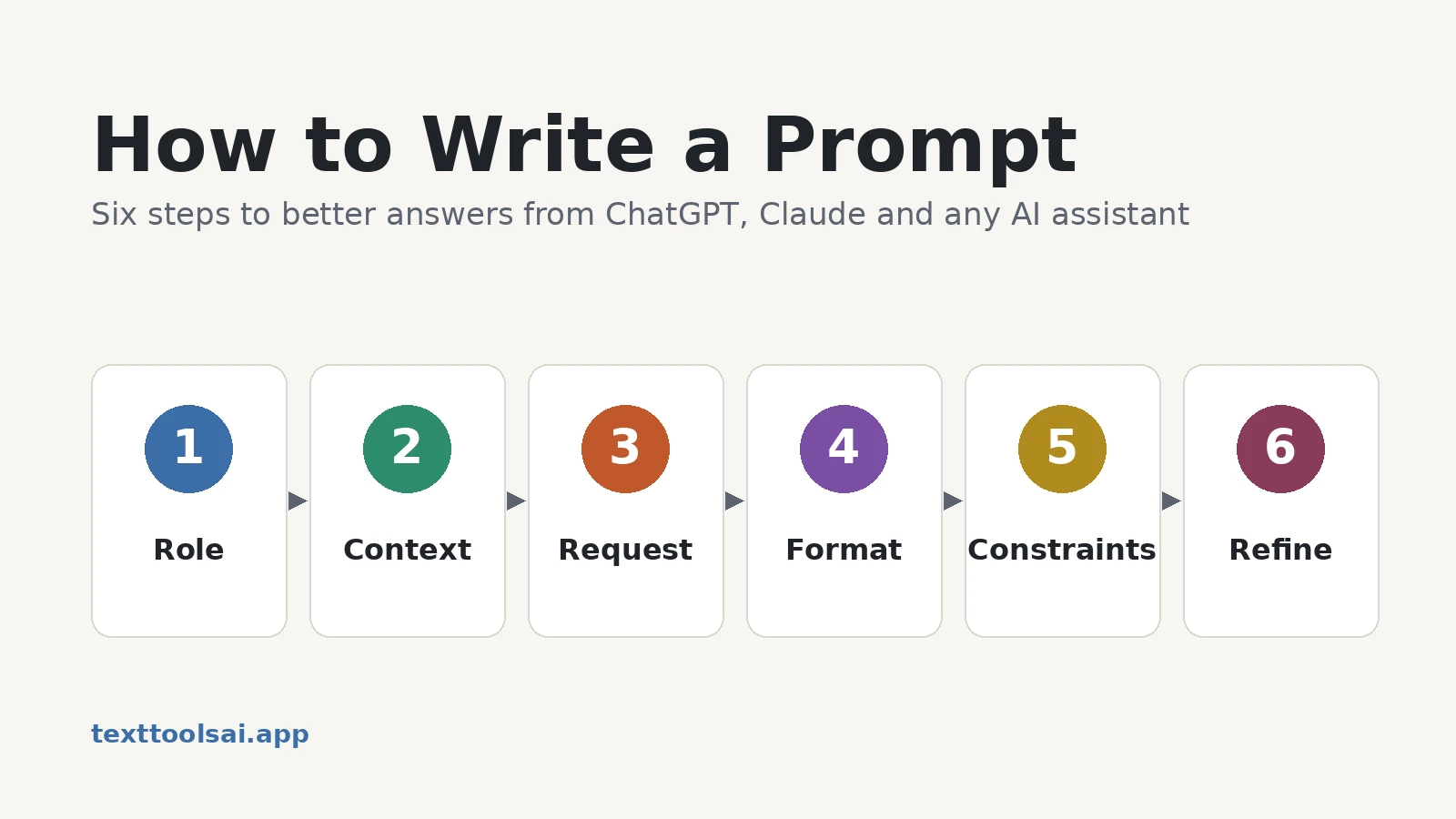
Here is the short version. The rest of this guide shows each step with examples:
- Give the AI a role.
- Add the context it can't guess.
- Make one specific request.
- Say what format you want.
- Add constraints: length, tone, what to avoid.
- Read the output, fix the weakest line, and refine.
Prompt types and what prompt engineering means
Usually a prompt is text, but newer models also accept images and audio. It can be one line ("Summarize this in 5 bullet points") or a full brief with background, examples and rules.
Learning how to write AI prompts starts with a simple shift in thinking. Wharton professor Ethan Mollick describes working with these tools as programming with words [1]. That's the right mental model. Your words are the instructions, and the model follows them literally, including the parts you forgot to say.
Prompt engineering is the practice of designing and refining prompts so the model gives you what you need. For most people it's less "engineering" than clear briefing. You're doing what a good manager does when handing a task to a new hire.
Prompts come in a few common types:
| Type | What it does | Example |
|---|---|---|
| Zero-shot | A direct instruction, no examples | "Summarize this article in 5 bullet points." |
| Few-shot | Includes examples for the AI to copy | "Here are two summaries I like. Write a third in the same style." |
| Role-based | Assigns a persona or viewpoint | "You're an MBA professor preparing a lecture outline on pricing." |
| Contextual | Adds background before the ask | "This is for first-year students. Rewrite it in simpler language." |
| System prompt | Standing rules set before the chat starts | "Always respond formally and never guess at facts." |
For how these fit into named frameworks like RACE and CRISPE, see our prompt frameworks and techniques hub.
Why your prompt matters more than the model
Here's the misunderstanding behind most bad prompts: an LLM is not a search engine. Google retrieves pages that already exist. A language model generates new text by predicting what's likely to come next. It's working from patterns, not looking anything up.
That has two consequences:
- The same prompt can give different answers. The output is probabilistic, not fixed.
- When your prompt leaves gaps, the model fills them with the most average answer. That's why vague prompts produce such generic text.
So a search-style query like "best social media post ideas" gets you a list anyone could have written. Add who you are, who you're writing for and what you've already tried, and the answer changes completely.
The payoff for getting this right is measurable. In a 2023 field experiment with 758 Boston Consulting Group consultants, those using GPT-4 on suitable tasks produced results rated more than 40% higher in quality than a control group. They also finished 12.2% more tasks and worked 25.1% faster [2]. On a task outside the AI's abilities, though, AI users did worse. Knowing how to prompt is part of knowing when AI will actually help.
The anatomy of a good prompt
If you want to know how to write effective AI prompts, this is the part worth memorizing. Every prompt framework you'll read says roughly the same thing with different letters. Strip away the acronyms and good prompts share five elements:
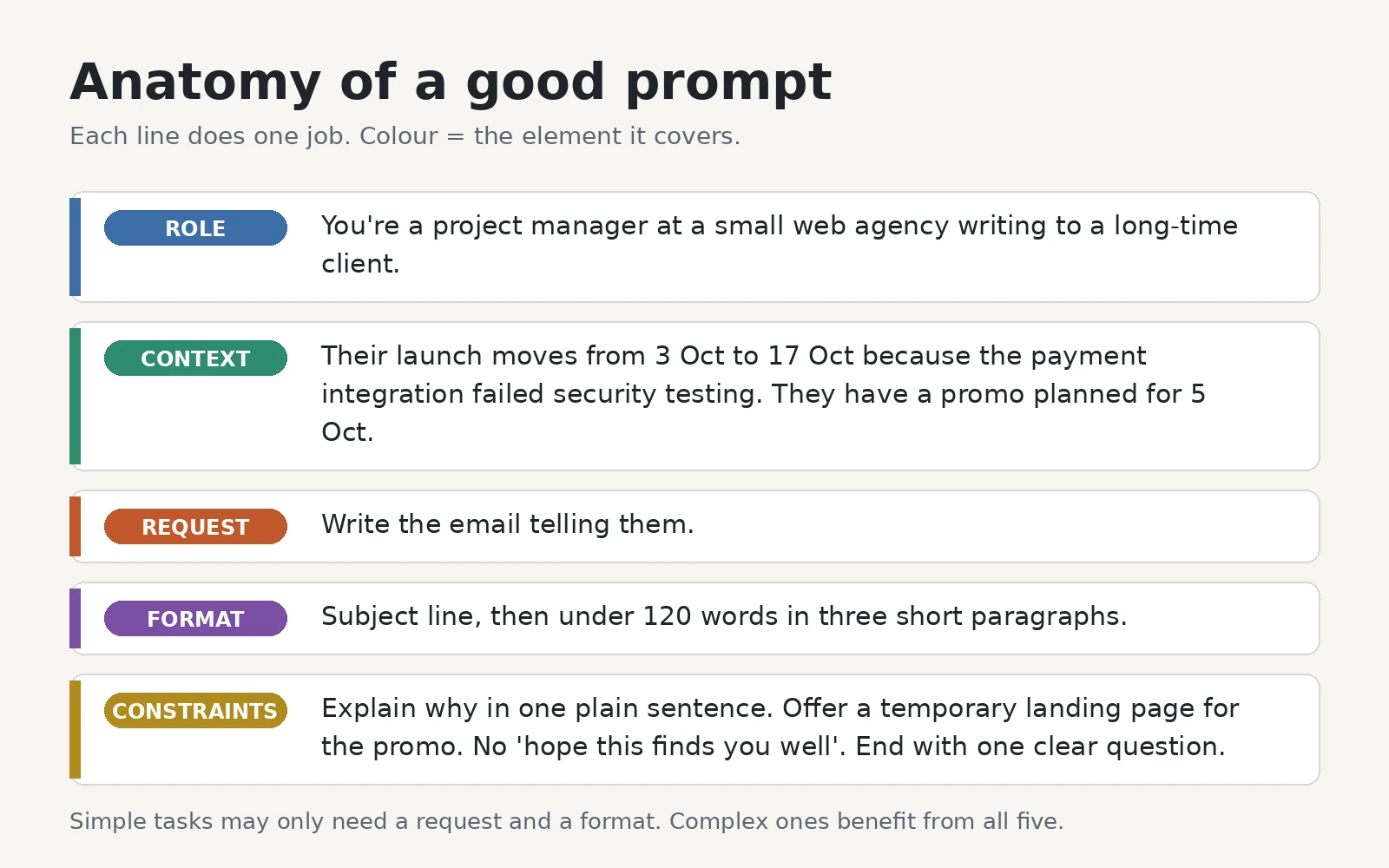
- Role: who the AI should act as. "You're a project manager at a small web agency" sets vocabulary, tone and assumptions.
- Context: the background it can't know. Who's reading, what happened, what's already decided.
- Request: the one thing you want produced, stated plainly.
- Format: the shape of the answer. Length, sections, table columns, bullet points.
- Constraints: the guardrails. What to avoid, what to include, and what to do when it doesn't know.
Not every prompt needs all five. "Translate this into Spanish" works fine on its own. The more a task depends on judgment, audience or tone, the more of these elements you'll need. We break down the ideal order of these elements in how to structure AI prompts.
How to write a prompt step by step
These six steps are the core of how to write ChatGPT prompts that land on the first or second try. They work the same way in Claude, Gemini or any other chat tool.
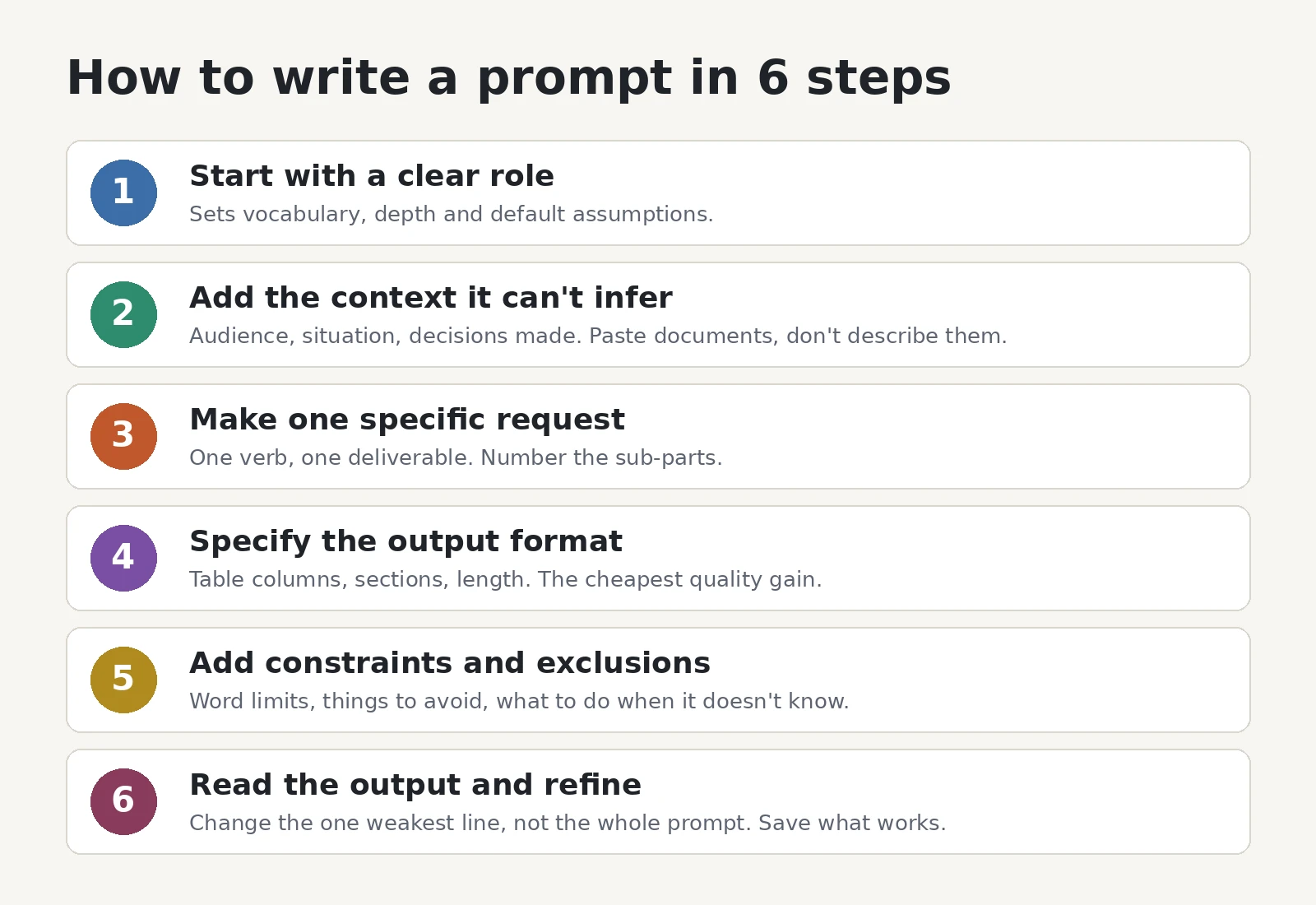
Step 1: Start with a clear role
The role tells the model which expertise and conventions to draw on before it reads your task.
You're a senior financial analyst who briefs executives.Run the same request with and without that line and the first drafts will differ noticeably in vocabulary and depth.
Step 2: Add the context it can't infer
Most weak outputs aren't a sign the AI isn't smart enough. They're missing context. Name the audience, the situation and anything already decided. If the answer depends on a document, paste the document rather than describing it.
Context: the reader is an operations director at a mid-size manufacturer who has already seen our product demo.Step 3: Make one specific request
Use one verb and ask for one deliverable: draft, summarize, compare, rewrite, classify. If the job has several parts, number them so nothing gets dropped.
Task: draft a follow-up email that answers their question about inventory tracking.Step 4: Specify the output format
This is the cheapest quality gain there is. "Give me an overview of the risks" invites a wall of prose. Instead, try:
Format: a four-row table with the columns Risk, Likelihood, Owner, Mitigation.That one line saves you a round of editing.
Step 5: Add constraints and exclusions
Constraints keep the output usable. Set a word limit, name the phrases or claims to avoid, and tell the model what to do when it doesn't know something.
Constraints: under 150 words, no jargon, and write "not in the source" for anything the document doesn't say.Step 6: Read the output and refine
Don't start over. Find the one line that caused the miss, usually a vague request, missing context or no format, and change only that. When a prompt works, save it.
Keep the structure, but rewrite the second paragraph in plain English and cut it to two sentences.Don't want to build it by hand? Our free ChatGPT prompt generator takes a one-line description of your task and turns it into a structured prompt with role, context, instructions, format and success criteria. It needs no signup, and you get five free generations a day.
A real test: weak prompt vs strong prompt
To show the difference these steps make, we ran two prompts for the same job through Claude on September 27, 2026. The task was telling a client their website launch is delayed.
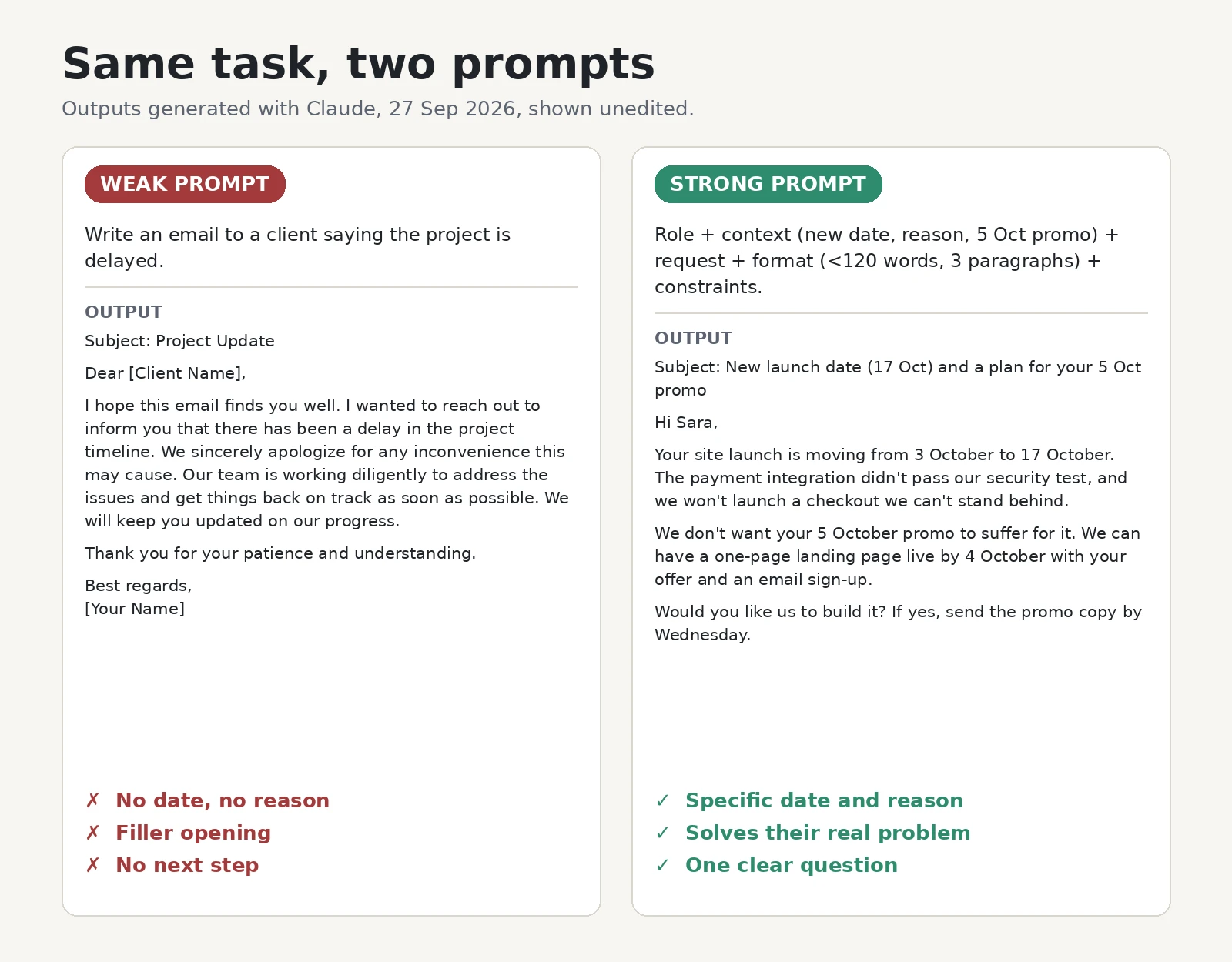
The weak prompt:
Write an email to a client saying the project is delayed.It produced exactly what you'd expect: "Subject: Project Update," a "hope this email finds you well" opener, an apology, and a promise that the team is "working diligently." It gave no new date, no reason and no next step. It's an email the client would have to reply to just to find out what's happening.
The strong prompt:
You're a project manager at a small web agency writing to a long-time client. Context: their launch moves from 3 October to 17 October because the payment integration failed security testing. They have a promo planned for 5 October. Task: write the email telling them. Format: subject line, then under 120 words in three short paragraphs. Constraints: explain why in one plain sentence, offer a temporary landing page for the promo, no "hope this finds you well," end with one clear question.The output named the new date in the subject line and gave the reason in one sentence. It also offered a landing page so the 5 October promo could still run, and it ended with a yes/no question and a deadline. It came in at under 100 words.
Notice what changed. The model didn't get smarter between the two runs. We simply told it what we knew. That's really all there is to how to write a good prompt.
Prompt engineering best practices
The six steps get you a solid first prompt. These best practices for writing effective AI prompts help with everything after that.
Be specific, not clever
Compare "Tell me about climate change" with "Explain the economic effects of climate change on developing countries over the next decade." The second gives the model a focus, a scope and a timeframe, and you'll get a far more useful answer.
The same applies to instructions about length and audience. "Keep it short, not too detailed" leaves the model guessing. "Use 2-3 sentences to explain this to a high school student" doesn't. Clear AI prompts don't rely on magic keywords. Plain, direct detail is what works.
Give examples when the format or tone matters
Showing beats telling. If you want a particular style, paste an example of it. For instance, "Match the tone of this subject line: [example]," or "Here's last week's recap; write this week's in the same format." This is called few-shot prompting, and it's one of the most reliable techniques there is. It became widely known after the GPT-3 research showed models can pick up a pattern from just a few examples [3].
Keep your examples consistent. If one example is formal and another is casual, the model has to guess which one you meant. More ready-made patterns are in our ChatGPT prompt examples.
Say what to do, not only what to avoid
"Don't be too salesy" is weaker than "Focus on the customer's problem and mention the product once, in the last line." Models follow positive instructions more reliably than negative ones. Negative instructions still have their place ("no jargon," "avoid clichés like game-changer"), so pair each one with what you want instead.
Ask it to think step by step on hard problems
For analysis, math or multi-step decisions, ask the model to work through the problem before answering, or tell it the steps to follow. This is chain-of-thought prompting. Google researchers showed it improves accuracy on reasoning tasks [4], and simply adding "Let's think step by step" helped in follow-up work [5].
Newer reasoning models do much of this internally, so you'll need the phrase less often. Spelling out the sequence you want ("first list the options, then compare costs, then recommend one") still helps.
Break big jobs into smaller prompts
Asking for a strategy, three blog posts and a social calendar in one message is how you get three mediocre drafts. Split the work instead: outline first, then each section, with each output feeding the next prompt. This is called prompt chaining, and it keeps quality consistent across long tasks.
Separate instructions from material
When you paste in text to work on, fence it off so the model can't confuse your instructions with your material. Triple quotes, ### or labels like Task: and Text: all work:
### Instruction ###
Summarize the text below in three bullet points for a busy executive.
Text: """[paste here]"""
Let the AI ask you questions
For anything complex, end your prompt with: "Before you answer, ask me any questions you need." Marketer Seth Waite popularized a stronger version [6]. It has the model rate its confidence from 0 to 100 after each round of questions and hold off answering until it's at least 95% sure.
A related tip: don't ask the AI "Is this correct?" It tends to tell you what you want to hear. Ask it to show its reasoning instead.
Iterate instead of restarting
Your first prompt will rarely be perfect, and that's normal. The quickest way to improve prompts is to build on the answer you got. Chat tools remember the conversation, so follow-ups can be short: "Make it funnier," "Explain it to college students using analogies," "Cut it in half." Ask for 10 headline options instead of one. When you switch to an unrelated topic, start a new chat so old context doesn't bleed in.
How to improve writing with AI prompts
This is where most people start with AI, and where lazy prompts show up most. Ask ChatGPT to "make this better" and you'll get something smoother but blander. It's often sprinkled with words like delve and synergy that make readers suspect a machine wrote it.
The fix is to use AI as an editor, not a ghostwriter:
- Protect your voice. "Act as a line editor. Tighten this for clarity and concision without changing my voice or adding new ideas. List your changes after the rewrite."
- Show it how you write. Paste two or three samples of your own writing first and ask it to match that style.
- Ban the tells. Keep a list of overused words (delve, synergy, leverage, game-changer) and tell the model not to use them. Put the list in your custom instructions so you never retype it.
- Name the reader. "Rewrite this for first-time managers. Warm, direct, no jargon."
- Work in pieces. Edit one paragraph or section at a time. Whole-document rewrites drift.
- Ask for options, not a verdict. "Give me three alternative openings, each under 25 words."
If you'd rather not write the prompt at all, our AI paragraph rewriter is built for exactly this kind of clarity edit. For the human side of the craft, see how to improve writing flow and our AI rewriting best practices.
How to write better AI prompts for business
The method doesn't change at work. What changes is how much context you need to supply, because business output has to be accurate and on-brand.
For B2B marketing
B2B buyers are specific, so your prompts should be too. Always include:
- the buyer's role and company size,
- the funnel stage,
- the objection you're answering,
- the proof points the model is allowed to use.
Tell it what not to claim as well, or it will happily invent customer counts and ROI figures.
You're a B2B content marketer. Write three LinkedIn post drafts for IT directors at mid-size logistics firms evaluating route-planning software. Each post answers the objection "it'll take months to implement." Use only these proof points: [paste]. Under 120 words each, no hashtags, no invented statistics.Ready-made versions live in our content marketing prompts and email marketing prompts.
To build an app
When you're writing AI prompts to build an app, context and constraints matter more than clever wording. Give the model:
- your stack and file structure,
- what already exists,
- the exact behavior you want,
- the edge cases (empty inputs, bad data, offline states),
- the output format: full file, diff, or code only.
Ask for one feature at a time, and ask it to list its assumptions before writing code. For quick bug fixes, a short prompt plus the error message is often enough, especially when the model already has your code in view. That's the one place where "lazy prompting" works.
For an online store
For ecommerce, knowing how to write good AI prompts saves hours every week. The usual jobs are product descriptions, customer emails and FAQs. Give the model the product specs, your brand voice, the customer you're selling to, and anything it must not say, such as health claims or shipping promises:
You're an ecommerce copywriter for a small eco-friendly home-goods brand. Using the specs below, write a product description: a one-sentence hook, three benefit bullets, and a 40-word paragraph on materials. Friendly, plain English. No sustainability claims beyond the specs. Specs: """[paste]"""Or skip the prompt and use our product description generator for Shopify.
How long should a prompt be?
As long as it needs to be, and no longer. There's no ideal length, only relevance:
| Task | Typical prompt length |
|---|---|
| Simple (translate, summarize, reformat) | 1-2 sentences |
| Everyday writing and analysis | A few sentences covering role, context and format |
| Complex or high-stakes work | 100-500 words with examples and constraints |
| Quick code fixes | Often under 50 words plus the error message |
Every extra detail competes for the model's attention, so cut anything that doesn't change the answer.
How long can ChatGPT prompts be? Far longer than you'll usually need. Current models accept very long inputs, often an entire report. Exact limits vary by model and plan, so check your tool before pasting something huge. The real question isn't whether it fits. It's whether every part of it is relevant.
How to write prompts to avoid AI hallucinations
A hallucination is when AI states something made up with complete confidence. It happens because generating plausible text is what these models do. Andrej Karpathy made this point in a December 2023 post on X, describing LLMs as "dream machines." In 2023, the tech site CNET had to correct dozens of AI-written finance articles after errors were found [7]. The lesson: review AI output with a critical eye, especially facts, numbers and quotes.
You can't switch hallucinations off, but you can make them much rarer:
- Give it the source. Paste the reference text and say: "Only use the text below. If the answer isn't there, say you don't know." This is the idea behind retrieval-augmented generation (RAG) [8], and it's the single most effective fix.
- Ask for citations. "Cite the source for each claim" makes unsupported statements easy to spot.
- Use code for math. Ask the model to calculate with Python rather than doing arithmetic in its head.
- Give it a way out. An instruction like "Write not in the source if you can't find it" removes the pressure to invent.
- Ask for reasoning, not reassurance. "Walk me through how you got this" catches more errors than "Are you sure?"
For large datasets, the same logic applies. Ask ChatGPT to use its data analysis tool and work in small batches. Tell it never to truncate or use placeholder text.
Common prompt mistakes
| Mistake | Fix |
|---|---|
| Vague request | Name the deliverable, audience and length |
| Missing context | Add background, a role and your goal |
| No format | Ask for a list, table, sections or word count |
| Too many tasks at once | Split into a chain of smaller prompts |
| Inconsistent examples | Keep all examples in the same style |
| Accepting the first output | Ask for changes to tone, length or structure |
| Only saying what not to do | Pair each "don't" with a "do instead" |
Most bad outputs come from the first three rows. Fix those and you'll fix most of your results.
Build a prompt library
Good prompts for ChatGPT are worth keeping. Save your best ones, with a note on what they're for, in a doc or folder. Over time you'll have a personal library that makes your output consistent week to week. A tuned prompt beats a new one almost every time.
For rules that apply to nearly everything, use custom instructions or memory in ChatGPT (Claude and Gemini have equivalents). Your default tone, your field, your banned-word list: set them once and stop retyping them. And after a long session, ask the AI to "summarize the key decisions from this chat" before you move on. It's a handy block to paste into a fresh conversation.
If a prompt isn't working in one tool, try it in another. Models respond differently to the same wording, and the techniques in this guide transfer across all of them. Our ChatGPT vs Claude writing comparison covers where each one is strongest. For more copy-and-adapt starting points, browse our ChatGPT prompt templates.
Practice beats theory
Reading about prompting only gets you so far. The fastest way to improve your prompt engineering skills is deliberate practice on real work:
- Use real tasks, not made-up exercises. You'll notice what's weak because you care about the result.
- Get feedback. Ask a colleague, or ask the AI: "Critique this prompt. What's ambiguous?"
- Change one thing at a time, so you learn what actually made the difference.
- Keep what works in your library.
A caution from the research, too. Writing in Harvard Business Review, Oguz A. Acar argued that defining the problem clearly matters more than polishing prompt wording [9]. As AI tools get better at filling in prompts for us, that skill is what lasts. A beautifully worded prompt for the wrong problem still gets the wrong answer.
The bottom line
Learning how to write a prompt isn't about memorizing tricks. It's about briefing the AI the way you'd brief a sharp new colleague: who to be, what's going on, what you need, what it should look like, and what to avoid. Then look at what comes back and fix the one thing that's off.
Pick your next real task and try the six steps. That's where ChatGPT prompts for better answers start. If you want a head start, the TextToolsAI prompt generator will build the structure for you, and you can refine from there. For more guides and templates, explore our hubs.
References
- Mollick, E. (2023). How to use AI to do practical stuff: A new guide. One Useful Thing.
- Dell'Acqua, F., et al. (2023). Navigating the Jagged Technological Frontier. Harvard Business School Working Paper 24-013.
- Brown, T., et al. (2020). Language Models are Few-Shot Learners. arXiv:2005.14165.
- Wei, J., et al. (2022). Chain-of-Thought Prompting Elicits Reasoning in Large Language Models. arXiv:2201.11903.
- Kojima, T., et al. (2022). Large Language Models are Zero-Shot Reasoners. arXiv:2205.11916.
- Waite, S. (2023). Confidence-based questioning prompt. LinkedIn.
- Thorbecke, C. (2023). Plagued with errors: A news outlet's decision to write stories with AI backfires. CNN Business.
- Lewis, P., et al. (2020). Retrieval-Augmented Generation for Knowledge-Intensive NLP Tasks. arXiv:2005.11401.
- Acar, O. A. (2023). AI Prompt Engineering Isn't the Future. Harvard Business Review.
Main tool
Generate highly effective ChatGPT and AI prompts for marketing, SEO, blog writing, email, and more. Free online AI prompt generator.
Open ChatGPT Prompt GeneratorFAQ
How do you write a good prompt for ChatGPT?▾
Here's how to write prompts for ChatGPT in short: give it a role, the context it can't guess, and one specific request. Then say what format you want, add constraints like length and tone, and refine based on what comes back. For simple tasks, a clear request plus a format is often enough.
What makes a prompt effective?▾
An effective prompt is specific, gives relevant background, defines the output format, and sets a role when the task needs expertise. It's direct rather than clever: the model shouldn't have to guess what you mean.
How long should a ChatGPT prompt be?▾
As long as necessary, and no longer. Simple tasks need one or two sentences. Complex ones benefit from 100-500 words with examples and constraints. Cut anything that doesn't change the answer.
What are the best practices for prompt engineering?▾
Be specific; give context and a role; show examples when format or tone matters; say what to do rather than only what to avoid; ask for step-by-step reasoning on hard problems; separate instructions from pasted material; and iterate instead of restarting. These best practices for AI prompts apply across ChatGPT, Claude, Gemini and other assistants.
How can I improve my writing with AI prompts?▾
Use AI as a line editor, not a ghostwriter. Paste samples of your own writing so it matches your voice, and ask for edits for clarity and concision without new ideas. Ban overused words like delve and synergy, and work one section at a time.
What are common prompt mistakes?▾
The most common are vague requests, missing context, no format instruction, cramming several tasks into one prompt, inconsistent examples, and accepting the first output without refining it.
What's the difference between a prompt and a system prompt?▾
A system prompt is a standing set of rules that shapes the AI's behavior for a whole conversation, like "You're a helpful legal assistant; always cite the clause." A regular prompt is the one-off task you ask within those rules, like "Summarize this contract."
What is prompt chaining?▾
Prompt chaining breaks a complex task into smaller prompts, with each output feeding the next. For example: outline first, then draft each section, then edit. It keeps quality high on long or multi-step work.
Related guides
The structural elements that turn a vague AI request into a prompt that produces consistent, useful output.
Reusable ChatGPT prompt templates organized by task - ready to copy, customize, and use across marketing, content, SEO, and research workflows.
ChatGPT and Claude leave different detectable fingerprints in their writing. Here is how to recognize each model's patterns and humanize the output effectively.
Related tools
Related workflows
writers, students, editors, marketers, and professionals
Paste a paragraph and rewrite it to read clearer while the meaning, facts, and intent stay exactly the same. Instant, faithful rewrites - free, no signup.
writers, students, marketers, founders, and content teams
Rewrite unclear text for clarity: a step-by-step way to make dense, wordy, or hard-to-follow writing clear and easy to read while the meaning stays intact. Free rewriter, no signup.
professionals, support teams, managers, founders, and students
Paste any email and rewrite it to sound clear, polished, and professional in seconds - without changing your message, request, or deadline. Free AI email rewriter, no signup.