

# ChatGPT Email Prompts: 30 Prompts for Marketing & Cold Outreach
Good email prompts give ChatGPT the details it can't guess: who you are, who is reading, what the email has to achieve and the limits it must respect. Leave those out and you get robotic output, three CTAs and a closing line nobody would send. Below are 30 email prompts grouped by the job the email does: cold outreach, follow-ups, newsletters, sales sequences, replies and brand voice. Each is a filled example with one line on why it works, so you can swap in your details and get a ready-to-send email faster.
Email is still the primary channel for B2B communication (surveys often cite around 60% of customers preferring it), and a team sending 2-3 emails per week ends up with roughly 120 email touchpoints a year. Generative AI works as a force multiplier: personalized content for each of your customer segments and buying stages, with brand voice and brand consistency intact. Good email prompts save time on brainstorming campaigns, clear creative block and keep B2B messaging concise across use cases, from copy to email design. The catch: AI-directed emails beat AI-written ones. Treat the AI tool as a skilled drafter that needs clear instructions, and relevant results follow.
This page is the email chapter of our ChatGPT prompts for marketing, sorted by channel. For search work, see ChatGPT prompts for SEO; social media and copywriting prompts get their own guides soon.
On this page: How to write email prompts · Cold outreach · Follow-ups · Newsletters · Sales sequences · Replies · Brand voice · Add-ons · Our test · Mistakes · FAQ
How to Write Email Prompts ChatGPT Can Follow
An AI email prompt hands ChatGPT or Claude the key details: purpose, audience, context, CTA and tone. "Write a welcome email" gets generic output. Add the brand, offer, word limit and button text, and the structure, layout and copy land close to your desired outcome, with room for creativity and personalization: usable output instead of a rewrite.
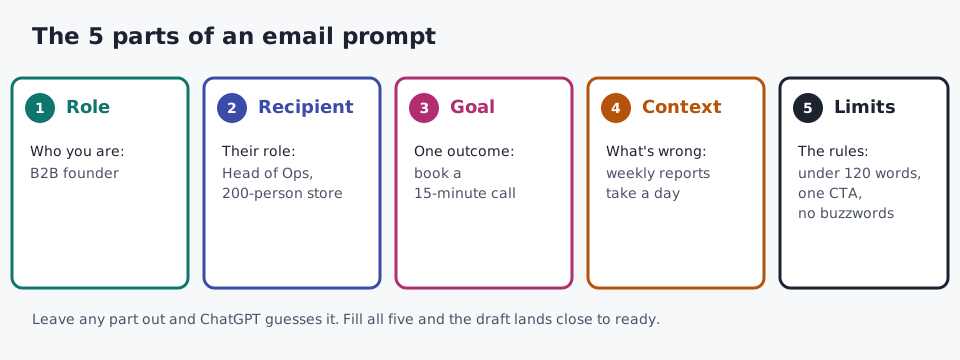
The five details every one of these email prompts includes.
Our prompt formula has five elements:
- Role. Who you are, or who ChatGPT should be: "act as an email copywriter for a skincare brand."
- Recipient. Their role, priorities and your relationship with them.
- Goal. One outcome: a booked call, a reply, a purchase.
- Context. What happened last, what the reader knows, the angle and the challenge they face.
- Constraints. Tone, length, format instructions (short sentences, bullet points, bold text) and what to avoid.
Other frameworks reorder the same parts: the six-part framework (context, audience, goal, tone, length, CTA) and the C.R.E.A.T.E framework (character, request, examples, adjustments, type of output such as a table, and extras like "ask me questions first"). Pick one; a prompt built this way takes about 60 seconds and saves around five minutes of editing per email.
Weak prompt: "Write a sales email for my company."
Strong prompt: "Act as an email copywriter for a clean skincare brand. Write a promotional email for women aged 25 to 40 who buy chemical-free products. Goal: shop the new summer collection. Tone: warm and confident. Under 150 words. End with a button that says Shop the Collection."
The weak one makes ChatGPT guess the brand, target audience and offer; the strong one is a promotional prompt it can follow. Keep a reusable prompt template for every email prompt you write:
Act as an email copywriter for [brand]. Write a [email type] to [recipient and relationship].
Goal: [one action]. Context: [what they know, what happened last].
Tone: [tone]. Length: under [X] words. Format: [short sentences / bullets].
End with one CTA: "[button text]". Avoid: [words, claims, competitor names].
This bracket template sits behind all 30 prompts below. More on structure: how to structure AI prompts. Outside email, see our ChatGPT prompt examples and ChatGPT prompt templates.
1. AI Prompts for Cold Outreach and First-Touch Emails
ChatGPT cold email prompts solve personalization at scale: prospect details in, a tailored first-contact email out in under 30 seconds. These chatgpt prompts for cold email keep drafts at 80 to 150 words with one low-friction ask. For a finished email instead, use our outreach email generator.
Prompt 1: Founder pitch around one pain point
I'm co-founder of a B2B reporting tool. Write an 80 to 150 word cold email to a Head of
Operations at an ecommerce company with 200 staff. Focus on one pain point: weekly reports
that take a full day to compile by hand. End with a low-friction ask: 15 minutes next week.
Peer-level tone, no buzzwords, no exclamation marks.
Why it works: one pain point and one small ask leave the reader a single yes or no decision.
Prompt 2: Trigger event (funding round)
Write a cold email to the VP of People at a company that announced its Series B funding
round last week. I sell enterprise HR software. Congratulate them in one line, link the new
funding to the hiring push that usually follows, and ask for a 20-minute call. Under 100
words. Direct, not pitchy.
Why it works: a real trigger answers the reader's first question, "why are you emailing me now?"
Prompt 3: Referral warm intro
Write a warm intro email to Priya Shah. Our mutual colleague, Tom Reyes, said she is
reviewing her company's tax structure. I'm an independent financial consultant. Mention Tom
naturally in the first line, skip the list of services, and close with a casual ask to talk.
80 to 100 words.
Why it works: the referral earns the open, so the prompt keeps everything else out of its way.
Prompt 4: Content partnership
Write a cold email proposing a content partnership to the editor of a SaaS newsletter with
50,000 subscribers. We are a B2B marketing agency. Offer two original case studies in return
for one featured placement. State the mutual benefit in the first two sentences.
Under 120 words. Confident, not presumptuous.
Why it works: naming what each side gets up front turns a favor request into a trade.
Prompt 5: PR pitch to a journalist
Write a PR pitch to a journalist who covers AI productivity tools. Our data story: in our
own customer survey, teams said they spend less time on routine email after switching.
Lead with the story angle, not the product. Under 100 words. Treat the journalist as a peer.
Use only the facts I gave you; do not add numbers.
Why it works: journalists open data stories, and the last line stops ChatGPT inventing statistics.
Prompt 6: Post-conference reconnect
Write a post-conference follow-up to a product director I met at a fintech event last
Thursday. We talked for five minutes about slow customer onboarding; I didn't pitch. I run a
UX research agency. Reference that conversation, add one observation about their onboarding
flow, and suggest a short call. 80 to 100 words, low pressure.
Why it works: a shared moment from the event makes a cold email read like a warm one.
The same structure covers other first-touch emails: a founder pitch to an angel investor in climate tech for a pre-seed round (one line of traction, ask for 30 minutes), a job seeker writing to a hiring manager or VP of Engineering, a speaker invitation for an annual conference that mentions the honorarium, and a note after a LinkedIn connection was accepted but never answered. Pair any of them with these cold email subject lines.
2. AI Prompts for Follow-Up Emails
Follow-up emails fail by being too passive ("just checking in") or too aggressive. These AI prompts for follow-up emails give ChatGPT a reason to write.
Prompt 7: After a product demo
Write a follow-up email 3 days after a product demo. The prospect said they need to talk to
their team. Recap the two pain points they raised: manual reporting and slow approvals.
Offer a soft next step: a one-page summary they can share internally. Under 120 words.
Why it works: repeating their own pain points shows you listened and gives them something to forward.
Prompt 8: Proposal with no response
Write a follow-up 5 business days after I sent a proposal and heard nothing. No
guilt-tripping, no "per my last email". Ask if they have questions, offer to adjust the
scope, and leave the door open. Under 80 words.
Why it works: offering to change the scope gives a silent prospect an easy reason to reply.
Prompt 9: Re-engagement for a dead lead
Write an email to a prospect who went quiet 4 months ago because they "weren't ready".
Don't apologize for the gap. Lead with one reason to talk now: we launched a new feature
that fixes the exact problem they described. Three sentences plus a CTA.
Why it works: re-engagement needs news, and a new feature tied to their problem is real news.
Prompt 10: Overdue invoice payment reminder
Write a payment reminder for an invoice that is 14 days overdue. This is a long-term client.
Polite but firm: give a clear pay-by date, offer help if something on their side is blocking
payment, and keep it under 100 words.
Why it works: a date plus an offer to help keeps the relationship intact and the cash moving.
Prompt 11: Webinar attendees and no-shows
Write two follow-up emails for a webinar on email deliverability. Version A for webinar
attendees: thank them, share the key takeaway in two sentences, link the slides. Version B
for no-shows: tell them the recording is ready and list the three things they missed.
Under 120 words each.
Why it works: one prompt, two segments, two messages that match what each group actually did.
Use the same pattern for a networking reply to an introduction thread, a job interview thank-you email, a guest post pitch with no reply after 10 days, a second follow-up after a no-response (add a small incentive if it's a cart), or a customer success check-in call offer for users who haven't logged in for 30 days. The follow-up email generator writes these in one step, and these follow-up email subject lines help them get opened.
3. ChatGPT Prompts for Newsletters
A newsletter builds trust more than it sells. These ChatGPT prompts for newsletters cover writing, summarizing content and repurposing.
Prompt 12: Weekly newsletter
Write a weekly newsletter for a freelance designers' community about pricing projects.
Three short sections: one tip, one resource, one closing thought. Friendly, like a note from
a real person, not a company. Under 300 words.
Why it works: a fixed three-part shape makes every weekly newsletter fast to write and easy to read.
Prompt 13: Monthly newsletter and roundup
Write a monthly newsletter for a home-fitness app. Recap October, highlight two
product updates, and end with what is coming next month. Add a short monthly roundup of the
three biggest trends in home fitness, in plain language. Under 400 words.
Why it works: a recap plus a look ahead gives readers a reason to open next month too.
Prompt 14: Repurposing a blog post
Turn this blog post into a skimmable 200-word section for our newsletter. Keep the single
most useful insight, make it conversational, and end with one line linking to the full
article. Blog post: [paste text]
Why it works: repurposing gives the newsletter fresh copy and sends readers back to your site.
Prompt 15: Summarizing long content into an email
Summarize this webinar transcript into a newsletter email for B2B marketing managers.
Pull out the three key insights, any statistics quoted by the speakers, and takeaways
they can act on this week. End with a CTA to download the full slides. Transcript: [paste]
Why it works: ChatGPT is fast at summarizing content, and asking only for quoted statistics keeps it honest.
Swap the source for a webinar video, podcast audio notes, a webpage URL's text, an industry report, a whitepaper, a case study, a survey summary, an announcement, an event overview or an event recap; the prompt shape stays the same.
4. ChatGPT Prompts for Sales Emails, Sequences and Nurture
These chatgpt prompts for sales emails cover welcome emails, promotional emails and automated emails. Welcome emails are usually your best-opened send (vendors often quote around a 50% open rate), so start there.
Prompt 16: Welcome email for new subscribers
Write a welcome email for new subscribers. At signup they downloaded our "7-day meal prep
plan" lead magnet. Greet them by first name, tell them what to expect (one email a day for
a week), and point them to day one. Friendly tone, warm and conversational,
sound like a friend. Under 150 words. One CTA: Start Day One.
Why it works: naming the lead magnet in the opening line proves the email isn't a generic blast.
For new users of a software platform, switch to a professional tone, list two key features, and make the next step "book a call" or "open your dashboard." New clients get the same polished version.
Prompt 17: Product launch
Write a product launch email for a noise-cancelling sleep headband aimed at light sleepers.
Highlight three benefits, add a launch offer of 15% off for the first week, and end with
one CTA. Exciting but believable. Under 180 words.
Why it works: three benefits and one offer is enough for a launch; more reads like a spec sheet.
Prompt 18: 3-email abandoned cart sequence
Write a 3-email sequence for abandoned carts on a leather backpack. Email 1 (day 0): a gentle
reminder of what they left. Email 2 (day 1): urgency, low stock. Email 3 (day 3): a 10%
discount plus free shipping. One CTA per email. Give each a subject line and preview text.
Why it works: each email has one job, which stops ChatGPT repeating the same pitch three times.
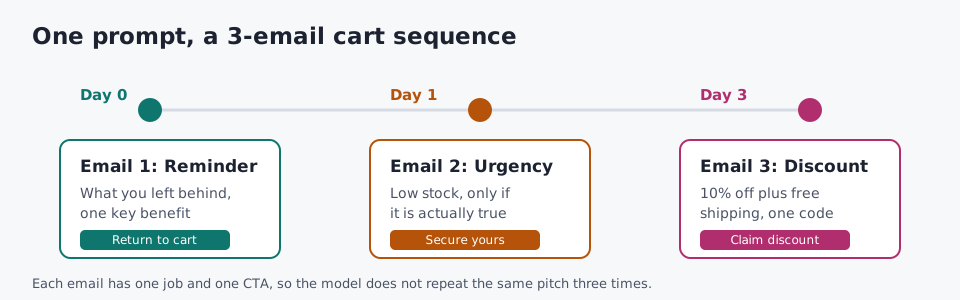
One prompt, three emails, one job each.
Prompt 19: Flash sale without spam trigger words
Write a flash sale email for a 25% percentage-off sale on our candle range, running 48 hours.
Make the deadline obvious. Don't use spam trigger words like "free", "act now" or
"guaranteed"; no exclamation marks, no all-caps, no clickbait. Calm, confident tone.
Why it works: telling ChatGPT what to avoid protects deliverability as much as what to include.
Prompt 20: Problem-solution framework
Write 200 to 300 words of body copy using a problem-solution framework for a scheduling app
for clinics. Problem: no-shows cost staff hours. Solution: automatic SMS reminders. Add the
two customer testimonials I paste below as social proof. Include a subject line and preview text.
Why it works: the framework puts the reader's pain first, and real testimonials, reviews or case studies do the persuading.
Prompt 21: Win-back email for past customers
Write a win-back email to past customers of an online tea shop who haven't ordered in 6
months. Mention our company milestone (5 years in business), thank them, and give a
special offer: a free sample with the next order. Warm, no guilt. One CTA. Under 130 words.
Why it works: a milestone gives a lapsed customer a reason to hear from you that isn't "we miss you."
For a storytelling narrative email, ask for 200 to 300 words around one theme and leave blanks where your products fit. Event announcements, a product intro, webinar invites with a registration CTA, seasonal promos and new-feature emails follow the same pattern. Keep each one on-brand with clear next steps, and judge it on conversions. Find openers in these sales email subject lines, or use the welcome email generator.
5. AI Prompts to Respond to Emails
Replies are the most frequent email job and the worst-prompted. These AI prompts to respond to emails start from the thread and double as everyday ChatGPT prompts for email writing.
Prompt 22: Reply to a thread
Here is an email thread: [paste]. Reply as me. Decline the request for a discount, keep the
relationship warm, and offer one alternative (an annual plan at the current price). Under
100 words. Don't promise anything about future pricing.
Why it works: the pasted email thread supplies the context, and the last line sets the limit a person would set.
Prompt 23: Declining a request from a colleague
Write an email declining a colleague's request to take on extra project work. I'm at
capacity until the end of the month. Decline clearly, acknowledge why their project
matters, and suggest they ask the team lead about reassigning it. Under 100 words.
Why it works: a clear no plus a useful alternative keeps a colleague on side.
Prompt 24: Summarize a long chain, then reply
Read this email chain: [paste]. First list the action items, decisions, important dates and
outstanding questions. Then draft a reply that confirms the decisions and asks only the
outstanding questions. Under 150 words.
Why it works: summarizing first stops the reply from missing the one question that mattered.
Prompt 25: Formal vendor complaint
Write a formal complaint to a software vendor about a service outage of 6 hours last
Wednesday that stopped our order processing. Ask for a root cause analysis, an
account credit, and a written SLA commitment. Professional, factual, firm. Under 200 words.
Why it works: three specific requests turn a complaint into something the vendor can act on.
Formal business emails and internal communication use the same pattern. Put these details into the prompt for common B2B business emails:
| Details to put in the prompt | |
|---|---|
| Project status update to leadership | Project (website redesign), status, user testing results, a delayed vendor deliverable, the revised timeline the executive team must approve |
| Process change | The change (expense reimbursement over $500 needs pre-approval), one line on why, a matter-of-fact tone |
| Constructive feedback to a direct report | The missed deadline, its impact, what must change, a request to talk |
| Cross-team collaboration | The product spec, the 30 minutes you need, why their view matters |
| Meeting recap | Decisions (Q3 launch date), action items with owners, sent to all 8 attendees |
| Escalation email to a C-level executive | The budget release that is blocked, the go-live date at risk, the decision needed by Friday |
| Quarterly board update | Revenue up 18%, churn 4.2%, headcount 87, one risk; prose, under 200 words |
| Contract termination | 30 days notice, the contract clause, the reason, a request for a transition checklist |
| Proposal cover email | A 6-month project for digital transformation at a financial services firm, the sections that matter most |
| New account manager intro | Her background, continuity of service, contact details |
The board figures are sample inputs, not benchmarks. Internal emails set team culture and operational clarity, so high-stakes correspondence deserves the same care as a sales email. To reword something you already wrote, paste it and ask ChatGPT to fix the tone and clarity, make it more engaging for different audience segments, restructure sentences and improve word choices while keeping the core message; the original email comes back polished.
6. Brand-Voice and Personalization Email Prompts
"It doesn't sound like me" is the top complaint about AI email writing, and it's a prompt problem, not a model limit. These five email prompts fix your voice once and reuse it.
Prompt 26: Match your writing examples
Here are three emails I've sent: [paste]. Describe my style in five bullet points: sentence
length, formality, how I open, how I close, whether I use bullets or prose. Then write a
reply to [paste email] in that style.
Why it works: asking for the style description first makes the match visible, so you can correct it.
Prompt 27: Build tone-of-voice profiles
Read our About page, homepage content and two blog posts: [paste]. Write two
tone-of-voice profiles for our emails: one snarky and direct for newsletters, one
professional and helpful for customer replies. Each under 120 words, with three example
sentences.
Why it works: a saved style guide means you paste one paragraph instead of re-explaining your voice every time.
No writing examples handy? Describe your tone and style instead: "short sentences, plain language, a single clear ask." Claude writes natural-sounding emails even on the free version, so test both tools.
Prompt 28: Messaging prep sheet
Interview me, one question at a time, to build a messaging prep sheet for my email
copywriter. Cover: business basics (what we do, our offers), the ideal customer
(challenges, desires, the excuses they make), and offer details (how it solves the
problem, our differentiating factors). Stop after 10 questions and summarize.
Why it works: the messaging prep happens once, and every later email prompt reuses the answers in your words.
For e-commerce, write one prep sheet for each of your product categories. One messaging session like this feeds months of prompts.
Prompt 29: Personalized subject lines for A/B testing
Write 10 subject lines for a renewal reminder email from an HR SaaS company. Leave blanks
for the recipient's name and their plan. Mix styles: curiosity (under 50 characters),
benefit-driven, emotional appeal and urgency. Label each one so I can A/B test them.
Then give 10 variations of the winner for our exclusive offer email.
Why it works: labeled styles turn a list into a test plan; subject line variations that change length, tone and urgency are the quickest lever on open rates, a habit borrowed from content marketing.
Prompt 30: Rewrite one email for each segment
Here is our product update email: [paste]. Rewrite it three times: for new subscribers in
their first 30 days, for loyal customers who buy monthly, and for churned customers who
left in the last year. Change the opening and the CTA; keep the facts the same.
Why it works: customer journey segmentation changes what the reader needs, so the prompt changes the opening and CTA, not the facts.
Industry angle: a real estate agent can feed in listing details and buyer location; an ecommerce business selling women's skincare products can segment by past purchases and browsing history; B2B teams can segment by role and lifecycle stage. A niche detail beats a broad one: "first-time buyers in Austin" works better than "age 30 to 40."
Add-On Email Prompts: Subject Lines, CTAs, Design and Compliance
The 30 prompts write the email. These add-ons handle the parts around it.
Writing add-ons
| Job | Add-on prompt | Watch for |
|---|---|---|
| Subject lines | "Now write 5 subject lines for this email: one direct, one question-based, one teaser, one with a deadline, one with a reward. Under 50 characters." | FOMO and spammy tactics. Change the angle per email: a limited-time offer, an abandoned cart incentive, a survey invitation, a sneak peek, an event promotion. Name the feeling you want: curiosity, excitement or nostalgia. Start with "Write X subject lines for..." and ask for multiple options. |
| CTAs | "Write 10 CTAs for this email (persuasive CTAs, not generic ones), then 3 variations of the best one that change copy, button design, placement, color, size and contrast." | The call-to-action is often an afterthought. Name its job: exclusivity or discounts for a sale, rewards for loyalty, survey feedback, a webinar recap, a feature update, a resource download or gratitude, and ask for tone variations. Put CTAs after strong selling points, as text links or buttons, and compare A/B variants on click-throughs. |
| Content ideas | "Give me 10 email content ideas for a seasonal campaign around Christmas and other holidays and events for an ecommerce business." | For ideation in a saturated market, ask for original content, interactive content (quizzes, polls, surveys, games) that lifts subscriber engagement, and storytelling themes that leave a strong brand impression. ChatGPT can also draft an email calendar. |
| Transactional emails | "Write order confirmations, shipping notifications, account activation, password resets and payment receipts in our voice." | Keep them short and clear; people open them more than any campaign. |
| Compliance | "Is this email GDPR, CAN-SPAM and CASL compliant? List anything missing, such as an unsubscribe option or a physical address." | A body copy check, not legal advice. |
Design, list and segmentation add-ons
| Job | Add-on prompt | Watch for |
|---|---|---|
| Email layout | "Create a product launch layout with a hero section, 3 feature blocks, a testimonial and a CTA button at the bottom." | For a welcome email: header image, short intro, onboarding steps, a footer with social links. Full email generation tools build the headline, copy and layout from one prompt. |
| Design style | "Design a minimal template with lots of white space, one accent colour, our brand colours and a single CTA." | For a holiday send, ask for seasonal elements that aren't overdone. |
| Visual branding | "Give me rules for color schemes, logos, typography and imagery, plus text-to-image ratio, email length and content hierarchy." | Good hierarchy helps readability and click-through rates. |
| Email visuals | "Generate a feature image, a product shot, a close-up for a teaser email, an illustration or a CTA banner." Name the composition style and background setting. | AI image generation shows inconsistencies, so run visual content testing and treat output as a blueprint for your designers. |
| List growth | "Give me 10 lead magnet ideas, such as a downloadable resource or a giveaway, plus optimization fixes for our opt-in form and sign-up flow." | Plan a social media integration with social media ads, contests and exclusive offers to turn followers into subscribers of your email list. Pair it with a regular list cleanup that removes unengaged contacts. |
| Segmentation | "Suggest targeted segments from demographics (age, gender, location, income level, occupation), psychographics, niche factors and behavioral data." | Feed in purchase history, behavior patterns and engagement patterns, then ask for tailored content: cross-selling, abandoned cart emails, re-engagement emails and lead magnets. |
The segmentation row is where AI earns its place: batch-and-blast gave way to targeted messages, with analytics engines finding segments and content generation writing for each, which is dynamic personalization without hand-writing every version. Our email subject line generator handles the first row in one step, and the email subject line best practices guide covers length and tone. Industry surveys are often quoted saying 47% of recipients open on the subject line alone and 69% mark as spam based on it; treat those as directional, not proof, and test with your own list.
On compliance: treat any answer as a compliance check against email marketing regulations, then confirm against the source. GDPR, the General Data Protection Regulation, covers personal data collection, processing and storage for people in the European Union. The CAN-SPAM Act of 2003 governs commercial email in the United States; the FTC's CAN-SPAM compliance guide for business lists what every message needs. CASL, the Canadian Anti-Spam Legislation, covers commercial messages sent to or from Canada, including SMS and instant messaging.
We Tested Two of These Email Prompts
On October 20, 2026, I ran plain-language versions of Prompt 1 and Prompt 18 through the TextToolsAI prompt tool (gpt-oss-120b via Groq API) to see what a structured email prompt looks like before and after a human edit.
Run 1: cold email (Prompt 1)
Input (54 words):
Write a cold email from the co-founder of a B2B reporting tool to a Head of Operations at
an ecommerce company with 200 staff. One pain point: weekly reports take a full day to
compile by hand. Ask for 15 minutes next week. 80 to 150 words, peer-level tone, no
buzzwords, no exclamation marks.
Show the raw output (255 words, unedited; only typographic characters normalized)
Role: You are a seasoned B2B copywriter specializing in concise, peer-level outreach emails.

Context: Write a cold email from the co-founder of a B2B reporting tool to the Head of Operations at an e-commerce company with 200 employees. The target's main pain point is that weekly reports currently require a full day to compile manually. The email should request a 15-minute call next week.

Constraints:
- Length: 80-150 words.
- Tone: Peer-level, professional, no buzzwords or exclamation marks.
- No invented company names, dates, or statistics. Use placeholders for any specific details not provided.
- Include a clear call-to-action proposing a 15-minute meeting next week.

Output Format: Provide the email body only, with a subject line on the first line, followed by a blank line, then the email text.

Placeholders:
- {{CoFounderName}}: name of the co-founder sending the email.
- {{ReportingToolName}}: name of the reporting tool.
- {{RecipientName}}: name of the Head of Operations.
- {{CompanyName}}: name of the e-commerce company.
- {{CalendlyLink}}: link for scheduling the 15-minute call.

Prompt:

You are a seasoned B2B copywriter. Write a cold email from {{CoFounderName}}, co-founder of {{ReportingToolName}}, to {{RecipientName}}, Head of Operations at {{CompanyName}}. The email should be 80-150 words, peer-level, professional, and free of buzzwords and exclamation marks. Mention that the recipient's team spends a full day each week compiling reports by hand, and explain how {{ReportingToolName}} can eliminate that effort. End with a clear request for a 15-minute call next week, including a scheduling link {{CalendlyLink}}. Provide a concise subject line, then a blank line, then the email text.
What I changed and why:
- The spec appeared twice. The structured section and the final "Prompt:" block said the same thing, and the final block dropped two details: the 200-staff company size and the "no invented statistics" rule. I merged them into one block that keeps both.
- Removed the scheduling link. A link in a first-touch cold email adds friction and can hurt deliverability. Asking for a reply is a lower bar.
- Softened "eliminate that effort." That promises a result we can't prove; "cuts that time, without promising numbers" keeps the claim honest.
- Added a subject line limit of 45 characters, which the original left open.
Edited version (115 words):
Role: You are a B2B copywriter who writes short, peer-level outreach emails.

Task: Write a cold email from {{CoFounderName}}, co-founder of {{ReportingToolName}},
to {{RecipientName}}, Head of Operations at {{CompanyName}}, an ecommerce company with
about 200 staff. Focus on one pain point: their team spends a full day each week
compiling reports by hand. Say how {{ReportingToolName}} cuts that time, without
promising numbers. Ask for 15 minutes next week. Do not include a link; ask them to
reply with a time that suits them.

Format: a subject line under 45 characters, a blank line, then 80 to 150 words of body copy.

Constraints: peer-level tone, no buzzwords, no exclamation marks, no invented names,
dates or statistics.
Run 2: abandoned cart sequence (Prompt 18)
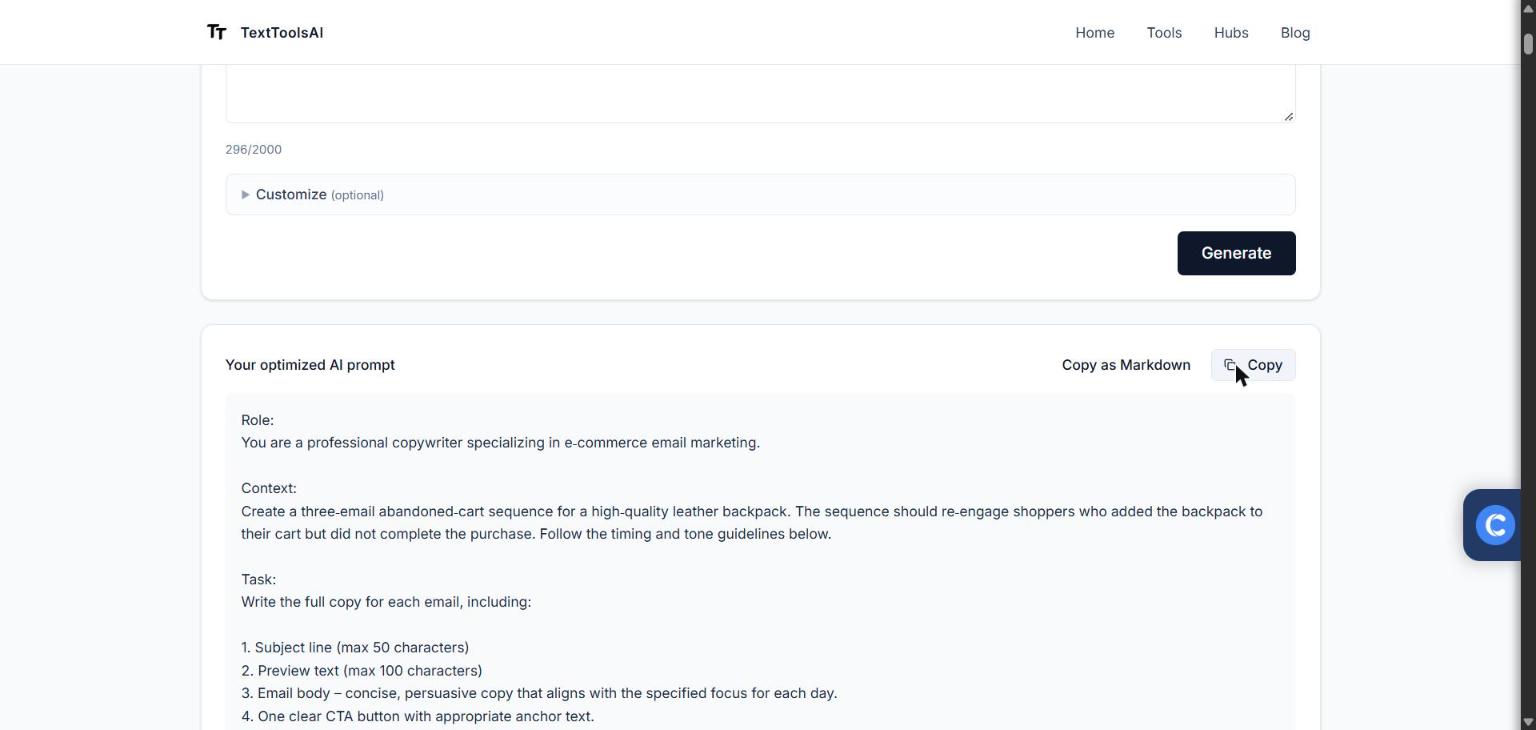
Run 2, October 20, 2026: the sequence prompt the tool returned.
Input (59 words):
Write a 3-email abandoned cart sequence for a leather backpack. Email 1 on day 0 is a
gentle reminder of what they left. Email 2 on day 1 adds urgency because stock is low.
Email 3 on day 3 offers a 10% discount plus free shipping. One CTA per email, and a
subject line and preview text for each.
Show the raw output (377 words, unedited; only typographic characters normalized)
Role:
You are a professional copywriter specializing in e-commerce email marketing.

Context:
Create a three-email abandoned-cart sequence for a high-quality leather backpack. The sequence should re-engage shoppers who added the backpack to their cart but did not complete the purchase. Follow the timing and tone guidelines below.

Task:
Write the full copy for each email, including:

1. Subject line (max 50 characters)
2. Preview text (max 100 characters)
3. Email body: concise, persuasive copy that aligns with the specified focus for each day.
4. One clear CTA button with appropriate anchor text.

Sequence requirements:

- Email 1, Day 0: Gentle reminder of the abandoned item. Emphasize the backpack's key benefits and invite the shopper to return to their cart.
- Email 2, Day 1: Add urgency by mentioning low stock levels. Highlight scarcity and encourage immediate action.
- Email 3, Day 3: Offer a 10 % discount plus free shipping as a final incentive. Include a discount code placeholder.

Constraints & placeholders:
- Do not fabricate any brand, store, or product details not provided. Use placeholders for any specific information the user must supply:
- {{BrandName}}: the name of the retailer or brand
- {{BackpackName}}: the product name or model
- {{CartURL}}: link to the shopper's cart
- {{DiscountCode}}: code for the 10 % discount
- {{CustomerFirstName}}: personalization token for the shopper's first name
- {{SocialMediaLinks}}: optional links to social profiles (if desired)

- Keep the tone friendly, trustworthy, and aligned with a premium leather goods market.
- Ensure each email contains only one CTA button.
- Use plain-text formatting for subject line and preview text, then present the email body in markdown (or plain text) with a clear CTA button label.

Output format:

```
Email 1, Day 0
Subject: [Subject line]
Preview: [Preview text]

Hi {{CustomerFirstName}},

[Email body copy...]

[CTA Button: "Return to Cart" linking to {{CartURL}}]

---

Email 2, Day 1
Subject: [Subject line]
Preview: [Preview text]

Hi {{CustomerFirstName}},

[Email body copy...]

[CTA Button: "Secure My Backpack" linking to {{CartURL}}]

---

Email 3, Day 3
Subject: [Subject line]
Preview: [Preview text]

Hi {{CustomerFirstName}},

[Email body copy...] Use code {{DiscountCode}} at checkout for 10 % off + free shipping.

[CTA Button: "Claim My Discount" linking to {{CartURL}}]
```

Produce the complete three-email sequence following these guidelines.
What I changed and why:
- Kept the good parts. The day-by-day plan, one CTA per email, a 50-character subject limit and placeholders instead of invented details. This run was stronger than the first.
- Made urgency conditional. The raw prompt told the model to "highlight scarcity" whether or not stock is actually low. I added {{StockLevel}} and a truth rule, because false urgency costs trust and can break advertising rules.
- Removed the social links placeholder. Optional social links compete with the one CTA.
- Added a body limit and varied openings. The raw prompt had no length cap, and sequences tend to reuse the same opening line, so each body is now under 120 words and must open differently.
- Chose plain text over "markdown (or plain text)" so the output is predictable, and trimmed preview text to under 90 characters.
Edited version (125 words):
Role: You are an email copywriter for a premium leather goods brand, {{BrandName}}.

Task: Write a 3-email abandoned cart sequence for {{BackpackName}}, for shoppers who left
it in their cart. Each email: a subject line under 50 characters, preview text under 90
characters, a body under 120 words, and one CTA button linking to {{CartURL}}.

Email 1 (day 0): a gentle reminder of what they left and one key benefit.
Email 2 (day 1): urgency from low stock. Use {{StockLevel}} and only say stock is low if
it is true.
Email 3 (day 3): 10% off plus free shipping with code {{DiscountCode}}.

Constraints: open each email differently; greet with {{CustomerFirstName}}; friendly,
trustworthy tone; no social links or second CTA; plain text; no invented product details.
What the two runs showed
| Run 1: cold email | Run 2: cart sequence | |
|---|---|---|
| Input | 54 words | 59 words |
| Raw prompt | 255 words | 377 words |
| Edited prompt | 115 words | 125 words |
| Cut by editing | 55% | 67% |
| Main fixes | Duplicate spec, risky link, overclaim | False urgency, extra link, no length cap |
Across both runs, 113 words of description became 632 words of prompt, and editing cut that to 240 words, about 62% less, without dropping a requirement. The tool does the structuring well; the human pass catches the claims and links that hurt trust and deliverability. That matches the rule for all 30 email prompts here: AI gets you about 90% of the way, and the editing pass is the job.
Mistakes That Make AI Emails Sound Generic
- Using output without reading. ChatGPT gets wrong names and misremembers context. Read the full first draft.
- One prompt, 20 cold emails. Twenty emails from one prompt come out as mediocre emails. One specific prompt per recipient gets replies.
- No tone, no audience. Without a tone, the AI picks one. Name it, and be precise about a specific audience: "women aged 30 to 45 who buy organic groceries online," not "my customers."
- Generic subject lines. Write subject lines separately and ask for multiple versions.
- Starting over instead of iterating. Iterate: paste the draft back and say "make it shorter" or "give me a stronger CTA." That back-and-forth beats a new prompt.
- Pasting sensitive information. Keep customer data out. Use a temporary chat or turn off model training for privacy.
- Skipping the human check. Grammatical errors and accuracy problems slip through. Have someone on your copywriting team, or anyone with real human expertise, read it.
AI removes filler phrases and tidies sentence structure, which helps non-native English speakers most, but it doesn't know your email strategy. Track open rate, click-through rate (CTR) and conversion rate, run A/B tests and split tests in your platform, and keep monitoring. First test: rebuild the email prompts behind your weakest email with the five elements, and compare.
These email prompts also work beyond ChatGPT: Claude for human-sounding text, Microsoft Copilot and Google Gemini inside your workspace tools, Perplexity AI for research-backed answers, and Jasper.ai, Copy.ai or Semrush ContentShake AI for marketing copy and keyword strategy for SEO. Individual users and smaller teams do fine with chat tools; enterprise-level solutions add workflow and brand controls. Pick what keeps your unique voice, whatever the AI interface, and fact-check the output.
On cost (checked October 20, 2026): ChatGPT's Free plan has usage limits and ads; the Go plan ($8/mo) raises limits (reviewers describe up to 10x capacity) and adds file uploads; the Plus plan ($20/mo) drops ads and adds priority access to advanced models; the Pro plan starts at $100 a month, with a $200/mo tier for near-unlimited computing. A free AI email generator usually means free tiers or a 30-day free trial with monthly caps and less customization than a paid plan or premium solution.
FAQ
What are the best ChatGPT prompts for email marketing?
The best ChatGPT prompts for email marketing name a role, the recipient, one goal, the context and the limits: tone, word count and one CTA. A prompt like "Act as an email copywriter for a sustainable clothing brand. Write a promotional email for millennial women. Under 150 words, end with one CTA" beats a one-line ask because it removes vague instructions. Adding your relationship with recipient, length preferences and background information gives a more tailored response and more accurate answers.
How do I write a cold email prompt for ChatGPT?
Give ChatGPT five details: who you are, who the prospect is, the one pain point you solve, a trigger that explains why now, and a low-friction ask. Cap it at 80 to 150 words, ban buzzwords, and leave links out of the first touch. Prompts 1 to 6 on this page are filled examples.
Can ChatGPT write a full email sequence?
Yes. Ask for the whole sequence in one prompt, give each email one job (reminder, urgency, discount), set the days between sends and allow one CTA per email. Then edit each email on its own, because ChatGPT tends to reuse the same opening line across a sequence. Your email marketing platform still does the sending.
How do I get ChatGPT to match my brand voice in emails?
Paste three emails you have sent and ask ChatGPT to describe your sentence length, formality, opening and closing before it writes anything. Save that description as a tone-of-voice profile with your brand guidelines and paste it into every email prompt. Match formality to the reader too, because industries differ: legal and finance readers expect a formal register and tolerate passive constructions, while tech and creative sectors accept casual language and directness. Unsure how formal a first-contact email to a senior partner at a law firm should be? Ask ChatGPT to advise first.
How do I write a prompt to reply to an email?
Paste the full email thread, say what the reply must do (agree, decline, ask, set a date), set the tone and a word limit, and tell ChatGPT what not to promise. For long email chains, ask it to list action items, decisions, important dates and outstanding questions first, then draft the reply. Many email clients and AI assistants already summarize your inbox and long conversations for busy professionals facing information overload, but a prompt gives you control over what the reply says.
What does an AI email generator do?
It takes your requirements and key points and returns email drafts with subject lines, calls to action and body text that you refine. General chat tools give you professional email content as text; email-specific tools return a designed email, ready to send, from a single prompt. Some platforms have a native app inside ChatGPT that lets you link accounts, draft and preview on desktop and mobile, then push campaign drafts back to set sending details and launch.
Will readers know an email was AI-assisted?
Not if you edit them. Edited, personalized AI emails are indistinguishable from well-written human emails. The tell is over-polished language and off-tone filler phrases, which editing removes in under a minute.
Generate an Email Prompt for Your Campaign
Most email writers stall on the blank page; a rough prompt, even a loosely structured one, gives you something to react to. The pattern effective emails follow: a subject line that earns the open, an opening line that works as a hook, a body with one clear point, and a CTA. Adoption keeps growing as the tools need less technical knowledge; surveys put it at about 24% of marketers using AI for email copy, and one 2026 survey reported 42% of small business owners using AI for copy, with 38% data analysis use close behind. Treat those figures as a snapshot, not a benchmark.
Pick one of the email prompts above, fill in your details, and generate an email prompt for your campaign →
More in this series: ChatGPT prompts for marketing, by channel · ChatGPT prompts for SEO · ChatGPT prompts for social media (coming soon) · ChatGPT prompts for copywriting (coming soon)
Sources and method: prompts written and edited by Clover Winter. Two first-hand tests with gpt-oss-120b via Groq API in the TextToolsAI prompt tool on October 20, 2026; word counts measured on each input, raw output and edited version. Compliance summaries checked against the official GDPR text (EUR-Lex), the FTC's CAN-SPAM guide and Canada's CASL site. Third-party survey figures are quoted as directional only. ChatGPT plan prices checked October 20, 2026. Read our editorial policy.