

# ChatGPT Prompts for Social Media: 40 by Platform
Most ChatGPT prompts for social media fail for one reason: they ask for "a post" without saying which platform, how long, or who will read it. A LinkedIn post, an Instagram caption and a TikTok hook have different limits, different openings and different jobs. So this page groups 40 social media prompts by platform and by job: LinkedIn posts and profile summaries, Instagram captions and growth, tweets and X threads, TikTok hooks, YouTube video ideas and ad scripts, Facebook ad copy, and a 30-day social media content calendar. Every prompt carries one line on why it works, so you can adapt it instead of pasting it blind.
It is part of our ChatGPT prompts for marketing, sorted by channel. Search work lives in ChatGPT prompts for SEO, and inbox work in ChatGPT prompts for email marketing.
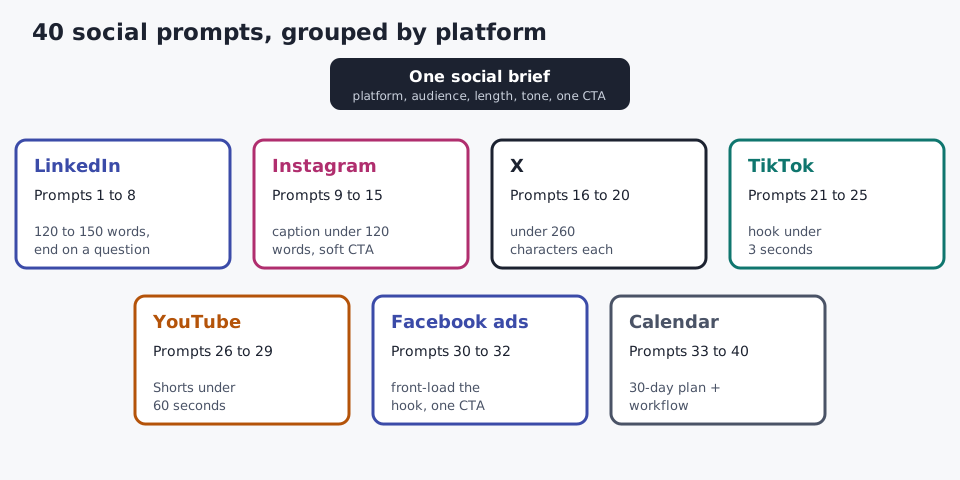
The 40 prompts at a glance
| Platform | Prompts |
|---|---|
| 1 Lesson-learned post · 2 Thought-leadership post · 3 Profile summary · 4 Launch or milestone post · 5 Customer spotlight · 6 Carousel from a slide deck · 7 Debate poll · 8 Team shout-out | |
| 9 Five caption angles · 10 Storytelling caption · 11 Carousel slide text · 12 Reel script · 13 Bio · 14 Story polls · 15 Tiered hashtag sets | |
| X | 16 5-tweet thread · 17 Ten standalone tweets · 18 Launch tweet · 19 Quote tweet · 20 Tweet storm from a blog post |
| TikTok | 21 Five hook variations · 22 "Things nobody tells you" · 23 POV format · 24 Comment-reply video · 25 Myth-busting duet |
| YouTube | 26 Video ideas · 27 30-second intro · 28 Shorts explainer · 29 Skippable ad script |
| Facebook ads | 30 Problem and solution ad · 31 One benefit, three platforms · 32 Retargeting sequence |
| Calendar and workflow | 33 30-day content calendar · 34 Three-post series · 35 Split a 600-word post · 36 Repurpose a podcast or webinar · 37 Seasonal content · 38 UGC campaign · 39 Comment replies · 40 Analyze your last 10 posts |
How to use these ChatGPT prompts for social media
Generic prompts produce generic content, and that holds for all AI prompts for social media, whichever model you paste them into. The fix is not a better model; it is a hyper-specific prompt. Every prompt below follows the same five-part formula, so you can rebuild any of them for a new platform or campaign type:
Act as {{Role}} for {{Brand}}. Write {{Format}} for {{Platform}}, {{Length}}, for {{Audience}}.
Tone: {{BrandVoice}}. Structure: {{Outline}}. Goal: {{Outcome}}. Avoid: {{Exclusions}}.
Three habits make the output usable:
- Brief it like a teammate, not a machine. Write conversational prompts with context and reasoning. Paste 2 to 3 example posts so it learns your brand voice from writing, not adjectives.
- Ask for 3 to 5 variations. Editing strong options takes minutes; one draft is a guess. Then iterate: "more casual", "add stats from {{Source}}", "shorter first line".
- Fill the placeholders with real details. Names, numbers and stories you supply are what stop a post sounding like everyone else's. Never paste customer data, proprietary information or unreleased figures.
Each platform rewards a different shape, so state the limit in the prompt rather than trimming afterwards:
| Platform | Length | Opening | CTA rule |
|---|---|---|---|
| LinkedIn post | 120 to 150 words | A number or observation, not a greeting | End on a question; three hashtags at the end |
| Instagram caption | Max 120 words | A relatable frustration or bold line | Soft CTA: save, share or comment |
| X | Under 260 characters per tweet | One benefit or one idea | One CTA |
| TikTok | Hook under 3 seconds, video 15 to 45 seconds | Spoken hook plus on-screen text | Question to drive comments |
| YouTube Shorts | Under 60 seconds | Answer or claim in the first line | One next step |
| Facebook ad | Front-load the hook; long text truncates | A specific problem scenario | One time-bound action |
For deeper guidance on structure, see how to write better ChatGPT prompts and these ChatGPT prompt templates.
ChatGPT prompts for LinkedIn posts, profile summary and thought leadership
LinkedIn rewards professional insight and real experience. These AI prompts for LinkedIn keep corporate jargon out by forcing one specific detail into every post. Swap in your own role and that detail, and these LinkedIn prompts work in any industry.
1. Lesson-learned post
Act as a {{Role}} with {{Years}} years in {{Industry}}. Write a LinkedIn post of 120 to 150 words about one lesson from {{SpecificExperience}}. Open with the lesson in one sentence, not a greeting. Tell the story in 3 short paragraphs of 1 to 2 sentences. Include this real detail: {{Detail}}. End with a question that invites discussion, then three hashtags.Why it works: the role and one real detail stop the model writing generic advice, and the closing question asks for comments rather than likes.
2. Thought-leadership post with a contrarian first line
Write a thought-leadership LinkedIn post arguing that {{ContrarianTake}} about {{Industry}}. First line: a bold, specific claim under 15 words that earns the "see more" click. Then 3 supporting points, each tied to an observable trend or example. Acknowledge the strongest counter-argument in one sentence. End with "Agree or disagree?" Under 200 words, no buzzwords.Why it works: naming the counter-argument keeps a hot take credible, and the word cap stops the hook getting buried.
3. LinkedIn profile summary
Write three versions of a LinkedIn profile summary (About section) for a {{JobTitle}} who helps {{Audience}} achieve {{Outcome}}. First person, under 200 words each. Version A: conversational. Version B: results-led, using {{Proof}}. Version C: story-led, starting from {{OriginMoment}}. The first two lines must make sense before the "see more" cut. End each with how to contact me.Why it works: visitors see only the opening lines before "see more", so the prompt makes those lines carry the value.
4. Promotional post for a launch or milestone
Write a promotional LinkedIn post announcing {{ProductOrMilestone}}. Lead with the problem it solves for {{Audience}}, not the feature name. Share what it took to get here in 2 sentences and credit {{PeopleOrTeam}}. 120 to 150 words, one CTA to {{Link}}, no exclamation marks, authentic rather than braggy.Why it works: problem first and credit to people makes an announcement read like news, not an ad.
5. Customer spotlight in your brand voice
Here are three of our approved LinkedIn posts: {{Paste3Posts}}. Match this brand voice and write a customer spotlight post about {{CustomerA}}, who used {{Product}} to {{Result}}. Structure: situation, challenge, what changed, result. Use only the facts I gave you. Max 150 words.Why it works: example posts teach voice better than descriptions, and "only the facts I gave you" blocks invented numbers.
6. LinkedIn carousel from a slide deck or article
Turn this {{SlideDeckTextOrArticle}} into a 10-slide LinkedIn carousel. Slide 1: a bold hook under 8 words. Slides 2 to 9: one point per slide, max 30 words, with a visual note. Slide 10: summary and a CTA to follow or save. Also write a 100-word feed caption.Why it works: one point per slide with a word cap makes each slide screenshot-ready on its own.
7. LinkedIn poll that sparks debate
Write 3 LinkedIn poll questions about {{Topic}} for {{Audience}}, each with 4 answer options. Each question should split professional opinion, not collect trivia. Add a 2-sentence post explaining why I am asking and promising to share the results in a follow-up.Why it works: a poll that divides opinion pulls comments, and the promised follow-up gives you a second post.
8. Team shout-out for employee advocacy
Write a LinkedIn post celebrating {{TeamMember}}'s work on {{Project}}. Say what they did, the impact in one sentence, and one detail only a teammate would know: {{Detail}}. Make it about them, not the company. Under 120 words. Then write a 2-line version colleagues can reshare with their own comment.Why it works: employee advocacy spreads when the post is about a person, and a short reshare version lowers the effort to join in.
The same structure covers a connection request or a recommendation request: brief, specific about the relationship, and no sales pitch in the first message. These ChatGPT prompts for LinkedIn give you a draft; for LinkedIn posts that don't sound like AI, follow the edit in our before-and-after LinkedIn rewrite.
ChatGPT prompts for Instagram captions and growth
Instagram is visual-first: the caption supports the image. These ChatGPT prompts for Instagram cover captions, carousels, Reels, your bio and the Story features that drive growth.
9. Five caption angles for one product photo
Write 5 Instagram captions for a product photo of {{Product}} aimed at {{Audience}}. Angles: benefit, story, problem and solution, social proof, urgency. Each under 120 words, with line breaks for scanning and one soft CTA (not "link in bio"). Suggest 1 to 2 emojis per caption.Why it works: five angles at once gives you A/B testing material instead of one guess.
10. Storytelling caption
Write an Instagram caption for {{Brand}} about {{Experience}} as a micro-story: a hook line that stops the scroll, 3 sentences of tension, one lesson, then a CTA to {{Comment/Save/Share}}. Under 120 words. Tone: {{Conversational/Vulnerable/Inspiring}}. Never open with "I'm so excited to announce."Why it works: tension before the lesson keeps people reading past the fold.
11. Carousel slide text
Write the text for a {{N}}-slide Instagram carousel about {{Topic}} for {{Audience}}. Slide 1: a headline under 8 words. Middle slides: one tip each, max 30 words. Last slide: the takeaway and a "save this" CTA. Then write the feed caption, ending with a question to drive comments.Why it works: educational carousels earn saves, so the closing slide asks for the save directly.
12. Reel script
Write a 30-second Instagram Reel script showing {{QuickTipOrHack}}. Give the on-screen text for the first 2 seconds, then 3 steps with shot notes, and end with a CTA to save or share. Write for voiceover: short sentences.Why it works: separating the on-screen hook from the voiceover fixes the most common Reel problem, a slow first 2 seconds.
13. Instagram bio
Write 5 Instagram bios for {{Brand}}, each under 150 characters. Include what we do (not who we are), who it helps, one proof point ({{Award/Client/Result}}) and a CTA pointing to the link. Use vertical bars or emojis as separators.Why it works: Instagram caps bios at 150 characters (Instagram Help Center), so stating the limit saves an editing round.
14. Story polls and "this or that" for growth
Write 10 Instagram Story polls for {{Niche}} followers: 5 "this or that" pairs and 5 binary questions that reveal buying preferences. For each, note what the answer tells me as a marketer, plus a follow-up Story to post the next day with the results.Why it works: every poll doubles as market research, and the follow-up Story turns one idea into two posts.
15. Tiered hashtag sets
Generate 3 hashtag sets of 10 for a {{Niche}} Instagram account with about {{FollowerCount}} followers: high-volume (500K+ posts), mid-volume (50K to 500K) and niche (under 50K). Make one reusable set per content pillar: {{Pillars}}, with minimal overlap. Suggest 3 branded hashtag options too.Why it works: tiers balance reach against the chance to be seen; ChatGPT cannot check live post counts, so confirm each tag in the app and make sure a branded tag is not already in use.
More caption structures: Instagram caption formulas that work.
ChatGPT prompts for tweets and X threads
X rewards concise, specific takes. Each prompt states the character limit so you are not trimming afterwards.
16. 5-tweet thread
Write a 5-tweet X thread about {{Topic}}. Tweet 1: a bold hook that promises what the thread delivers. Tweets 2 to 4: one insight each with a specific example. Tweet 5: a summary and CTA. Each tweet under 260 characters and readable on its own.Why it works: tweets get quoted out of context, so each one has to stand alone.
17. Ten standalone tweets
Write 10 tweets for a {{Niche}} account in a mix of formats: 3 hot takes, 3 quick tips, 2 one-line observations, 2 question posts. Under 260 characters each, no hashtags.Why it works: a format mix keeps your feed from repeating one note all week.
18. Launch tweet
Write 3 tweets announcing {{Launch/BlogPost/Event}}. Each under 260 characters with one clear benefit, one CTA and a {{Link}} placeholder. Version A: plain. Version B: curiosity. Version C: built on this real number: {{RealStat}}.Why it works: three framings of the same news let you test which one your followers click.
19. Quote tweet
I want to quote-tweet this: "{{OriginalPost}}". Write 3 replies under 200 characters that add a specific perspective from {{MyExperience}}, not vague agreement. One should politely disagree.Why it works: asking for one disagreement keeps the replies from becoming "Great point!" filler.
20. Tweet storm from a blog post
Here is a blog post: {{PasteBlogPost}}. Turn it into a 10-tweet storm. Lead with the counterintuitive insights and data points. Each tweet must stand alone while building the full narrative. End with a link back to the post.Why it works: pasting the real text gives the model facts to work from instead of a title to guess at.
Go further with how to write viral tweets and how to write Twitter threads.
ChatGPT prompts for TikTok hooks
TikTok rewards speed and personality, so these scripts are written to sound spontaneous, not read from a teleprompter.
21. Five hook variations
Write 5 TikTok hooks for a video about {{Topic}}, each spoken in under 3 seconds: curiosity, controversy, personal story, stat-based (using {{RealStat}}), and direct instruction. Add matching on-screen text for each.Why it works: testing five hook types on the same video shows you which style your audience stops for.
22. "Things nobody tells you" script
Write a 30-second TikTok script: "Things nobody tells you about {{Topic}}." Open with a bold statement, share 3 quick points with implied fast cuts, and end with a question to drive comments. Casual, high-energy tone.Why it works: the format promises insider knowledge, which is a reason to keep watching.
23. POV format
Write a 45-second TikTok in the "POV: you're a {{Profession}} who just discovered {{ToolOrTechnique}}" format. Relatable and slightly funny. The product appears as part of the workflow, not as a pitch.Why it works: native formats such as POV and day-in-the-life videos don't feel like ads, so viewers don't scroll past.
24. Comment-reply video
A viewer commented: "{{Comment}}". Write a 20-second TikTok reply video that answers the question in the first sentence, adds one example, and ends with a soft CTA.Why it works: a reply video answers a question someone actually asked, so relevance is built in.
25. Duet that corrects a misconception
Write a 25-second TikTok duet script responding to the misconception that {{Myth}}. Start with "Actually", give the correct version, and support it with one fact I will verify: {{Fact}}.Why it works: myth-busting gives viewers a reason to share, and the supplied fact keeps you from spreading a new myth.
Hook theory in depth: TikTok hook strategies and how to write viral hooks.
ChatGPT prompts for YouTube video ideas, ad scripts and Facebook ad copy
YouTube video ideas and scripts
26. Video ideas
Give me 15 YouTube video ideas for a {{Niche}} channel aimed at {{Audience}}. For each: a working title, the viewer question it answers, and the format (tutorial, explainer, unboxing, talking-head, Shorts). Skip ideas I can't film with a phone.Why it works: tying each idea to a viewer question keeps the list searchable rather than clever.
27. 30-second intro
Write the first 30 seconds of a YouTube video titled "{{Title}}". Hook with a bold claim or a stat from {{Source}}, preview what the video covers, and give one reason to watch until the end.Why it works: the intro decides whether people stay, so it gets its own prompt instead of a line in a full script.
28. Shorts explainer
Write a YouTube Shorts script under 60 seconds that explains {{Concept}}. Structure: what it is (10 seconds), why it matters (15), how it works (25), what to do next (10). Add visual cues in brackets.Why it works: timing each beat stops the script running long, the most common Shorts edit.
29. YouTube ad script
Write a 30-second skippable YouTube ad script for {{Product}} aimed at {{Audience}}. The first 5 seconds must work as a standalone hook, because viewers can skip after that. Then problem, solution, one proof point, CTA. Give 2 versions: emotional and practical.Why it works: viewers can skip a skippable in-stream ad after 5 seconds (Google Ads Help), so putting the brand and benefit inside that window means even a skipped ad does some work.
Facebook ad copy
30. Problem and solution ad
Write Facebook ad copy for {{Product}} addressing {{PainPoint}}. Structure: a specific problem scenario (25 words), how the product solves it (30 words), one real result or testimonial: {{Proof}} (20 words), and a time-bound CTA (15 words). Give 3 variants with different opening lines.Why it works: word counts per section force a tight ad, and three openings give you a real test.
31. One benefit, three platforms
Write ad copy for {{Product}} built on one core benefit: {{Benefit}}. Facebook: 125 words, problem and solution with social proof. Instagram: 100 words, aspiration-led with visual cues. LinkedIn: 150 words, ROI-led for decision-makers. Keep the benefit identical; change only the framing.Why it works: one message framed three ways keeps a multi-platform campaign consistent.
32. Retargeting sequence
Write a 3-ad Facebook retargeting sequence for people who abandoned their cart on {{Product}}. Ad 1 (days 1 to 2): a reminder of what they liked, no discount. Ad 2 (days 3 to 5): answer {{CommonObjection}} with {{GuaranteeOrProof}}. Ad 3 (days 6 to 7): {{Offer}} with a 48-hour deadline. Max 50 words each.Why it works: urgency rises across the sequence, so you only discount people the first two ads didn't convert.
Ad headlines and landing pages belong to copywriting; our copywriting prompts guide covers them in depth (coming soon).
A 30-day social media content calendar, plus 7 workflow prompts
These ChatGPT prompts for social media marketing handle planning, repurposing, engagement and analytics: the work that sits around the posts.
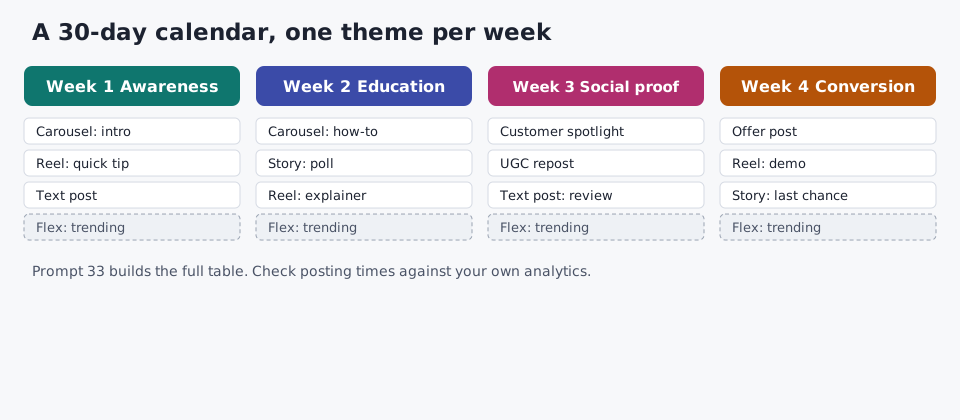
33. 30-day social media content calendar
Create a 30-day social media content calendar for {{Brand}} on {{Platforms}}, targeting {{Audience}}. Goal for the month: {{Goal}}. Week 1: awareness. Week 2: education and value. Week 3: social proof and community. Week 4: conversion. For each day give the content pillar, format (carousel, Reel, Story, text post, poll), hook, CTA and a suggested posting time in {{Timezone}}. Mark 4 flex days for trending topics. Output as a table.Why it works: weekly themes give the month a funnel shape, and flex days absorb trends without breaking the plan.
34. Three-post series with a suggested visual
Plan a three-post series for {{Platform}} about {{Topic}}. For each post give the full copy, a suggested visual, and how it leads into the next post. Post 3 ends with this CTA: {{CTA}}.Why it works: a series gives followers a reason to come back for the next post.
35. Split a 600-word post into five
Here is a 600-word post: {{Paste}}. Split it into 5 standalone short posts for {{Platform}}, each with one main idea, one actionable point for the audience and 3 hashtags. None should need the original to make sense.Why it works: repurposing multiplies one long piece without writing anything new.
36. Repurpose a podcast or webinar
I hosted a {{Podcast/Webinar}} on {{Topic}}. Key takeaways: {{List5To7}}. Create a 5-post series for {{Platform}}: each post stands alone, opens with one insight, gives one framework and points to the full episode. Also write a show-notes summary and a 200-word newsletter blurb I can reuse.Why it works: you already did the thinking on air; the prompt only changes the format.
37. Seasonal and event content
List seasonal moments, holidays, industry events and awareness days for {{Industry}} in {{MonthOrQuarter}}, including Black Friday if it fits. Drop any that would feel forced for {{Brand}}. For the top 8, give the date, a post idea, format, hook and CTA, split into pre-season, peak and last-chance posts. Suggest 2 micro-holidays we could create.Why it works: filtering out forced tie-ins is the step most seasonal plans skip.
38. User-generated content campaign
Design a user-generated content campaign for {{Brand}} on {{Platform}}: a campaign name and branded hashtag, 3 simple steps to join, 3 example captions, an incentive, a 2-week launch plan, and repost rules covering how we credit creators and ask for rights.Why it works: example captions show people what a good entry looks like, which lifts both the number and quality of submissions.
39. Comment reply templates
We often get these comments: {{PriceComplaints, ProductQuestions, Praise, NegativeReviews, ShippingQuestions}}. For each type, write 3 replies under 50 words in a {{Tone}} voice: acknowledge the person specifically, help, and end with a question or next step. Never defensive. Flag any comment type that should go to a person instead.Why it works: templates speed up community management, and the flag keeps complaints that could become a crisis out of auto-replies.
40. Analyze your last 10 posts
Here is data from my last 10 posts on {{Platform}}: {{Topic, Format, PostingTime, Reach, Likes, Comments, Shares, Saves, Clicks}}. Tell me which post performed best and why, which format earns the most engagement, whether posting time matters, and 3 changes for my next 5 posts. Show your reasoning.Why it works: ChatGPT can't see your accounts, so pasting data turns it into an analyst; "show your reasoning" exposes weak logic.
For social media managers: one week with these prompts
Used together, these ChatGPT social media prompts cover a full week. Monday, batch the week in a 2 to 3 hour block with prompt 33 and repurpose last week's best piece with prompt 35. Mid-week, run engagement with prompt 39 and post a poll from prompt 7 or 14. Friday, paste the week's numbers into prompt 40 and log the answer in a weekly analytics report. For competitor analysis, paste 3 to 5 competitor posts and ask for the patterns, gaps and CTAs they use, then three ways to differentiate. Crisis responses, influencer deals and lead generation decisions stay with a person.
A real run: one social prompt, raw output and the edit
We ran prompt 1, the LinkedIn lesson post, through our free prompt tool on October 22, 2026, using gpt-oss-120b. Settings: category "Social media / LinkedIn", tone "Professional". The lesson came from our own launch test on the By Channel hub, so every number in the input is real. The tool returned its prompt in under 5 seconds.
Input:
Write a LinkedIn post of 120 to 150 words for content marketers about one lesson from testing ChatGPT prompts across four marketing channels: editing took longer than drafting (10 of 14 hands-on minutes). Open with the lesson in one sentence, not a greeting. Tell the story in 3 short paragraphs. End with a question that invites discussion, then three hashtags.Raw output (exactly as returned):
Role: You are a professional copywriter specializing in LinkedIn content for content marketers.

Context: Write a LinkedIn post (120‑150 words) aimed at content marketers. The post should share one clear lesson learned from testing ChatGPT prompts across four marketing channels: “editing took longer than drafting (10 of 14 hands‑on minutes).” Open with the lesson in a single sentence (no greeting). Then tell the story in three short paragraphs. Conclude with a question that invites discussion, followed by exactly three relevant hashtags.

Output Format:
- One opening sentence stating the lesson.
- Three short paragraphs (each 1‑2 sentences) expanding the story.
- A closing question on a new line.
- Three hashtags on the final line, separated by spaces.

Constraints:
- Total word count must be between 120 and 150 words.
- Maintain a professional tone throughout.
- Do not include any greetings or sign‑offs.
- Ensure the hashtags are relevant to social media, content marketing, and AI prompting.
Edited version:
Role: You are a content marketer sharing a first-hand lesson on LinkedIn.

Context: We ran one product launch through four ChatGPT channel prompts: SEO, email, social and copy. Generation took seconds; editing took 10 of the 14 hands-on minutes. Audience: content marketers who use ChatGPT for first drafts.

Task: Write one LinkedIn post of 120 to 150 words.

Format:
1. Open with the lesson in one sentence: the edit, not the draft, is the real job. No greeting.
2. Three short paragraphs of 1 to 2 sentences, separated by line breaks.
3. A closing question that invites discussion, on its own line.
4. Exactly three hashtags on the final line.

Constraints: Professional, plain tone. Use only the numbers above and do not invent statistics. No exclamation marks, buzzwords or sign-off.
What we changed and why: the tool did the structural work well (role, format, word range, hashtag rule), and three things still needed a person. The role was a copywriter, but the post is a first-person lesson, so we made the writer the marketer who ran the test. The raw prompt packed every instruction into "Context", so we split context from task and format, and named the four channels so the story has something concrete to say. Last, we added a ban on invented statistics, exclamation marks and buzzwords, because a lesson post loses trust the moment it quotes a number nobody measured.
Step 2: the edited prompt in ChatGPT
We pasted the edited prompt into ChatGPT running gpt-oss-120b on October 22, 2026. This is the post it wrote, exactly as returned (136 words):
The edit, not the draft, is the real job when using ChatGPT for content.
We tested this by running one product launch through four ChatGPT channel prompts: SEO, email, social and copy. Generation took seconds, but the work wasn’t finished when the drafts arrived.
Editing took 10 of our 14 hands-on minutes. That meant most of our time went into refining what ChatGPT produced, not generating it. We still had to make the content clear, relevant to the audience and consistent with the product’s message.
My takeaway: better prompts can improve the first draft, but they don’t replace editorial judgment. ChatGPT helps you get words on the page faster. Knowing what to keep, change or remove is where the real work happens.
Where do you spend more time when using ChatGPT for content: prompting or editing?
#ContentMarketing #ChatGPT #ContentStrategy
It followed most of the brief: the lesson opens the post, there is no greeting, the closing question and three hashtags are in place, and it used only the numbers we supplied. It missed one rule: two of the three paragraphs ran to three sentences instead of one or two. That is the pattern from our launch test again; the model gets the shape right and a person catches the limit it skipped.
What we would publish (126 words):
The edit, not the draft, is the real job when using ChatGPT for content.
We tested this by running one product launch through four ChatGPT channel prompts: SEO, email, social and copy. Generation took seconds, but the work wasn't finished when the drafts arrived.
Editing took 10 of our 14 hands-on minutes, so most of our time went into refining what ChatGPT produced, not generating it. We still had to make every draft clear, relevant to the audience and consistent with the product's message.
My takeaway: better prompts can improve the first draft, but they don't replace editorial judgment. Knowing what to keep, change or remove is where the real work happens.
Where do you spend more time when using ChatGPT for content: prompting or editing?
#ContentMarketing #ChatGPT #ContentStrategy
The edit: we joined the two short sentences about editing time into one, and cut "ChatGPT helps you get words on the page faster", which repeated the opening. Both paragraphs now meet the two-sentence limit and the post stays inside 120 to 150 words.
Before you post: four checks
Every one of these social media prompts returns a draft, not a finished post. Four checks close the gap:
- Verify every number. ChatGPT writes statistics, dates and claims with the same confidence whether they are true or not. Fact-check against the source.
- Check the platform limit. Compare the draft against the table above: word count, character count, one CTA.
- Match your voice. Read it against your last three approved posts. Add the human touch the model lacks: yesterday's customer conversation, a current event, a real opinion.
- Remove risky claims. Competitor claims, legal copy, influencer disclosures and anything regulated go to a person. Disclosure rules apply to social posts and influencer content as they do to any ad; see the FTC's advertising and marketing guidance.
FAQ
What are the best ChatGPT prompts for social media posts?
The best ChatGPT prompts for social media posts name the platform, the audience, the length, the tone, the structure and one CTA. A prompt such as "Write a LinkedIn post of 120 to 150 words for {{Audience}} about {{Lesson}}, open with the lesson, end with a question" beats "write a post about marketing" every time. Start with prompts 1, 9 and 16 on this page, then ask for 3 to 5 variations and edit the strongest.
How do I use ChatGPT for LinkedIn posts without sounding like AI?
Paste three of your approved posts as voice examples, give one real detail only you know, and tell it to open with an observation or number instead of a greeting. Ban buzzwords and exclamation marks in the prompt, then do a human edit pass: cut the first sentence if it is throat-clearing and replace any vague claim with a specific one. Our before-and-after LinkedIn rewrite shows the edit step by step.
Can ChatGPT create a 30-day social media content calendar?
Yes. Give it your brand, platforms, audience, content pillars and monthly goal, and ask for a table with a pillar, format, hook, CTA and posting time per day (prompt 33). It cannot see your analytics, so check posting times against your own data, verify any dates and holidays, and leave a few flex days for trending topics.
What prompts work for Instagram captions vs TikTok hooks?
Instagram caption prompts should support the image: under 120 words, a scroll-stopping first line, line breaks, and a soft CTA such as save, share or comment. TikTok hook prompts should produce spoken lines under 3 seconds with matching on-screen text, and ask for several hook types (curiosity, controversy, story, stat, instruction) so you can test which one your audience stops for.
How do I write a prompt for a LinkedIn profile summary?
State your job title, who you help, the outcome you deliver and one proof point, and ask for first person, under 200 words, with the first two lines readable before the "see more" cut. Ask for three versions (conversational, results-led, story-led) and finish with how to contact you. Prompt 3 on this page is a ready-made version.
Sources and method: prompts written and edited by Clover Winter. First-hand run: prompt 1 through our free prompt tool, then the edited prompt in ChatGPT, both gpt-oss-120b, October 22, 2026; the lesson it reports comes from our October 17, 2026 launch test. Platform limits: Instagram Help Center, "Add a bio to your Instagram profile"; Google Ads Help, "Skippable in-stream ads". Federal Trade Commission, Advertising and Marketing business guidance. Read our editorial policy.
About the author
[Clover Winter](/authors/clover-elise-winter) is a Senior SEO Content Strategist and Technical Research Writer at TextToolsAI, with more than six years of experience driving organic growth for B2B SaaS, eco-technology and digital-media brands. She writes and maintains the guides, comparisons and use-case articles on this site, and ran the tests on this page herself. Connect on LinkedIn.
Related
- Platform-native social media CTA examples
- ChatGPT prompts for SEO
- ChatGPT prompts for email marketing
- Back to ChatGPT prompts for marketing, by channel
Have a post to write today? Turn a rough idea into a platform-specific prompt with our free prompt generator: generate a social media prompt →