
ChatGPT Prompt Templates: 25 Free Prompt Engineering Templates
You found a prompt that worked. The draft came back sharp, on-tone, ready to send. A week later you need it again, rebuild it from memory, and the answer comes back flat. Nothing about the model changed. The prompt did.
That is the problem prompt engineering templates solve. A template is a prompt you write once, with the parts that change pulled out into placeholders like [AUDIENCE] or {{product_name}}. You fill the blanks, paste it into ChatGPT, Claude or Gemini, and get the same structure, and roughly the same quality, every time.
This page is a free, copy-paste library of 25 prompt templates for ChatGPT. They're really prompt templates for AI in general, so they work in other assistants too. They're grouped by the jobs people actually do with AI: writing, marketing and SEO, business, sales, support, meetings, research, code, legal review, learning, careers and creative work. Each one has fill-in placeholders and a note on the variable to get right first.
Further down, you'll find an honest look at where templates fall short and how to stop them hallucinating. There's also a cheat sheet you can download as a PDF.
 Written & reviewed by Muhammad Adnan, AI Solutions Provider & Full Stack Developer
Every template here uses the same four-part structure (role, task, context, format) and follows guidance published by OpenAI and Anthropic. Each was tested across ChatGPT, Claude and Gemini, and spot-checked on open-weight models, on 5-10 briefs before being included. Treat any AI output as a first draft and review it before you publish or send it.
What is a prompt template?
A prompt template is a reusable prompt with placeholder variables, such as [TOPIC] or {{audience}}, for the parts that change each time. A good one states four things: the role the AI should play, the task, the context it needs, and the output format you want. The role, instructions and format stay fixed, so you fill the placeholders with specific details and get consistent, usable output instead of a generic first draft. The same structure works in ChatGPT, Claude, Gemini and most other assistants.
What is a prompt template and why it works
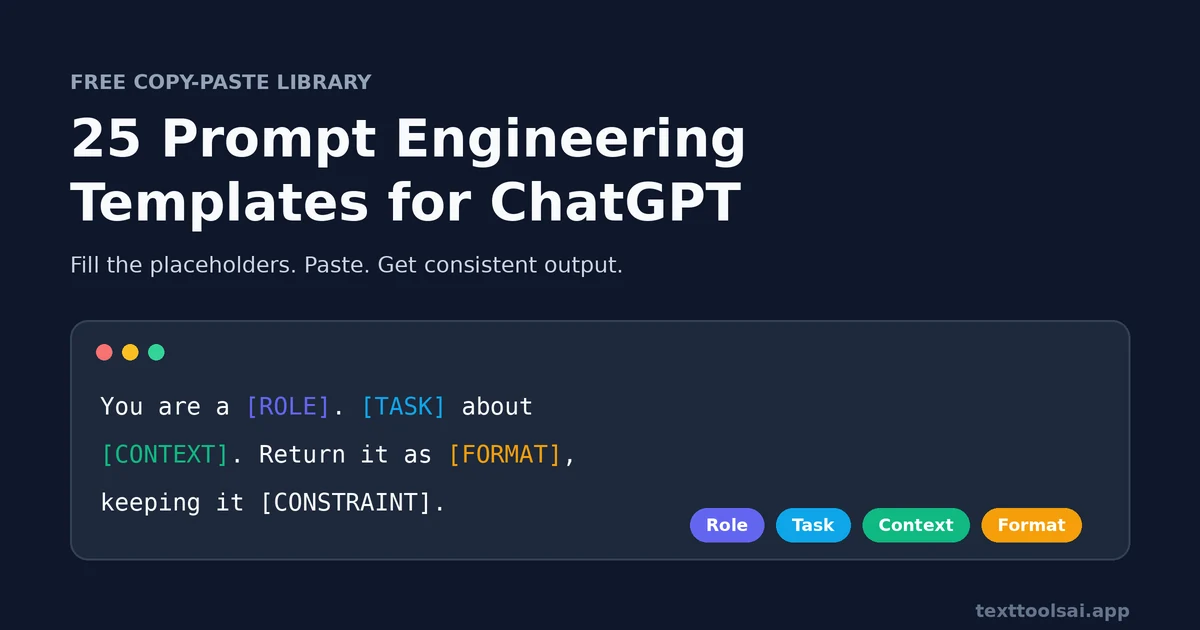
So, what are prompt templates, exactly? A prompt template is a reusable format with placeholders for the parts that change. Think topic, audience, tone, word count, or the text you paste in. Everything else, the framing and the instructions, stays fixed. That fixed part is where the quality lives.
Developers call the same idea an LLM prompt template: a string with named variables that the code fills before each model call.
Ad hoc prompts drift. One day you mention the audience, the next you forget. One day you ask for bullets, the next you get an essay. A template removes that drift. That's why teams that share templates get output that reads like one writer, not five.
The four-part anatomy of a good template
Look at enough well-built prompts and the same anatomy keeps showing up. The labels differ from guide to guide, but the parts don't.
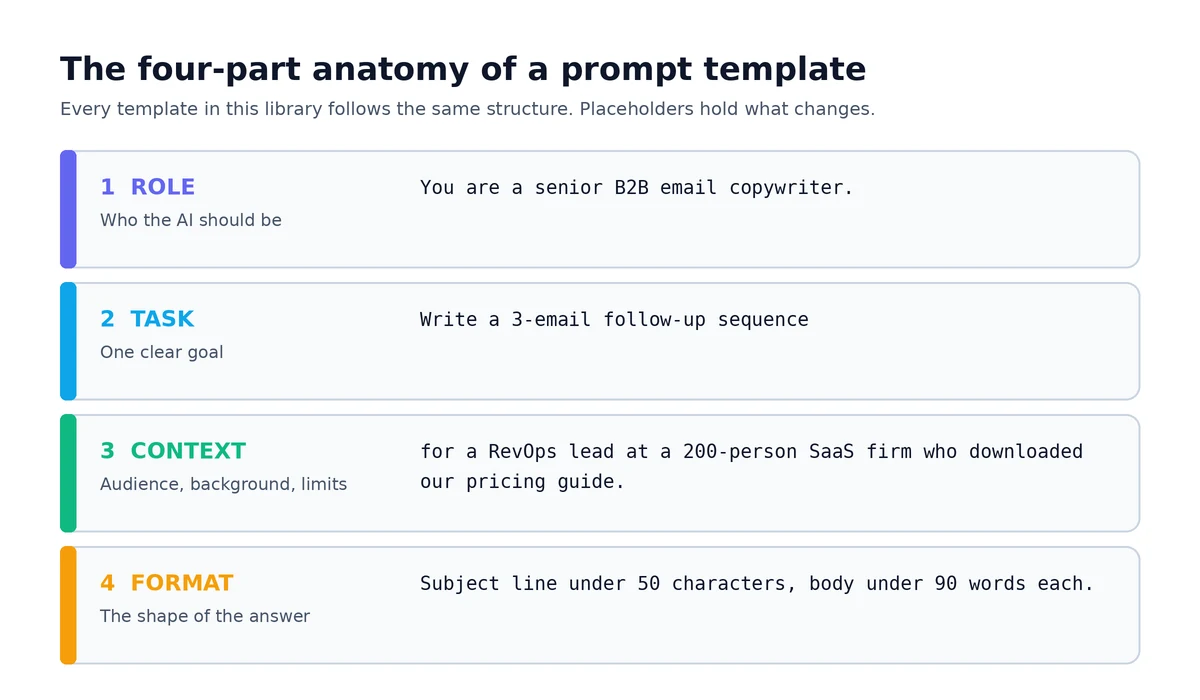
| Part | What it does | Example line |
|---|---|---|
| Role | Sets the expert perspective, tone and depth | "You are a senior B2B email copywriter." |
| Task | States one clear goal. A vague task gets a vague answer | "Write a 3-email follow-up sequence." |
| Context | Gives background, audience, constraints and the desired outcome | "The prospect is a RevOps lead at a 200-person SaaS company who downloaded our pricing guide." |
| Format | Defines the shape of the answer: table, bullets, word cap, sections | "Return each email with a subject line under 50 characters and a body under 90 words." |
OpenAI's own prompt engineering best practices say much the same thing. Put instructions first and separate them from the context, then be specific about outcome, length, format and style. Of the four parts, format is the one people skip most and the one that changes results the most. End with "return it as a table with columns for channel, hook and effort." It beats "give me some ideas" every time.
You'll sometimes see vendors claim structured, role-based prompts produce "3x better output." Treat that number as marketing. What holds up in practice is simpler: the more of the four parts you specify, the less the model has to guess.
The one-line formula
If you remember nothing else, remember this prompt engineering template. It generates a usable prompt for almost any task:
You are a [ROLE]. [TASK] about [CONTEXT]. Return it as [FORMAT], keeping it [CONSTRAINT].For deeper, framework-based structures such as RTF, CO-STAR and RISEN, see our guide to prompt frameworks.
Prompt example vs prompt template
People use these words interchangeably, and that causes confusion.
- A prompt example is fixed and one-off. "Write a LinkedIn post about our Q3 hiring freeze" works once, for one situation.
- A prompt template is reusable. "Write a [PLATFORM] post about [TOPIC] for [AUDIENCE]. Open with a one-line hook..." works for every post you'll ever write, because the variables carry the situation.
Examples are great for learning what good output looks like. Templates are what you actually reuse. We go deeper on this distinction, with side-by-side cases, in 50 ChatGPT prompt examples.
How to use a prompt template
Every template on this page follows the same loop: copy, fill, run, refine, save.
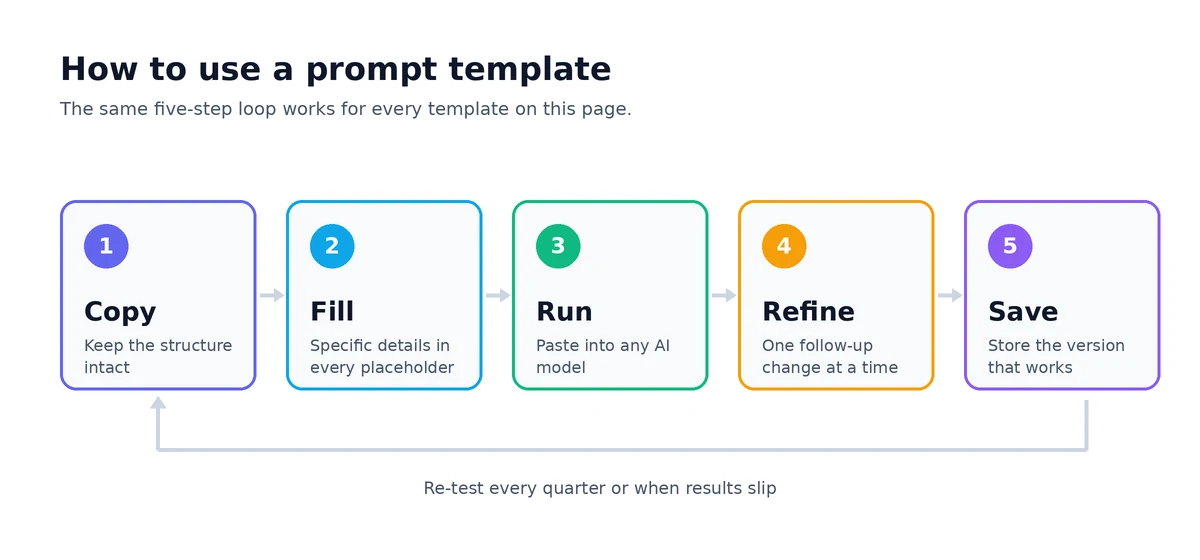
- Copy the template intact. Don't trim the format line or the constraints; that's the structure doing the work.
- Fill the variables with real specifics. Replace [TOPIC], [AUDIENCE], [GOAL] (or {{topic}}, {{product_name}} in brace-style templates). "Audience: marketers" produces generic marketing language; "Audience: B2B SaaS demand-gen managers at 50-200 person companies running their first ABM campaign" produces something you can use.
- Paste into any model. These templates are model-agnostic: ChatGPT, Claude, Gemini, Grok, Perplexity and most other assistants.
- Run it, then adjust a line or two. Use short follow-ups ("tighter," "more data-backed examples," "less salesy") rather than starting over.
- Test before you standardise. Run a new template 3-5 times on different inputs before you hand it to a team. If it only works once, it isn't a template yet.
- Keep one master version with one owner. If results slip, tighten the format constraint or add a context slot. Don't let five slightly different copies circulate.
- Save the version that works, starting with your most-used category.
Don't want to fill brackets by hand? Fill a template automatically by describing your goal in plain language, and our free prompt generator builds the full structured prompt.
25 ChatGPT prompt templates by category
These 25 templates cover eleven categories. Each lists what it's for, the template, and the variable that matters most. Copy the text inside each block, replace everything in [BRACKETS], and paste.
Writing and content
The everyday workhorses: turning raw material into structure, drafting, editing and headlines.
1. Turn source material into an outline
Use this when you already have raw material and need a clean structure before writing. Call notes, transcripts, research and messy drafts all work. It's the template people search for most on this site, so it's first.
You are an experienced content editor. Below is my source material for an article about [TOPIC] for [AUDIENCE].

Turn it into a detailed outline:
- An H1 title under 60 characters
- 6-8 H2 sections, each with 2-4 H3 points
- Under each heading, note which part of the source material supports it
- A "Gaps" list of anything the outline needs that the source material does not cover
- A FAQ section with 5 questions the source material can answer

Use only the source material. Do not add facts, statistics or examples that are not in it. If a section has no support in the material, flag it instead of filling it.

Source material:
"""
[PASTE NOTES, TRANSCRIPT OR DRAFT]
"""
Get this right: paste the material inside the triple quotes. Separating instructions from context is one of the most reliable ways to stop the model blending the two.
2. Blog post outline template
You are an experienced content writer. Create a detailed blog post outline for an article about [TOPIC] targeting [AUDIENCE]. The article angle is: [WHAT MAKES THIS DIFFERENT FROM GENERIC COVERAGE]. Include: H1 title, 6-8 H2 sections with a brief note on each, a FAQ section with 5 questions, and a recommended word count range. Audience knowledge level: [BEGINNER / INTERMEDIATE / ADVANCED]. Tone: [DESCRIBE TONE].Get this right: the angle. Without it you get the same outline as every other page on the topic.
3. Editing pass
Edit the text below for clarity and conciseness. Cut it by [PERCENTAGE, e.g. 30%], remove filler words, and keep every fact and the original meaning. Use plain, professional English. Return the edited text first, then a short list of the main changes you made.

Text:
"""
[PASTE TEXT]
"""
Get this right: the target length. "Shorter" is vague; "30% shorter" isn't.
4. Headline generator
Give me 10 headline options for [CONTENT TYPE] about [TOPIC] for [AUDIENCE]. Mix styles: curiosity, direct benefit and number-led. Keep each under 60 characters. Then pick your best 3 and explain each choice in one line.5. Email newsletter
You are an email newsletter writer. Write one issue about [TOPIC] for [AUDIENCE].
- Subject line under 50 characters, plus preview text
- Open with a short story or insight, not a product push
- No more than 3 sections, short paragraphs, conversational first-person tone
- One primary call to action: [CTA]
Do not open with "I hope this email finds you well."
Need subject line options to test? Run the topic through our email subject line generator.
Marketing and SEO
Briefs, pages and ads: give the model intent and audience and it stops writing for everyone.
6. SEO content brief
Act as an SEO content strategist. Create a content brief for an article targeting the keyword "[KEYWORD]".
Search intent: [INFORMATIONAL / COMMERCIAL / TRANSACTIONAL]
Audience: [DESCRIBE]
Include: an SEO title under 60 characters, a meta description of 150-160 characters, 5-8 secondary keywords, 8-10 H2 headings with H3 subheadings, the key points under each, internal linking opportunities, a FAQ section with 5-8 questions, a recommended word count, and one angle that differentiates the piece from the current top 3 results.
Get this right: search intent. An informational brief and a commercial brief for the same keyword look completely different.
7. Landing page copy
You are a conversion copywriter. Draft above-the-fold landing page copy for [PRODUCT] aimed at [AUDIENCE]. Primary benefit: [MAIN OUTCOME].
Return: a headline that leads with the outcome (not the feature), a subhead, 3 benefit bullets, one line that handles the biggest objection ([OBJECTION]), and a CTA.
Use the words this audience actually uses. Avoid buzzwords like "revolutionary," "game-changing" and "best-in-class."
8. Ad copy variants
Write 5 ad variations for [PRODUCT] aimed at [AUDIENCE] on [PLATFORM]. Give each a different angle: pain, benefit, social proof, curiosity, urgency. Label the angle. Respect platform limits: [e.g. Google RSA headlines 30 characters, descriptions 90 characters; Facebook hook inside the first 125 characters, headline under 40].9. Customer persona builder
You are a marketing researcher. Build a realistic customer persona for [PRODUCT OR SERVICE] in [TARGET MARKET]. Business goal: [GOAL].
Give the persona a name, role and short backstory, then cover: goals, pain points, buying motivations, where they spend time online, how they discover products, the top 5 objections they'd raise before buying, and the exact phrases they'd use to describe their problem.
Skip demographic details that wouldn't change how we market to them.
Business and strategy
These are the ai prompt templates for business owners and operators use to pressure-test an idea, not admire it. Unlike most business prompt templates, they're built to find what's wrong, not to flatter the plan.
10. Pre-mortem risk finder
Act as a skeptical investor. Here is my business idea: [IDEA].
Assume we launched it today and it failed completely 12 months from now. List the 3 most likely market or structural reasons it died. For each, give one cheap test I could run this week and one pivot if the test fails. Finish with the single assumption the whole idea depends on most.
11. Pricing tiers
Act as a pricing strategist. Product: [PRODUCT]. Cost per unit: [COST]. Target margin: [MARGIN]. Competitor price range: [RANGE]. Customer: [DESCRIBE].
Compare cost-plus and value-based pricing, then propose 3 tiers (or a free vs premium split with clear feature gates). Give a one-line rationale for each tier and say which one you'd test first.
12. Decision brief
Write a one-page decision brief on [DECISION] for [EXECUTIVE / TEAM / STAKEHOLDER] readers.
Structure: Background, Options Considered (2-4), Recommendation, Risks, Next Steps. Keep each section under 80 words. Flag any assumption you had to make.
Sales and outreach
Built with B2B marketers and SDRs in mind, but they work for anyone writing to a stranger who owes them nothing.
13. B2B cold email
Write a cold email to a [PROSPECT ROLE] at a [INDUSTRY] company about [VALUE WE OFFER]. Personalise the opening line to this trigger: [TRIGGER, e.g. a new funding round or job post]. Focus the subject line on [PAIN POINT]. Body: under 90 words, no more than 3 short paragraphs. One low-friction CTA: [SPECIFIC ASK]. Tone: direct, helpful, not salesy.Get this right: the trigger. A real reason for writing now is the difference between a reply and a delete. For a full sequence, add: "Then write 2 follow-ups: day 3 adds value, day 7 is a polite breakup email."
14. Objection response
A prospect said: "[OBJECTION TEXT]".
Give me 3 ways to respond, each under 50 words. Each should acknowledge the concern, reframe it, and pivot to [KEY DIFFERENTIATOR]. Consultative, not pushy. End each with a question that moves the conversation forward.
Customer support
Replies that acknowledge the real issue and set a clear timeline, without promising fixes you can't deliver.
15. Ticket response
You are a customer support agent for [COMPANY]. A customer submitted this ticket:
"""
[TICKET TEXT]
"""
Write a reply that acknowledges the specific issue, explains what happens next, and sets a clear timeline. Tone: [FORMAL / FRIENDLY / CONCISE]. Under 120 words. Do not promise refunds or fixes that aren't listed here: [WHAT WE CAN OFFER].
Variation (escalation handoff): "Summarise this ticket thread in 3 bullets for a tier-2 agent: the core issue, what has been tried, and the customer's current sentiment."
Meetings and productivity
Turn messy notes into decisions, owners and updates, using only what was actually said.
16. Meeting notes to action items
Turn the meeting notes below into:
1. A 3-sentence summary
2. Key decisions
3. An action-item table with columns: task, owner, due date ("not stated" if missing)
4. Open questions
Do not add anything that isn't in the notes. Leave out small talk.

Meeting type: [STANDUP / CLIENT CALL / PLANNING]
Notes:
"""
[PASTE NOTES OR TRANSCRIPT]
"""
17. Weekly status update
Write a weekly status update for [PROJECT] for [AUDIENCE]. Three sections: Completed, In progress, Blockers (with what's needed to unblock each). Under 200 words. Use only these notes:
"""
[PASTE NOTES]
"""
Research and analysis
Grounded summaries and stress-tests that cite what they use and flag what they can't support.
18. Grounded research summary
I'm pasting [NUMBER] sources on [TOPIC]. Using only these sources:
1. Extract the most relevant direct quotes, numbered.
2. Summarise where the sources agree and where they conflict, citing quote numbers.
3. List gaps the sources don't cover.
4. Give a balanced one-paragraph takeaway.
If the sources don't support a claim, say "not supported by the sources" rather than guessing.

Sources:
"""
[PASTE SOURCES]
"""
This one is built to cut hallucinations. More on why it works in the hallucinations section below.
19. Devil's advocate
Here is my plan / thesis: [PASTE]. My stance: [STANCE].
Argue against it as a smart, fair skeptic would. Give the 3 strongest objections, the weakest assumption in my logic, and what would have to be true for each objection to be wrong. Suggest one source or data type I should check.
Coding and technical
Find root causes and scaffold agents, with strict output shapes so the result drops into your workflow.
20. Debug root cause
You are a senior [LANGUAGE] engineer. This code should [EXPECTED BEHAVIOUR] but instead [ACTUAL BEHAVIOUR]. Error message: [ERROR].
Find the root cause, not just the symptom. Explain it in plain English, give a minimal fix (do not rewrite the whole file), and write one regression test that would have caught it.

Code:
"""
[PASTE CODE]
"""
21. AI agent prompt template
The most-asked-for ai agent prompt template is one that builds other prompts. This produces a single-purpose agent prompt with a strict output schema:
Build a system prompt for an AI agent whose only job is to [TASK]. The prompt must include:
- A system role and scope (what the agent must refuse or hand off)
- The input data format it will receive
- Step-by-step reasoning instructions it should follow before answering
- A strict JSON output schema with field names, types and an example
- What to output when the input is missing or ambiguous
For deeper agent and system-level patterns, a dedicated guide to system prompt templates is coming to this hub.
Legal
A review aid, not legal advice: it quotes clauses first so the model can't paraphrase them into something they don't say.
22. Contract clause review (legal AI prompt template)
You are assisting a [LAWYER / PARALEGAL / FOUNDER] reviewing a [CONTRACT TYPE] from the perspective of [PARTY].
1. Extract the exact text of every clause about [TOPIC, e.g. termination, liability caps, IP ownership], numbered.
2. For each, explain in plain English what it obliges our side to do, and flag anything unusual or one-sided.
3. List questions to raise with counsel.
Base your analysis only on the quoted clauses. If a clause isn't in the document, say so. This is a review aid, not legal advice.

Contract:
"""
[PASTE CONTRACT]
"""
Get this right: never skip step 1. Making the model quote first keeps it from paraphrasing a clause into something it doesn't say.
Learning and education
Tutoring that tests you instead of lecturing, then hands you flashcards on what you covered.
23. Feynman tutor
Act as a patient tutor using the Feynman Technique. Teach me [TOPIC] at a [BEGINNER / INTERMEDIATE / ADVANCED] level.
Start with a 2-paragraph overview using one everyday analogy. Then ask me one question to test my understanding and wait for my answer before going deeper. After three rounds, give me 5 flashcards (question and a two-sentence answer) on what we covered.
Career and HR
Tailor a resume and cover letter to one job, truthfully, with a real hook instead of "I am writing to apply."
24. Tailor a resume and cover letter
You are a career coach. Rewrite my resume bullets to match the job description below. Use strong action verbs and quantified results, and keep everything truthful: do not invent numbers. Then write a cover letter under 300 words that opens with a specific hook (not "I am writing to apply"), connects my experience to what [COMPANY] needs, and ends with a clear next step.

My bullets: [PASTE]
Job description: [PASTE]
Personal, social and creative
These double as creative prompt templates for writers who are stuck on the blank page.
25. Story and world-building starter
Act as a story developer. Genre: [GENRE]. Setting: [TIME AND PLACE]. Tone: [DARK / WHIMSICAL / DRAMATIC]. Premise: [ONE LINE].
Give me: 3 opening paragraphs in different tones (under 80 words each), a protagonist with a goal, a flaw and a secret, 3 rules of this world that create conflict, and 5 what-if twists.
Variation (social): "Turn the piece below into a LinkedIn post, a 5-post thread and a short caption. Open each with a hook in the first line."
Saving and organising a prompt library
Having 25 templates doesn't help if nobody can find the right one. The usual setup, a shared doc or a pinned Slack message, works for a few weeks. Then someone pastes an old version. Someone else edits their own copy. Soon the team runs three versions of the same cold email, and nobody knows which one works best.
Storing templates and deploying them are two different jobs. A good ChatGPT prompt library does both. (People also search for it as a "chat gpt prompt library". If you work across models, it's an LLM prompt library.) Here's what that looks like:
- Organise by category and tag. Folders and subfolders that mirror your work, for example Marketing, then Social, then Instagram.
- Turn placeholders into fields. Bracket and brace placeholders work best when they become form fields you tab through before sending.
- Insert without switching tabs. A short abbreviation or shortcut in the chat box beats hunting through a doc.
- One owner per template. When the owner improves it, everyone gets the update.
- Track versions and pin favourites. Know which version you're running and keep the top 5 within reach.
Build it step by step. Pick 5-10 templates from your main use case and customise them. Save the winners, share them with your team, and review the library every quarter.
Advanced prompt engineering tips
Once the basics are working, these five techniques give the biggest lift:
- Use a specific expert role. "Senior B2B email copywriter" outperforms "helpful assistant."
- Show the output format. Paste a sample of what you want back, like "Bold heading, then 3 bullets, then a one-line summary." Models do better when they see the format, not just hear it.
- Add constraints, and say what to do instead of only what to avoid. Length, tone, reading level, and what to leave out. Constraints make output more creative, not less.
- Ask it to reason step by step for complex tasks, or to explain its reasoning before giving a final answer. This surfaces faulty logic you'd otherwise miss.
- Refine with follow-ups. Build on the first draft ("add two data-backed examples," "cut the intro") instead of restarting from scratch.
For the full method, see our guide to how to write better ChatGPT prompts.
Common prompt mistakes to avoid
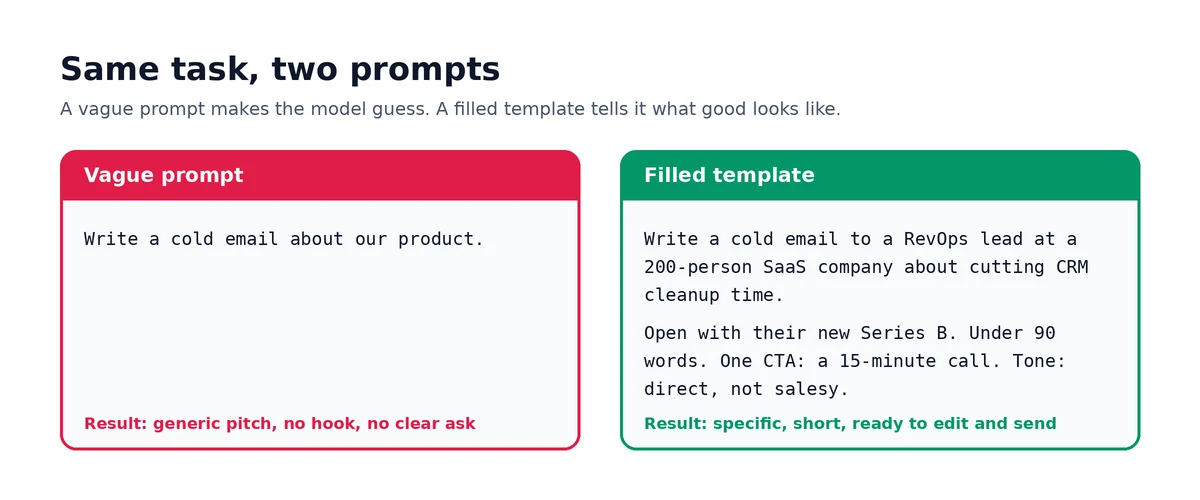
- Being too vague. "Write about marketing" gives you mush. "Write a 500-word post on email list segmentation for small e-commerce stores, with one worked example" gives you a draft.
- No role. Generic requests produce generic outputs.
- No format instruction. If you want a table, bullets or a word cap, say so.
- No audience or goal context. The model can't tailor what it can't see.
- Expecting perfection on the first try. Plan on 2-3 refinements for anything that matters.
- Not saving prompts that worked. The best template is the one you already tested.
Limitations of prompt templates and how to overcome them
Templates are not magic, and pretending otherwise is how people end up disappointed. Here are the limits we see most often, and the fix for each.
| Limitation | What it looks like | How to overcome it |
|---|---|---|
| Generic input, generic output | You fill [AUDIENCE] with "marketers" and get bland copy | Fill placeholders with specifics: role, company size, situation, the exact words customers use |
| Templates go stale | A template that worked in spring gives mediocre results by autumn | Re-test quarterly; tighten the format constraint or add a context slot |
| One size doesn't fit every case | The template forces structure onto a task it wasn't built for | Keep the role and format, swap the task; or branch a new template rather than stretching the old one |
| Confident wrong answers | The model fills gaps with plausible-sounding facts | Ground it in pasted sources, let it say "I don't know," and ask for quotes (see below) |
| Version sprawl | Five people run five versions of the same prompt | One master template, one owner, a shared library |
| Model differences | A prompt tuned for one model behaves differently on another | Test on each model you use; keep model-specific notes next to the template |
Can prompt templates reduce hallucinations?
Yes, if you build the right guardrails into the template. A template can't make a model know facts it doesn't have, but it can stop the model from inventing them. Anthropic's guide to reducing hallucinations lists the techniques that matter, and they work as template lines in any model:
- Allow uncertainty. Add: "If the sources don't contain the answer, say you don't have enough information."
- Ground in direct quotes. For long documents, ask the model to extract the relevant quotes first, then answer using only those quotes.
- Restrict knowledge. Add: "Use only the information in the text provided, not general knowledge."
- Make it state assumptions. Add: "If information is missing, state your assumption before writing." In our testing, this one line stopped models from inventing stats and case studies.
- Verify with citations. Ask it to support each claim with a quote and remove any claim it can't support.
- Compare runs. Run the same prompt more than once; inconsistent answers are a warning sign.
Templates 1, 16, 18 and 22 above already include these lines. Even so, no prompt eliminates hallucinations entirely, so always validate anything high-stakes.
Prompt engineering cheat sheet (PDF)
Want all of this on one page? Here's the condensed version. Download the free ChatGPT prompts cheat sheet PDF.
| Goal | Add this to your prompt |
|---|---|
| Better quality | "You are a [specific expert role]." |
| Right shape | "Return it as [table / 5 bullets / under 120 words]." |
| Right voice | "Tone: [direct / warm / formal]. Audience: [specific reader]." |
| Fewer hallucinations | "Use only the text provided. If unsure, say so." |
| Better reasoning | "Think step by step, then give your final answer." |
| Clean inputs | Wrap pasted text in triple quotes |
| Better first drafts | Paste one example of the output you want |
| Fast iteration | Follow up with one specific change at a time |
The PDF version of this AI prompts cheat sheet includes all 25 templates. It's the file people look for as a "ChatGPT prompt templates PDF", so print it or pin it next to your screen.
How to build any prompt you need
You don't need 500 templates. You need a handful of good prompt engineering templates and the habit of adapting them. Keep the role and the format, and swap the task:
- Blog post, then product description, then press release, then video script
- Cold email, then follow-up, then objection response
- Cover letter, then STAR-format interview answer, then LinkedIn summary
Each swap is a new template in under a minute. Five well-built templates become a library of fifty.
Rather skip the manual work? Our free ChatGPT prompt generator turns a plain-language description into a structured prompt, with role, context, task and format built in. Browse more prompt examples and templates in the hub.
How these templates were built
Every template here uses the four-part structure above. They also follow guidance published by the model makers themselves, including OpenAI's prompt engineering best practices and Anthropic's hallucination guidance.
We kept them model-agnostic and made every placeholder explicit. Wherever a template handles facts, contracts or research, we added grounding lines.
From the author: how I tested them
I don't publish a template until it has survived real use. These 25 came out of a working library of around 40-50 content templates.
ChatGPT was my main test bed for marketing and blog work. I also ran the templates in Claude for long-form outlines and Gemini for research-heavy tasks. Then I spot-checked open-weight models such as Qwen and GLM, to make sure nothing only worked on one provider.
Each template ran on 5-10 different briefs, covering different topics, niches and difficulty levels. Each brief then got 2-3 rounds of tweaks to check the output stayed consistent. I also keep a small test set of five briefs, including one edge case and one "trap" brief with conflicting instructions. A change to a template only stays if it still passes all five.
Testing changed the templates. These fixes made the biggest difference:
- A "this is not" line. Adding "This is not a motivational post; don't use inspirational quotes" cut fluffy intros sharply.
- Locked section labels. Spelling out the exact order, like "H2: Rule #1 - [name]", reduced drift between runs.
- Stated assumptions. "If information is missing, state your assumption before writing" stopped models from inventing stats and case studies.
- Shorter roles. Long, flowery role paragraphs made output less consistent. One crisp line, with the detail moved into the context, worked better.
A real before and after. My old prompt was "Write a blog post about time management for remote workers." It gave me generic advice, a fluffy intro and no clear angle.
The template version gave the model a one-line role: a senior content writer for a SaaS blog. It named the reader's real problem, which was meeting overload and context switching. It set a specific title ("7 Time-Management Rules Remote Teams Actually Follow") and a specific audience: remote team leads at 10-200 person companies. It listed must-haves, phrases to avoid, and an exact structure of H1, a short intro, seven H2s and a CTA. The drafts came back 70-80% publish-ready, instead of needing a full rewrite.
Sources
- OpenAI. Best practices for prompt engineering with the OpenAI API. OpenAI Help Center.
- Anthropic. Reduce hallucinations. Claude Platform Docs.
Main tool
Generate highly effective ChatGPT and AI prompts for marketing, SEO, blog writing, email, and more. Free online AI prompt generator.
Open ChatGPT Prompt GeneratorFAQ
What is a prompt template?▾
A prompt template is a reusable prompt with placeholders, such as [TOPIC] or {{audience}}, for the parts that change. The role, instructions and output format stay fixed. That gives you consistent output instead of starting from scratch.
What is the difference between a prompt example and a prompt template?▾
A prompt example is a single, fixed prompt written for one situation. A prompt template turns that prompt into a reusable pattern by replacing the specifics with variables you fill in each time. Examples teach you what good looks like; templates are what you reuse.
Can prompt templates reduce hallucinations?▾
Yes. A template can't add knowledge the model lacks, but it can stop the model from inventing it. Add lines that limit the model to the text you provide, let it say "I don't know," and ask for a quote or citation behind each claim. These cut hallucinations noticeably, though they never remove them completely, so verify anything high-stakes.
How do I overcome the limitations of prompt templates?▾
Fill placeholders with specific details, not generic labels. Re-test templates every few months and keep one master version of each. For anything factual, add grounding instructions. When a task doesn't fit, keep the role and format but write a new task rather than forcing an old template to stretch.
Is there a PDF or cheat sheet version?▾
Yes. A free cheat sheet PDF is available on this page. It includes the one-line formula, the eight most useful prompt add-ons, and all 25 templates on this page.
Are these prompt templates free?▾
Yes. Every one is free to copy, edit and reuse, including for commercial work. If you've been hunting for AI prompt templates free of sign-up walls, this page has none. Treat what the AI produces as a first draft, and review it before you publish or send it.
Do these templates work in Claude, Gemini and other AI tools?▾
Yes. They're model-agnostic. The role, task, context and format structure transfers to ChatGPT, Claude, Gemini, Grok, Perplexity and most other assistants. Test once on each model you use, since tone and length can vary slightly.
How do I customise a template for my business?▾
Replace every placeholder with details from your own situation: your audience, your offer, your constraints. Then adjust the output line (word count, tone, structure) to fit where the result will be used. Save your tuned version so you don't have to customise it twice.
Related guides
The structural elements that turn a vague AI request into a prompt that produces consistent, useful output.
ChatGPT and Claude leave different detectable fingerprints in their writing. Here is how to recognize each model's patterns and humanize the output effectively.
Related tools
Related workflows
writers, students, editors, marketers, and professionals
Paste a paragraph and rewrite it to read clearer while the meaning, facts, and intent stay exactly the same. Instant, faithful rewrites - free, no signup.
writers, students, marketers, founders, and content teams
Rewrite unclear text for clarity: a step-by-step way to make dense, wordy, or hard-to-follow writing clear and easy to read while the meaning stays intact. Free rewriter, no signup.
professionals, support teams, managers, founders, and students
Paste any email and rewrite it to sound clear, polished, and professional in seconds - without changing your message, request, or deadline. Free AI email rewriter, no signup.