

# ChatGPT Prompts: Find the Right One for Your Task
TL;DR: Pick your prompt by task, then add three things: audience, constraints and format. Paste your own source material and verify facts. In our 5 tests (ChatGPT, 7 November 2026), the strong prompt beat the vague one every time.
Most ChatGPT prompts fail for a boring reason. They were written for someone else's task. Copy one from a roundup and the language model returns the most average answer it can, because it doesn't know who you are, what you have, or what "good" means to you.
This hub works as a router. Pick your task, choose an example, template or generated prompt, and see what changed when we turned five weak prompts into strong ones. We also ran one prompt in ChatGPT, Claude and Gemini on the same day.
Want ready-made prompts? Start with 50 ChatGPT Prompt Examples. This page helps you pick one and adapt it.
ChatGPT prompts are now part of everyday work and high school. A Pew Research Center survey found that 26% of U.S. teens aged 13-17 used ChatGPT for schoolwork in 2024, double the 13% share in 2023. A February 2026 follow-up put chatbot use for schoolwork at 54%. Whatever the kinds of work, the problem is the same: what to type.
This guide was drafted with AI assistance and reviewed by a human editor under our [editorial policy](/editorial-policy). Don't paste passwords, client data or personal details into any AI tool.
Find a Prompt by Task
Start with the task, not the prompt. A prompt is any input that steers the model. ChatGPT generates text that statistically follows your words. It has no beliefs or real understanding, so your phrasing decides the quality of the AI output. "Tell me a joke" works. "Explain the theory of relativity in simple terms" works better because it's specific.
Writing and editing
Ask for one clear verb: rewrite, critique or extract. Paste your draft between delimiters and add constraints: "keep facts, cut 30%, short sentences, return only the edited text." Ask for three outline options before drafting, or have a skeptical reviewer list the five weakest claims with suggested evidence. To draft and refine, be exact: "a friendly email under 120 words declining an invitation."
Creative work needs loose content but tight quantity. That covers poems, sonnets, monologues, musicals, music-video scripts and song concepts for poets and music lovers.
- Poetry: a nature sonnet with metaphor, or a poem on love and loss.
- Stories: a short story about perseverance, written in an author's style.
- Music: a musical about a legendary musician.
- Constrained ideation: 15 ideas split into conventional, unusual and deliberately impractical.
- Voice matching: paste samples and ask the model to flag uncertainties.
Business and work
Turn meeting notes into a table of owner, action, deadline and dependency, and flag actions with no owner. Run a pre-mortem: assume failure, rank causes, add preventive steps. Have the model play a cautious buyer listing objections, hardest first.
Business prompts also cover: - Customer-facing: marketing copy, customer communication and customer service FAQ lists. - Internal: scripts, content planning and team tasks. - Emails (the biggest group): follow-ups, thank-yous, apologies, referrals, upsells and partnerships, e.g. "an apology email for a delay in our service."
For multi-source, multi-step or file-producing tasks in ChatGPT Work, describe the result, supply sources, limit sources and date ranges, and require approval before anything is sent. Examples: quarterly reports into an executive brief and six-slide deck, three support platforms compared in a recommendation memo, or a launch plan with owners, risks, an FAQ and a checklist.
Study and learning
Students learn more from prompts that explain, quiz and give feedback than from prompts that do the assignment. Ask ChatGPT to "explain at my level" with one analogy, one numerical example and three test questions. Ask it to help you understand a topic like compound interest using defined terms, or say "quiz me" one question at a time with escalating difficulty. Turn notes into study guides with definitions, formulas and takeaways.
Strong study prompts: - Break down big ideas. Explain the water cycle simply, then with scientific detail. - Quiz yourself. Ask for 10 multiple-choice questions with explanations. - Spot the mistakes. Solve a linear equation and flag the common errors. - Compare and contrast. Build a mitosis vs meiosis table. - Make sticky analogies. Three memory aids for Newton's laws: funny, sports and everyday. - Practice out loud. A vocabulary quiz with memory tips for wrong answers. - Highlight themes. Three themes in To Kill a Mockingbird. - Switch learning styles. Photosynthesis as a diagram walkthrough, then as a story. - Build a study plan. Three days of 30-minute blocks with self-tests.
The same works for study schedules, essay topics, interactive learning and step-by-step math solutions (paste a math problem and ask for each step explained). You can also have it teach a theorem, then run testing and grading. For research, ask it to compare supplied sources in a table of agreements, conflicts and gaps. ChatGPT Study Mode explains, quizzes and reviews step by step without doing the work for you, and it needs the same clarity.
Marketing
Name the audience, angle, channel and goal, then give the persona, offer, tone and word limit. Typical asks are a 30-second commercial script, a persuasive email for a free trial, or a one-month content calendar. Ask for five hooks, pick one, then request three tones. Paste last month's best posts as voice samples, and protect the brand with banned words, approved claims only, and no prices unless supplied.
Coding
Give the desired behavior, repro steps, constraints and how you'll verify. Coding prompts cover debugging ("find the bug in this code"), writing tests, code translation, algorithms and data structures, scraping and automation, GUI and games, ML and NLP. They range from a Python factorial function to a full-stack learning roadmap. In Codex, common workflows include: - Explaining a codebase - Fixing a bug: reproduce it, make a minimal fix, add a regression test - Prototyping from a screenshot - Iterating on UI - Updating docs - Local /review or PR review on GitHub
Use /plan before edits. For full walkthroughs, see AI prompts for coding.
Productivity and planning
Give the model your task list, available time and energy peaks. Prompts built on proven methods work well: - Pomodoro durations and breaks - The Eisenhower Matrix's four quadrants for daily decisions - Eat That Frog (hardest task first) - Batch processing to group similar tasks and reduce switching - Time blocking - Deep work with a good environment setup and fewer interruptions - The Two-Minute Rule for small tasks - Mind mapping - Energy management, so you put hard work at your peaks
For weekly triage, sort tasks into do now, schedule, delegate or drop. For decision support, ask for the six questions most likely to change the answer, then the trade-offs without recommending. Everyday planning works too: compare phone plans in a table, or plan five quick peanut-free weeknight dinners with a shopping list. Productivity is a system, not a talent.
Role-play prompts
Role-play prompts ask ChatGPT to act as an interviewer, travel guide, translator, chef, fitness coach or financial advisor. Give the role, the situation and what you want back.
Example vs Template vs Generated: Which One to Use
| Your situation | Use | Why |
|---|---|---|
| Quick one-off task | Example | Copy, adapt in 3 edits, done |
| Repeated work (weekly reports, recurring emails) | Template | Save a template once, swap content each time |
| New or complex task, unsure what to include | Generated | A generator asks for goal, context, output and boundaries |
| You have source material | Any, plus paste and constrain | Grounding the model in your own material is the biggest accuracy gain |
| Output for others | Any, audience and format first | Rough prompts are fine only for personal use |
| Facts, numbers or legal | Any, then verify | Use the model to organize, then check primary sources |
| Creative work | Example | Loosen content limits, tighten quantity and format |
Need reusable structures? See ChatGPT prompt templates. Want to know why prompts work? See types of prompts.
Weak vs Strong: 5 Tasks Tested
We ran five everyday tasks twice in ChatGPT, once with a vague prompt and once with a strong one.
Test setup: ChatGPT Free (Instant) · 7 November 2026 · new chat per run · same source material in both versions of tasks 1-3.
Task 1: Customer follow-up email
- Weak: "Write a follow-up email to a customer about this call. Notes: …"
- Strong: "Using only the call notes below, write a follow-up email under 150 words with a subject line and three sections: recap, next steps with owners and due dates, and one question. Don't use words like 'exciting' or 'thrilled', and don't add any detail that isn't in the notes."
- Result: The weak version added filler ("It was great learning more about Brightline Logistics") and had no question or owners. The strong version used labelled owners ("Maria: Confirm the driver list by November 12") in about 95 words.
Task 2: Summarize a report
- Weak: "Summarize this." plus a Q3 report.
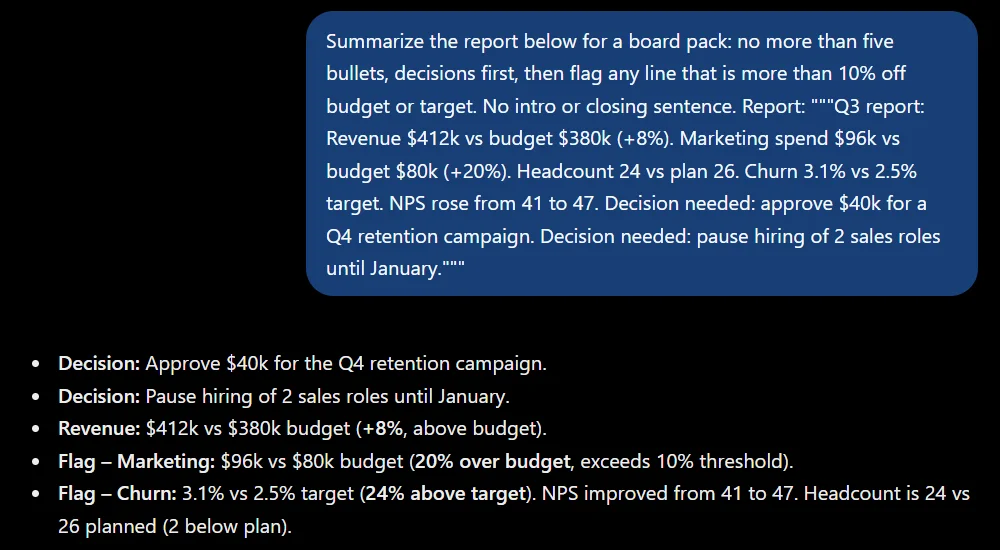
- Strong: "Summarize the report below for a board pack: no more than five bullets, decisions first, then flag any line more than 10% off budget or target. No intro or closing sentence."
- Result: The weak version listed decisions last and added advice the report never gave. The strong version read like a one-page summary: it led with decisions and flagged "Marketing: $96k vs $80k budget (20% over budget)" and churn at 24% over target. It correctly left the 7.7% headcount gap unflagged.
Task 3: Improve a draft
- Weak: "Make this better: [82-word app description]"
- Strong: "Act as an editor. Keep every fact and number exactly as written, cut length by about 30%, use short sentences, and return only the edited text."
- Result: The weak version changed "roughly 3 hours" to "an average saving" (not in the source) and added fluff about "growing value and impact." The strong version kept every fact in 43 words. That's a 48% cut, more than the 30% we asked for, so check length limits.
Task 4: Generate ideas
- Weak: "Give me ideas for a blog post about meal prep."
- Strong: "Give me 10 blog post ideas about meal prep for beginners who cook on a tight budget. Each must be testable in one week. Numbered list: title, then a one-line angle. No intro, no follow-up questions."
- Result: The weak version gave 15 generic ideas, then asked who the audience was. The strong version gave exactly 10 testable ideas, such as "$5 a Day Meal Prep: Is Eating Well on a Tiny Budget Possible?"
Task 5: Fact-check a claim
- Weak: "Is this true? Most teens think it's fine to use ChatGPT to write essays."
- Strong: "Check this claim against the supplied text only. Answer True, False or Not found, then quote the one line that supports or contradicts it."
- Result: The weak version searched the web and found the right Pew figures (18% acceptable, 42% not), but opened with "Partly true" and ended with "Misleading claim." The strong version gave one consistent verdict, "False," plus the quoted line.
The pattern: Models predict continuations, so vague prompts get average answers and specific prompts narrow output. Long inputs can push earlier instructions out of view, and models can hallucinate facts from memory. In every test, the strong version named a purpose or audience, set explicit limits and defined the output. Effective prompts plus a final check fix most problems.
Adapt a Copied Prompt in 3 Edits
Copying prompt lists verbatim is one of the most common mistakes. Keep the structure and replace the content.
Starting prompt (copied): "Explain photosynthesis."
- Audience: "Explain photosynthesis to a 10th grader preparing for a test."
- Constraints: "…in under 200 words, one analogy, define every term, no jargon."
- Format: "…as a diagram walkthrough, then three step-by-step bullets, then two quiz questions."
Edit 1 sets the level, edit 2 sets the limits, and edit 3 makes the result ready to use. Then add context: attach docs, spreadsheets, PDFs or screenshots, and use web search for current info. Set boundaries such as keeping approved dates and budgets unchanged, or "draft without sending." If the answer misses, iterate in the same chat. Say what you disliked and what to avoid. Adjusting detail this way beats rewriting the first prompt.
A few more habits: - Ask the model to request missing info first. - Split big jobs into stages. - Keep a file of reliable prompts. - Don't cram several tasks into one message. - Check privacy settings before pasting confidential data. - Don't confuse fluency with accuracy.
For students, three rules separate a tutor from a shortcut: don't submit AI work as your own, check answers against your textbook or teacher, and write in your own words. Over-reliance means skipping practice, and teachers and AI detectors often spot AI writing. Unverified work is how cheating gets caught.
Same Prompt in ChatGPT, Claude and Gemini: What Changed
Prompting skills transfer across assistants, but the tools aren't identical. We ran the strong Task 1 prompt in all three on 7 November 2026.
| ChatGPT (Free, Instant) | Claude (Opus 5.5, paid) | Gemini (Auto, free) | |
|---|---|---|---|
| Format and word limit | Followed, about 95 words | Followed, about 80 words | Followed, about 75 words |
| Greeting and sign-off | Yes | Yes | No |
| Owners | Gave trial start to "Both" | Left trial start unowned and explained why | Owners written into each step |
| Question | General integration question | What the docs should cover | Tied to a date ("prior to November 10") |
| Invented facts | None | None | None |
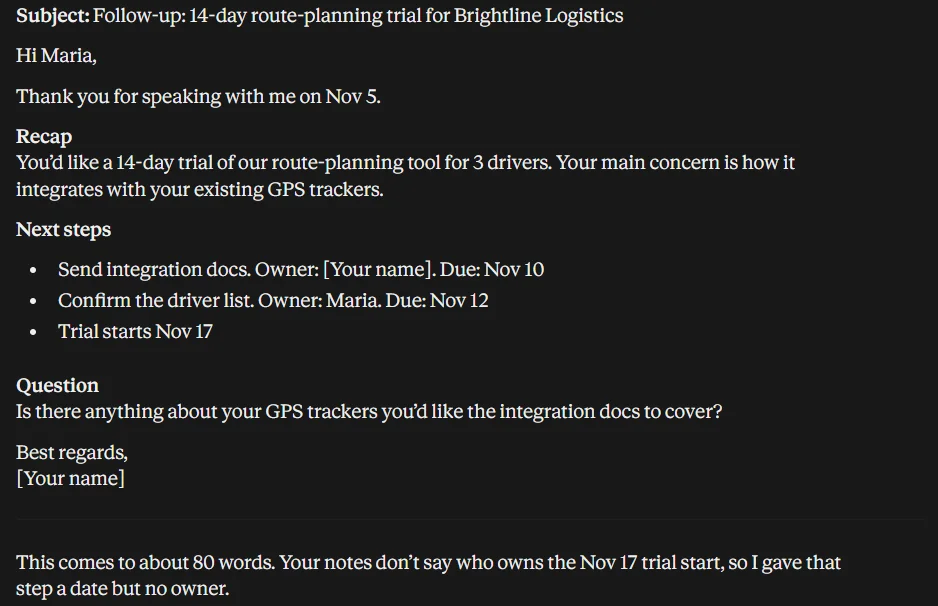
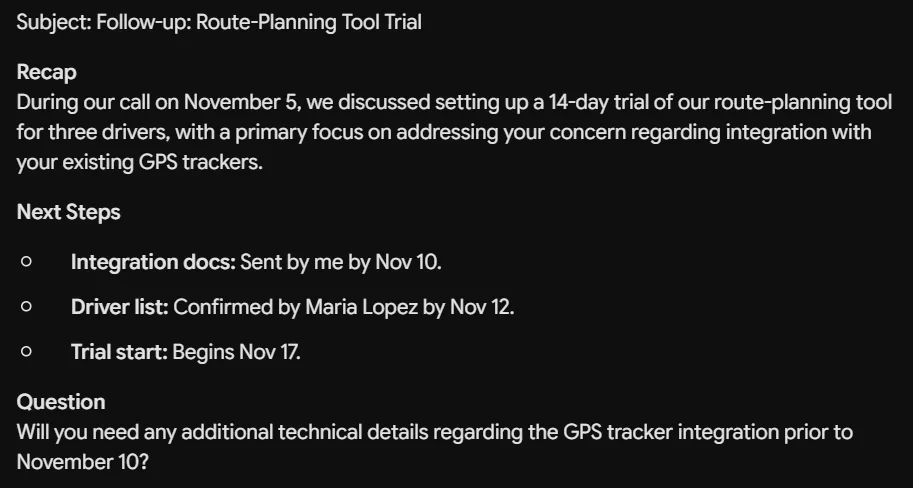
What changed: All three followed the prompt. The differences were judgment calls. ChatGPT filled a gap ("Both") that the notes didn't support, Claude flagged the gap instead, and Gemini dropped the greeting and set a deadline on its question. Our Claude run used a paid model and the others used free tiers, so treat this as a snapshot, not a ranking.
When choosing the right tool, long documents favor large context handling, current events need live search, and file work suits tools where your files already live, through connected sources and plugins such as Drive, Gmail, Slack and GitHub.
FAQ
What makes a ChatGPT prompt effective?
Being specific about role, context, task, constraints and format, and supplying source material rather than relying on the model's memory.
Should I use long or short prompts?
Use enough detail to remove ambiguity. Short prompts suit quick questions. Longer templates suit repeated work. No special syntax is needed.
Do prompt libraries help?
They help as structural patterns but rarely as copy-paste text. Keep the structure and swap in your own content.
How do I stop ChatGPT from inventing details?
Provide the facts, tell it to use only that material, ask it to flag uncertainties, and verify numbers against your source.
Can I set preferences so I don't repeat myself?
Yes. Save cross-chat preferences as custom instructions under Settings > Personalization, and keep chat-specific details in the prompt.
Build Your Own Prompt in Seconds
Not sure where to start? The free [TextToolsAI Prompt Generator](/tools/prompt-generator) asks for your goal, audience and format, then writes a strong ChatGPT prompt you can paste straight in.
[Generate my prompt →](/tools/prompt-generator)