

# How to Structure an AI Prompt
Prompts are conversation starters. A prompt is your input: a text instruction that tells an AI system such as ChatGPT, Claude or Gemini what to produce. It can be a single phrase, a few paragraphs, or multimodal inputs like images and audio. Ethan Mollick called the model "a machine you are programming with words." Prompt quality sets response quality, even for something as small as a professional email or a meeting request to a potential client. A clear prompt gets specific results and a useful response. Vague prompts get an average, often off-topic answer, while specific prompts and structured prompts give the model a target. If you write AI prompts every day, how you structure a prompt decides your AI results. This guide breaks down AI prompt structure and prompt design: the five parts, the main types of prompts, a reusable format, and whether order matters. Then it tests one structure on three real tasks.
Structure matters because a model uses natural language processing and machine learning to read conversational input and predict the likeliest reply. Some chatbots also use intent recognition to read user intent and user sentiment from context. That adaptability is why detailed prompts steer results. A thin instruction gets a vague answer. A structured one gets a focused answer, clearer answers and more useful responses.
Prompt writing is now a workplace skill. In HubSpot's 2025 survey of more than 1,000 marketers, only 4% said they use AI to write entire pieces of content. Most people use AI as a drafting partner, so how you phrase requests matters, and communicating with AI well follows a few basic guidelines. Those guidelines work for study guides, writing feedback or math explanations alike. They give you accurate answers, better content and useful insights. They also save time on repetitive tasks, which adds productivity and confidence. Below, real examples replace a list of tips to show better results.
The five parts of a well-structured prompt
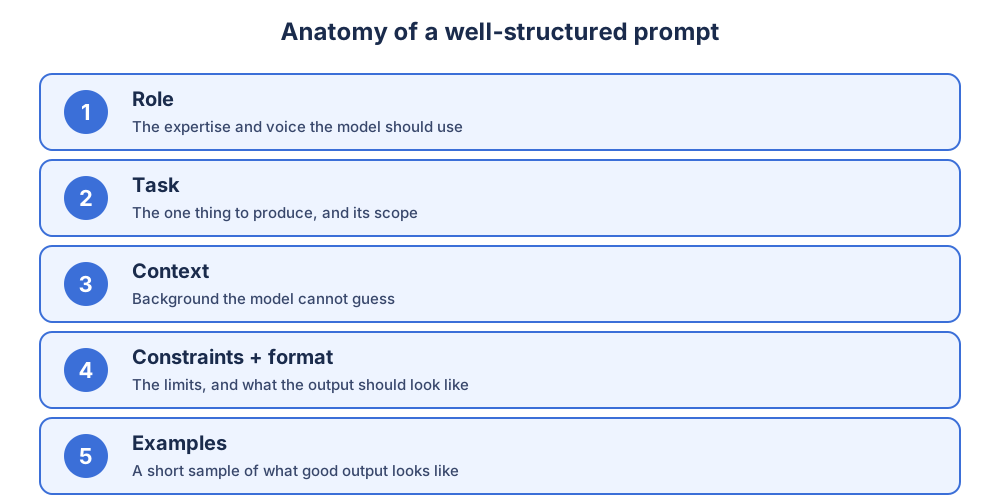
A well-structured prompt has five parts: role, task, context, constraints with format, and examples. These are the core components of prompt engineering. Guides label them differently. The PCRF framework uses Persona, Context, Request and Format. Some education guides use Role, Task, Requirements and Instructions. The anatomy underneath is the same. For named frameworks such as CRISPE, TAG and RACE, see AI prompt frameworks.
| Part | What it answers | Example line |
|---|---|---|
| Role | Whose expertise should the model use? | "You are an experienced B2B editor." |
| Task | What is the one deliverable? | "Draft a 150-word follow-up email." |
| Context | What background can't it guess? | "The reader saw our demo last week." |
| Constraints + format | What are the limits, and what should the output look like? | "Under 200 words, two short paragraphs." |
| Examples | What does good output look like? | "Match the tone of this sample: ..." |
1. Role (persona)
The role sets vocabulary, depth and default assumptions before the model reads the task. Openers like "You are an experienced…", "Act as…" or "Pretend to be…" shape both style and accuracy. A role-based prompt also helps with creativity and domain-specific answers. It can even turn the exchange into an interactive conversation, for example a tutor who quizzes you. A persona can also describe the user. "I am an HR manager. Write a welcome email to a new hire" tells the model whose voice to write in.
2. Task (the request)
The task states the goal and objective: one verb and one deliverable. "Tell me about climate change" invites open-ended results. "Discuss the economic implications of climate change in developing countries over the next decade" produces targeted output. In the same way, "Write a 500-word guide to email subject lines for B2B software" beats "write something about marketing." Open-ended prompts lead to open-ended results. Specificity comes from details like the year, the region, the rules and how to perform the work. A precise request with clear instructions gets clearer results, as long as you skip unnecessary words.
3. Context
Context is the background the model can't infer: the audience, the situation, prior decisions and the source material. If the answer depends on a document, paste documents instead of describing them. Compare a plain fall-foliage question with this version: "You are a wildlife biologist. Predict this year's best foliage week in New England and explain it to kindergarteners." The voice and parameters reshape the whole reply. Naming a target audience ("for a high school student") works the same way. To mimic style, include writing samples of your own. Missing context is the most common mistake behind generic output.
4. Constraints and format
Format instructions are the cheapest quality gain in prompting. Without word limits, models tend to over-produce. Set the length ("one paragraph", "under 200 words") and pick an output structure: lists, tables, bullets or prose. Emails should be short, while blogs can run long. Add exclusions and say what to avoid. Tell the model how to handle missing information, for example by writing "not in the source." Every requirement you leave out gets filled with assumptions.
Two habits keep this clean. First, avoid ambiguity. Pronouns like "it" or "they" can point anywhere, so name the thing: "Explain the main argument of the selected document in simple terms." Second, use natural language. Write naturally, as you'd speak to a colleague, and skip AI jargon. Clear prompts and direct prompts beat clever phrasing, and rewording usually beats adding more. Name the tone too, such as "friendly" or "professional but conversational."
5. Examples
Structure tells the model what you want, and an example shows it. When the output keeps missing a style that's hard to describe, add one or two samples of good output. This is few-shot prompting. It improves consistency because the model can mimic the tone and structure directly. Keep samples short and representative. Examples can also show how to approach the task, as part of your instructions.
Not every prompt needs all five parts. Simple tasks often need only a task and a format. When output falls short, check which part is missing.
The main types of prompts
The main types of prompts (AI prompt types) are zero-shot, one-shot and few-shot, grouped by how many examples you give. Prompts are also grouped by what they rely on: instructions, a role, context, step-by-step reasoning or a system-level setup. Most real prompts combine several types.
The 3 types by number of examples
- Zero-shot prompt: an instruction with no examples. "Summarize this article in 5 bullet points." Good for quick, general tasks.
- One-shot prompt: a single example to copy. Good when format matters more than style.
- Few-shot prompt: two or more examples. "Here are two sample summaries. Write a third in the same style." Best for tone, voice and repeatable patterns.
Our prompt engineering techniques page compares these three on one fixed task, with real outputs.
Types by what the prompt relies on
| Prompt type | Description | Example |
|---|---|---|
| Instructional | Direct commands with verbs like write, explain, compare | "Write an executive summary of this memo in under 100 words." |
| Role-based | Assigns a persona or viewpoint | "You are an MBA professor preparing a lecture outline." |
| Contextual | Gives background or framing before the ask | "This text is for an intro econ course. Simplify it." |
| Chain-of-thought | Asks for reasoning step by step | "Think through this step by step before answering." |
| Meta prompt / system prompt | Sets behavior before any user input | "Always respond formally and never guess." |
| Multiple-options | Asks for a range of answers | "Write ten headlines instead of one." |
Together, those six types cover most everyday prompting, and knowing the types of prompts helps you choose the right one for each job. Chain-of-thought improves analytical accuracy on multi-step problems, as Wei et al. (2022) showed for math word problems. Asking for multiple options shows the model's range. System prompts are a separate layer, usually set by the platform or app builder; see what is a system prompt.
A fill-in prompt format you can reuse
This copy-paste skeleton is a universal template, and the most practical prompt engineering format for everyday work. Fill in the brackets and delete any line a simple task doesn't need.
Role: You are a [role with the expertise this task needs].
Context: [audience, situation, decisions already made, source material].
Task: [the one thing to produce, and its scope].
Constraints: [length, tone, must-include, must-avoid, what to do when a fact is missing].
Format: [list / table / numbered steps / paragraphs / JSON].
Examples (optional): [one short sample of good output].
Labeling each line isn't required, but it helps the model parse each instruction cleanly. It also shows you which line you left blank. This is the simplest answer to how to format AI prompts: the ChatGPT prompt structure is the same one that works in Claude or Gemini. People reach for different models for creative work, nuanced analysis, long documents or Google Workspace tasks, but the techniques and skills transfer, because every model rewards clear instructions.
Swap the task line and the skeleton becomes five templates: the universal version plus draft an email, summarize a document, analyze data, and rewrite or edit. It handles content creation (a B2B marketing blog post), a project manager's team email, a client feedback request, a knowledge base article, refining a paragraph, or summarizing articles with industry context. Different tasks need different structure and detail. An email needs specifics, while a summary can stay more open-ended. For a ready-made set, see our ChatGPT prompt templates.
Does prompt order matter?
Yes. Put the role first, so the model takes on the perspective before it reads the task. Put the format last, so it's the freshest instruction when the model starts writing. Context and task sit in the middle, with constraints just before format. The exception is long source material. Paste a long document at the very end under a clear label, so your instructions aren't buried above hundreds of lines.
How long should a prompt be?
As long as the task needs, since clarity beats brevity. Simple tasks need 1-2 sentences. Complex tasks often run 100-500 words. Concise prompts avoid the side comments that confuse a model in long prompts, and details can come in follow-ups. Multi-sentence prompts are fine too, since you don't have to give instructions one sentence at a time. Detailed prompts are effective when every sentence adds something the model doesn't already have.
For complicated tasks, break the work into smaller questions with sequential prompts: first an outline, then expand each section. If the work must stay in one prompt, number the parts.
Writing guides often spread this across six steps:
- Give a clear role.
- Add the necessary context.
- Make one specific request: one verb, one deliverable.
- Set the output format.
- Add constraints and exclusions.
- Read the output and refine instructions one line at a time.
Those simple steps map onto the five parts. For the full method, see how to write a prompt.
Same structure, three tasks: what changed
To test the structure, we ran three everyday tasks twice, once with a weak prompt and once with the five-part structure. Each run used a fresh chat. Model: ChatGPT, Free plan, default "Instant" model. Date: November 6, 2026. Task 2 used a short sample quarterly report we wrote for the test.
Task 1: Follow-up email to a demo prospect
Weak prompt: Help me with an email.
Strong prompt:
You are an experienced B2B sales rep.
Context: the reader is a VP of Operations at a mid-size manufacturer. She attended our demo last week, asked about inventory features, and said budget approval will be hard.
Task: draft a follow-up email that references her inventory question and offers one helpful resource.
Constraints: under 150 words, no pushy language, one clear ask.
Format: subject line, then three short paragraphs.
Weak output: No email at all. ChatGPT asked three questions first: who the email is for, what its purpose is, and which tone to use.
Strong output: A finished email of about 90 words. Subject: "Following Up on Inventory Management." It thanked her for the demo, referenced "how our platform handles inventory tracking," acknowledged that "budget approval can be challenging," and closed with a single ask.
Task 2: Document summary of a quarterly report for a CEO
Weak prompt: Summarize this document. + the report
Strong prompt:
You are a chief of staff preparing a briefing for the CEO.
Context: the document below is our quarterly report. Use only what it contains.
Task: summarize it covering (1) key metrics vs. last quarter, (2) top 3 wins, (3) top 3 challenges, (4) recommended actions.
Constraints: plain language, no jargon, under 150 words, mark anything not stated as "not in the source".
Format: a one-page brief with bullet points.
Document: """[report text]"""
Weak output: An accurate summary, because the source was short and tidy. It closed with advice the report never gave, saying the main focus for Q4 "should be balancing continued growth with improved profitability."
Strong output: The same facts, in exactly the four requested sections. It ended with a line we hadn't seen in the weak run: "Not in the source: Specific action owners, deadlines, financial targets, and expected impact."
Task 3: Biology study guide
Weak prompt: Make a study guide on cells.
Strong prompt:
Act as a tutor who specializes in college-level biology.
Task: create a study guide for an upcoming test on cell structure and function.
Requirements: key terms and definitions (mitochondria, nucleus, endoplasmic reticulum), a short summary of each organelle's role, clear language for an intro course.
Format: headings and bullet points, then a 3-5 question multiple-choice quiz.
Weak output: A long, general guide pitched at a younger reader, with "nucleus = brain" style analogies and round-versus-rectangular cell shapes. It had no quiz.
Strong output: An "introductory biology" guide with a formal definition for each of the three named terms. It split rough ER from smooth ER, added a quick-revision table, and ended with a five-question multiple-choice quiz.
What changed: - Weak prompts weren't always wrong. With clean source material (Task 2), the facts barely changed. Structure changed fit and honesty: the right shape, and gaps flagged instead of invented advice. - Missing parts get filled with guesses or questions. With no context (Task 1), the model stopped to ask. With no audience (Task 3), it guessed a younger level. - Format lines were followed. Three paragraphs and a closing quiz both arrived as asked. The email still named a resource we'd have to supply, so review before sending.
Common structural gaps and how to fix them
| Missing part | Symptom in output | Fix |
|---|---|---|
| Role | Sounds like no one in particular | Add "You are a [expert]" at the start |
| Context | Too generic to apply | Add audience, product and situation |
| Task | Wanders or covers too much | Name one deliverable and its scope |
| Constraints | Wrong tone, length or phrases | Add explicit must and must-not rules |
| Format | Shape doesn't match your use | Name the exact format: list, table, steps |
The common prompting mistakes are vague requests, missing context, no format, asking too much at once, unnecessary jargon, and accepting the first output. Each has the same fix: add the missing part. "Write about leadership" is a weak prompt. "Write a short paragraph explaining three leadership skills for new managers" is a strong prompt. When you get bad responses, diagnose the gap before regenerating. They usually trace back to vague prompts, missing context or unclear expectations.
Refine the prompt, not your luck
First outputs are rarely final. Fix the weakest line instead of restarting. Chat tools keep earlier context, so a follow-up like "make it funnier" works. For a new topic, open a new chat. Small wording changes give different results, so test variations, rephrase and iterate until the output starts to improve. Refine one thing at a time, as covered in how to write a prompt.
Save prompts that work in a personal prompt library, and share prompting tips with your teams so everyone learns what works. Prompting skills grow through practice on real tasks with feedback, on your own or through a course like Google AI Prompting Essentials. Prompts use natural language, so beginners don't need coding skills or programming knowledge.
Where structure stops helping
Structure improves output, but AI is not perfect. Models can hallucinate, producing believable but false content. In a 2023 incident, a news outlet had to correct AI-written articles riddled with errors. Review results critically and check for accuracy, because an AI hallucination reads as fluently as a fact.
AI can also reinforce biases and cause harms. In one widely reported case, an image tool asked to make a student's headshot "more professional" lightened her skin. Follow your organization's data privacy guidelines before prompting with sensitive material.
Looking long-term, as models learn to refine prompts on their own, Oguz Acar argues in Harvard Business Review that problem formulation will matter more than wording. That means defining a problem's focus, scope and boundaries. Treat the five parts as a way to think the problem through, not as a magic formula.
Apply this structure automatically
Describe your task in plain language, and the ChatGPT Prompt Generator builds the role, context, task, constraints and format for you. Copy the result into ChatGPT, Claude or Gemini.
FAQ
What are the components of a good prompt?
Quick answer: better prompts lead to better outputs in any AI tool. A good prompt has a role, a specific task, the context the model can't guess, constraints with an output format, and optional examples. Frameworks like PCRF (Persona, Context, Request, Format) package the same parts. Short prompts can drop the role and examples, but always keep the task and format.
What are the 3 types of prompt engineering?
When people ask about the 3 types of prompts, they usually mean zero-shot (no examples), one-shot (one example) and few-shot (several examples). They differ only in how much the model gets to copy. Few-shot gives the most control over tone and format.
What are the different types of prompts in AI?
The common types of prompts in AI are zero-shot, one-shot and few-shot, plus instructional, role-based, contextual, chain-of-thought and system prompts. A single prompt often combines several, such as a role-based, few-shot prompt with a strict format.
How do I format a prompt for ChatGPT?
Use labeled lines in this order: role, context, task, constraints, format. Paste long source material at the end under a clear label. The same ChatGPT prompt structure works in Claude and Gemini, and it is the quickest fix for vague answers.
Does prompt order matter?
Yes. A role first sets the perspective, and the format last stays freshest when the model starts writing. Long documents go at the very end, so they don't bury your instructions.