

# ChatGPT Prompts for Copywriting: 40 for Content & Sales
Most copywriting prompts fail before ChatGPT writes a word: they ask for "persuasive copy" without naming the placement, the reader, the one claim you can prove, or the action that comes next. A hero headline, a Google Ads description and a product page bullet have different limits and different jobs. So this page groups 40 ChatGPT prompts for copywriting by the copy job: landing page copy, ad copy, blog and content writing, product descriptions and ecommerce copy, sales copy for B2B, and storytelling for website copy. Every prompt carries one line on why it works, so you can adapt it instead of pasting it blind.
It is part of our ChatGPT prompts sorted by channel. Search work lives in ChatGPT prompts for SEO, inbox work in ChatGPT prompts for email marketing, and posts in ChatGPT prompts for social media.
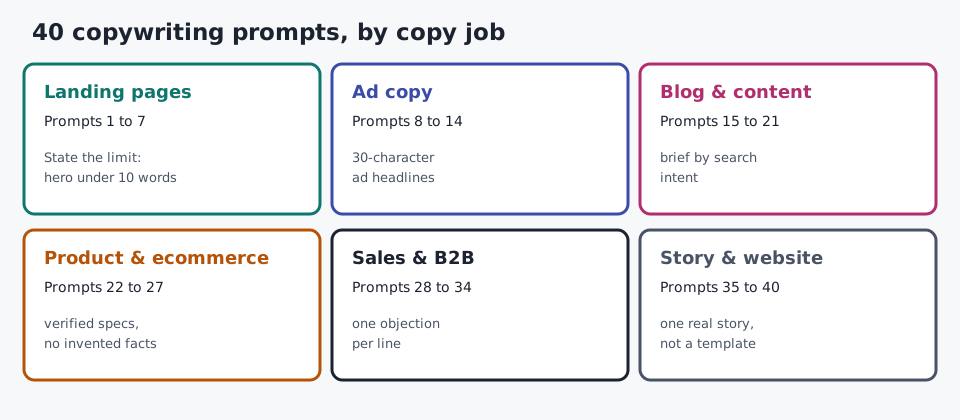
The 40 copywriting prompts at a glance
| Copy job | Prompts |
|---|---|
| Landing page copy | 1 Hero headlines · 2 Full page draft · 3 Value proposition ideas · 4 Objection-handling block · 5 Social proof section · 6 CTA button variants · 7 A/B testing plan |
| Ad copy | 8 Google Ads responsive search ad · 9 Five variants, five hooks · 10 Facebook ad (PAS) · 11 AIDA ad · 12 Humor ad with guardrails · 13 Active-voice rewrite · 14 Ad-to-landing message match |
| Blog and content writing | 15 Content brief · 16 Pillar and cluster plan · 17 Blog outline · 18 Three intros · 19 Title options · 20 Section draft from notes · 21 Repurpose one post |
| Product and ecommerce copy | 22 Product description from specs · 23 Features into benefits · 24 Cut product copy by 40% · 25 Marketplace title and bullets · 26 Product page FAQ · 27 Category page copy |
| Sales copy and B2B | 28 Long-form sales page · 29 Voice-of-customer analysis · 30 Prospect research and opener · 31 Objection battle card · 32 Sales one-pager · 33 Case study · 34 Proposal summary |
| Storytelling and website copy | 35 Brand story · 36 About page · 37 Homepage sections · 38 Customer story · 39 Founder origin story · 40 Branded prompt template |
How to use these ChatGPT copywriting prompts
Generic AI prompts for copywriting return generic copy, whichever model you paste them into: ChatGPT, Claude or Gemini. The fix is a specific brief, not a better model. Every prompt below follows the same five-part formula, so you can rebuild any of them for a new offer:
Act as {{Role}}. Write {{Piece}} for {{Placement}}, {{Length}}, for {{Audience}}.
Offer: {{Product}}. Benefit we can prove: {{Benefit}} because {{Proof}}.
Tone: {{BrandVoice}}. Goal: {{Action}}. Avoid: {{Exclusions}}.
Here is that formula filled in for a real-sounding offer, so you can see the level of detail that changes the output:
Act as a B2B SaaS copywriter. Write 3 hero headlines for a landing page, under 10 words each, for freelance designers who invoice 5 to 15 clients a month.
Offer: an invoicing app with automatic payment reminders. Benefit we can prove: fewer late payments, because reminders go out on day 1, 7 and 14 without the user doing anything.
Tone: plain and friendly. Goal: start a free trial. Avoid: "revolutionary", exclamation marks, invented statistics.
Three habits make the output usable:
- Give it the proof, not adjectives. A benefit, a mechanism and one real data point beat "make it compelling". If you have no evidence, tell the model not to make absolute claims.
- Ask for 3 to 5 variants. One draft is a guess; several drafts give you material to test. Then iterate one variable at a time: "shorter", "lead with the problem", "more formal".
- Mark gaps instead of filling them. Ask ChatGPT to put any missing fact in [brackets]. A bracket is a to-do; an invented price or review is a liability.
- Save the winners. Keep the copywriting prompts that work in a shared prompt library, tagged by copy job, so your workflow starts from a tested prompt instead of a blank page.
State the funnel stage too. A cold Google Ads click and a returning customer need different promises, even for the same offer.
Each placement has its own limit, so state it in the prompt rather than trimming afterwards:
| Placement | Length | Opening | CTA rule |
|---|---|---|---|
| Landing page hero | Headline under 10 words, subheadline 20 to 45 words | Outcome before features | One button |
| Google Ads (responsive search ad) | Headlines up to 30 characters, descriptions up to 90 | A differentiator, not price | One action per ad |
| Facebook ad | Front-load the hook; long primary text truncates | A specific problem scenario | One time-bound action |
| Blog intro | 80 to 120 words | Answer or tension in the first line | Point to the next section |
| Product description | 60-word intro, 5 benefit bullets | The use case, not the spec sheet | Add to cart |
| Sales page | Long-form, one idea per section | The buyer's problem in their words | Repeat one CTA |
For the structure behind these, see our AI prompt frameworks, the copy-paste ChatGPT prompt templates and more ChatGPT prompt examples. Copy frameworks such as AIDA and PAS map onto them; our guide to SEO copywriting frameworks shows when to use each.
ChatGPT prompts for landing page copy
Landing page copy has one job: move one reader to one next step. These copywriting prompts build the page block by block, so you can test each block separately.
1. Hero headlines
Act as a conversion copywriter. Write 3 hero headlines for a landing page for {{Product}}, aimed at {{Audience}} who want {{Outcome}}. Each under 10 words, outcome first, no hype words. For each, add a 20 to 25 word subheadline and one line on the promise it makes.Why it works: the 10-word cap forces a single promise, and the promise line shows you which headline makes a claim you can back up.
2. Full landing page draft
Write landing page copy for {{Offer}}. Audience: {{Audience and situation}}. Problem: {{Friction}}. Benefit we can prove: {{Benefit}}. Proof: {{DataPointCaseOrMechanism}}. Sections in order: headline, subheadline of 35 to 45 words, three benefits, how it works in 3 steps, social proof, objection handling, CTA. Use natural language, no superlatives, and do not invent figures. Mark missing facts in [brackets].Why it works: a fixed section order gives you a page a designer can lay out, and the bracket rule stops the model inventing proof.
3. Value proposition ideas
I need a value proposition for {{Offer}}. It solves {{Problem}} for {{Audience}}, who want {{Desire}} while avoiding {{PainPoint}}. What makes it different: {{Differentiator1}}, {{Differentiator2}}, {{Differentiator3}}. Write 10 value propositions. For each: a one-liner, one supporting line of copy, and one sentence on how it positions the offer against typical alternatives.Why it works: asking how each one positions the offer turns a list of slogans into a decision about your USP.
4. Objection-handling block
List the 5 most likely objections a {{Audience}} would have before buying {{Offer}} at {{Price}}. For each, write a one-line answer using only these facts: {{Facts}}. Format as an FAQ block for the landing page. If a fact I gave does not answer an objection, say so instead of guessing.Why it works: answering hesitations on the page, before the reader raises them, removes the reasons people leave.
5. Social proof section
Here are real customer quotes and results: {{PasteApprovedTestimonials}}. Pick the 3 that best support the headline "{{Headline}}" and write a one-line lead-in for each. Do not change the wording of any quote and do not create new testimonials. Suggest where on the page each one should sit.Why it works: the model only selects and frames real proof, so you get placement advice without fake testimonials.
6. CTA button variants
Write 8 CTA button labels for a landing page where the next step is {{Action}}. Each under 5 words, starting with a verb, describing what the reader gets rather than what they do. Mark which 2 you would A/B test first and why.Why it works: "get my free plan" tells readers what they gain; "submit" tells them nothing, and the test pick gives you a starting experiment.
7. A/B testing plan for a landing page
Create an A/B testing plan for this landing page: {{URLorPastedCopy}}. Primary goal: {{PrimaryGoal}}. Secondary goal: {{SecondaryGoal}}. Focus on {{HeroSection/Messaging/ProofPlacement/Pricing}}. KPIs: {{KPIs}}. Give 5 tests ranked by expected impact, each with the hypothesis, the variant copy, and the metric that decides the winner.Why it works: a hypothesis per test keeps you learning why a version won, not just which one.
More on headlines: headline formulas that work.
ChatGPT prompts for ad copy: Google Ads, Facebook and more
Ad copy only needs to open an expectation that the landing page can fulfil, whether it runs on Google Ads, Facebook or Instagram. These prompts state each platform's limit so you are not counting characters afterwards.
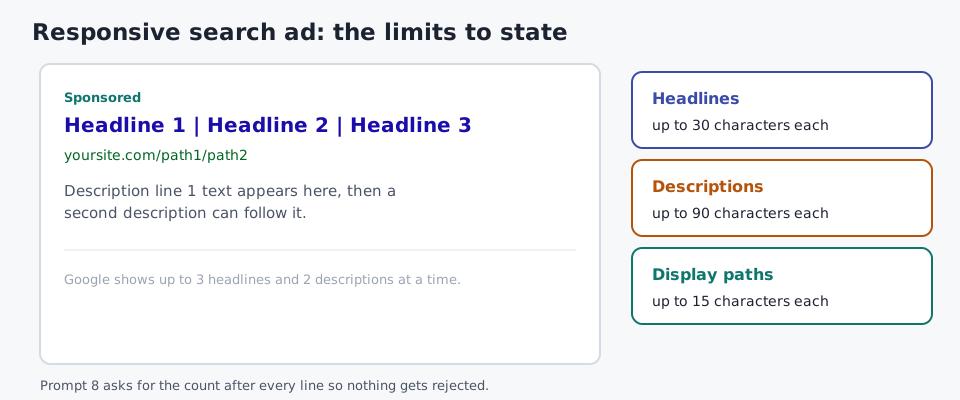
8. Google Ads responsive search ad
Write a Google Ads responsive search ad for {{Product}} targeting the keyword "{{Keyword}}". Give 4 headlines of up to 30 characters each and 2 descriptions of up to 90 characters each. Build them on this differentiator, not price: {{Differentiator}}. Show the character count after each line. One CTA.Why it works: headlines in responsive search ads support up to 30 characters and descriptions up to 90 (Google Ads Help), and printing the count saves you from rejected assets.
9. Five ad variants, five hooks
Write 5 ad variants for {{Product}} on {{Channel}}, aimed at {{Audience}}. Each tests a different hook and tone: a question, a bold claim, a customer quote, a statistic from {{RealStat}}, and a problem scenario. Keep the offer and CTA identical so only the hook changes.Why it works: changing one variable per variant means your ad test tells you which hook works, not just which ad.
10. Facebook ad (problem, agitate, solution)
Write Facebook ad copy for {{Product}} using PAS: name the problem {{PainPoint}} in one scene, agitate it in one sentence, then present the solution with one real result: {{Proof}}. Primary text under 125 words with the hook in the first line, a headline under 40 characters, and a time-bound CTA. Use the deadline {{Deadline}} only if it is real; no fake urgency. Give 3 opening-line variants.Why it works: long primary text gets cut off, so the prompt puts the hook where every viewer sees it, and the deadline rule keeps urgency honest.
11. AIDA ad
Write an ad for {{Product}} aimed at {{Audience}} using AIDA. Attention: one line under 10 words. Interest: one surprising fact I supply: {{Fact}}. Desire: two benefits in the reader's words. Action: one CTA. Under 80 words total. Label each stage so I can edit it.Why it works: labeled stages make it obvious which part is weak when the ad underperforms.
12. Humor ad with guardrails
Write 3 light, funny ad concepts for {{Product}} aimed at {{Audience}}. The humor should come from a situation the audience recognizes: {{RelatableSituation}}. No jokes about the customer, competitors, or sensitive topics. Each concept: a headline, 2 lines of body copy, and a CTA. Rate each for brand fit with {{BrandVoice}}.Why it works: humor that laughs with the reader builds affinity; the guardrails and fit rating catch jokes that would embarrass the brand.
13. Active-voice rewrite and cut
Rewrite this ad copy in active voice and cut it by a third without losing the core claim: {{PasteCopy}}. Remove filler words and stacked adjectives. Show the original word count, the new word count, and the core claim you kept.Why it works: naming the core claim before cutting stops the edit from removing the one sentence that sells.
14. Ad-to-landing message match
Here is my ad: {{AdCopy}}. Here is the landing page hero: {{HeroCopy}}. Check message match: does the page deliver the exact promise, offer and wording the ad made? List every mismatch and rewrite the hero so the click lands on what the ad promised.Why it works: a click that lands on a different promise is wasted spend, and this check catches it before launch.
ChatGPT blog prompts for content writing
These ChatGPT prompts for content writing cover the content marketing side of copy: briefs, outlines, drafts and repurposing. Keyword research and on-page fixes live in our ChatGPT prompts for SEO; these blog prompts start once you know what to write.
15. Content brief
Create a content brief for a blog post answering "{{Query}}" for {{Audience}}. Include the search intent, the reader's knowledge level, 5 H2s, the questions each H2 must answer, 3 FAQs, and the facts I need to research before writing. Flag every claim that needs a source. Use the keyword {{Keyword}} naturally; do not repeat it to hit a quota.Why it works: the research-gap list tells the writer what to verify before drafting, which is where AI briefs usually fall short.
16. Pillar and cluster plan
Plan a pillar page and 8 cluster articles for {{Topic}} for {{Audience}}. For each cluster article: working title, search intent, the one question it answers, and the anchor text it should use to link to the pillar. Avoid two articles that would compete for the same query.Why it works: the overlap rule stops you planning two posts that cannibalize each other.
17. Blog outline
Write an outline for a {{WordCount}}-word blog post titled "{{Title}}" for {{Audience}}. Give H2s and H3s, a one-line note on what each section proves, where an example or table belongs, and a closing CTA to {{NextStep}}.Why it works: a note on what each section proves keeps the outline from becoming a list of topics with nothing to say.
18. Three intros
Write 3 intros for a blog post titled "{{Title}}", each 80 to 120 words, for {{Audience}}. Version A opens with a specific problem scenario. Version B opens with a surprising fact I supply: {{Fact}}. Version C opens with the answer. Each must say what the reader will get by the end.Why it works: three openings side by side show you which angle earns the second paragraph. More examples: blog intro examples.
19. Title options
Write 10 blog post titles for an article about {{Topic}} for {{Audience}}. Mix formats: how-to, number list, question, and outcome-led. Each under 60 characters and including "{{Keyword}}" near the front. Mark the 3 most likely to earn a click without overpromising.Why it works: the 60-character cap keeps titles from being cut off in search results.
20. Section draft from your notes
Draft the section "{{H2}}" of my blog post using only these notes and interview answers: {{PasteNotes}}. 250 to 350 words, short paragraphs, one example from the notes. Do not add statistics, names or claims that are not in my notes. If the notes are thin, list the questions I should answer first.Why it works: drafting from your own material keeps your expertise in the post, and the question list turns a thin section into an interview.
21. Repurpose one post into five assets
Here is a published blog post: {{PasteBlogPost}}. Turn it into: a 150-word newsletter blurb, a LinkedIn post of 120 to 150 words, 3 quotable lines, a 5-slide carousel outline, and a 30-second video script. Each must stand alone. Keep every fact as written in the post.Why it works: you did the thinking once; the prompt only changes the format. For channel-specific versions, use our social media prompts.
Planning the calendar these posts fit into is covered in our content marketing strategy guide.
Product descriptions and ecommerce copy prompts
Ecommerce copy has to answer purchase questions accurately, so these prompts protect facts first and persuasion second. The mistakes these prompts are built to avoid are covered in common product description mistakes.
22. Product description from verified specs
Write a product description for {{Product}}. Buyer and use case: {{Audience and UseCase}}. Verified specifications: {{Specs}}. Keyword: {{Keyword}}, used once or twice without forcing it. Structure: a headline, a 60-word intro, 5 benefit bullets, a short care or compatibility section, and a CTA. Separate features, benefits and limits. Do not invent materials, stock levels or reviews; mark missing data in [brackets].Why it works: a fixed structure plus verified specs gives you a description that sells and survives a returns-desk check.
23. Features into benefits
Here are the features of {{Product}}: {{Feature1}}, {{Feature2}}, {{Feature3}}, {{Feature4}}, {{Feature5}}. For each, write the benefit for {{Audience}} in one sentence that starts with what changes in their day. Then write the "so what" test: why would the buyer care?Why it works: buyers buy outcomes, and the "so what" line catches benefits that are still features in disguise.
24. Cut product copy by 40%
Cut this product copy by 40% without losing the core claim: {{PasteCopy}}. First state the core claim in one sentence. Then rewrite, keeping every verified fact. Show the before and after word counts.Why it works: naming the claim first protects it, so the cut removes filler instead of the reason to buy.
25. Marketplace title and bullets
Write a product title and 5 bullet points for {{Product}} on {{Amazon/Shopify/Etsy}}. Title under {{CharLimit}} characters with brand, product type, key attribute and size. Each bullet starts with a benefit in capitals, then the supporting spec. Use only these facts: {{Specs}}.Why it works: marketplace shoppers scan, so a benefit-first bullet answers "why this one" in the first three words.
26. Product page FAQ
Write 6 FAQs for the product page of {{Product}}, based on these real customer questions: {{PasteQuestions}}. Answer each in under 50 words using only {{Specs and Policies}}. Flag any question I need to answer myself, such as shipping times or warranty terms.Why it works: real questions answer real hesitations, and the flag keeps policy promises with a person.
27. Category page copy
Write category page copy for "{{Category}}" on an online store selling to {{Audience}}. An 80-word intro above the products that helps shoppers choose, and a 150-word buying guide below them. Mention these subcategories: {{Subcategories}}. No keyword stuffing.Why it works: a short intro above the grid helps shoppers without pushing products below the fold.
Need a quick first draft? Our product description tool covers single products.
ChatGPT prompts for sales copy and B2B
These ChatGPT prompts for sales cover the copy that supports a sales conversation: sales pages, B2B sales prospecting, and sales enablement material your team reuses. Like all sales AI prompts, they are only as good as the customer language you feed them, so the best ChatGPT prompts for sales start with prompt 29. Subject lines, preheaders and full cold email sequences live in our email marketing prompts.
28. Long-form sales page
Write a long-form sales page for {{Offer}} at {{Price}} for {{Audience}}. Sections: headline, the problem in the buyer's words ({{CustomerQuotes}}), what they have tried, the offer, what is included, proof ({{Proof}}), objections and answers, guarantee ({{Guarantee}}), and one repeated CTA. No fake scarcity or invented results.Why it works: starting from the buyer's own words makes the page sound like a conversation, not a pitch.
29. Voice-of-customer analysis
Analyze this customer feedback from a post-purchase survey: {{PasteResponses}}. Identify the top 3 reasons customers decided to buy, their main hesitations before buying, and unexpected benefits they mention. Quote the exact phrases they used. Then suggest 3 messaging angles for our sales copy.Why it works: your best copy is often already in your survey answers, and exact phrases give you headlines customers recognize.
30. Prospect research brief and opener
Here is public information about a prospect: {{CompanyNotes, RoleNotes, RecentNews}}. We sell {{Offer}} to {{ICP}}. Summarize the 3 problems they most likely have that we solve, rate how confident you are in each, and write 3 personalized first lines for outreach that reference one specific detail. No flattery.Why it works: the confidence rating stops a guess from becoming the opening line of a cold message.
31. Objection battle card
Create a sales enablement battle card for {{Offer}}. For the 6 objections our reps hear most: {{Objections}}, give the likely reason behind each, a two-sentence response using {{Proof}}, and one question the rep can ask back. Keep competitor claims factual and limited to: {{VerifiedCompetitorFacts}}.Why it works: a question back keeps the rep in the conversation instead of arguing, and the fact limit keeps competitor claims safe.
32. Sales one-pager
Write a one-page sales sheet for {{Offer}} for {{BuyerRole}} at {{CompanyType}}. Sections: the problem, the outcome, 3 benefits with proof, how it works, pricing summary ({{Pricing}}), and next step. Under 300 words. Write for a reader who will forward it to their boss.Why it works: writing for the forwarded reader makes the sheet make sense without a rep in the room.
33. Case study from interview notes
Write a case study about {{CustomerA}} from these interview notes: {{PasteNotes}}. Structure: situation, challenge, what they chose and why, implementation, results ({{VerifiedResults}}), and a quote from the notes. 400 to 500 words. Use only facts in the notes and list any result I still need to confirm.Why it works: case studies sell through specifics, and the confirm list keeps you from publishing a number the customer never approved.
34. Proposal executive summary
Write an executive summary for a proposal to {{Client}}. Their goal: {{Goal}}. Their constraint: {{Constraint}}. Our approach: {{Approach}}. Investment: {{Price}}. Timeline: {{Timeline}}. Under 200 words, written for a decision-maker who reads only this page.Why it works: most decision-makers read the summary and skim the rest, so the prompt treats it as the whole pitch.
Storytelling and website copy prompts
Storytelling makes copy relatable and memorable. These prompts give the model real material to work with, so the story is yours and not a template.
35. Brand story
Write a brand story for {{Brand}} using these real details: founded {{Year}} by {{Founders}}, the problem that started it: {{OriginProblem}}, key milestones: {{Milestones}}, what we still do the same way: {{Tradition}}. 250 to 350 words, warm and specific. End with what the brand promises customers today.Why it works: milestones and one unchanged tradition give the story proof of character, not just history.
36. About page
Write an About page for {{Brand}}. Lead with who we help and what changes for them, not our founding date. Then our story in 3 short paragraphs ({{StoryNotes}}), our values with one example each ({{Values}}), the team, and a CTA to {{NextStep}}. Under 450 words.Why it works: readers visit an About page to decide whether to trust you, so it opens with them, not you.
37. Homepage website copy
Write homepage copy for {{Brand}}, which offers {{Services}} to {{Audience}}. Sections: hero (headline under 10 words, subheadline, CTA), 3 core services with one benefit each, how it works in 3 steps, social proof ({{Proof}}), and a closing CTA. Plain language; a visitor should know what we do in 5 seconds.Why it works: the 5-second test forces clarity over cleverness, which is what most homepage website copy lacks.
38. Customer story narrative
Turn this customer result into a short story for our website: {{CustomerA}}, {{Situation}}, {{Result}}. Make the customer the hero and our product the guide. Structure: the moment they realized they had a problem, what they tried, the turning point, life after. Under 250 words, facts only from what I gave you.Why it works: making the customer the hero lets prospects picture themselves in the story.
39. Founder origin story for a launch
Write a founder origin story for {{Founder}}, launching {{Product}}. The moment that started it: {{Moment}}. What they tried first and why it failed: {{FirstAttempt}}. What they learned: {{Lesson}}. First person, under 300 words, no "I'm so excited to announce". End with an invitation to {{Action}}.Why it works: a failed first attempt makes the story credible, and the ban line removes the most common launch cliché.
40. Branded prompt template
Create a reusable branded prompt for {{Brand}} that I can paste before any copywriting task. Include: our audience ({{Audience}}), approved messaging ({{Messages}}), voice rules ({{VoiceRules}}), words we never use ({{BannedWords}}), 3 examples of approved copy ({{Examples}}), and a rule to ask me questions when a fact is missing. Keep it under 250 words.Why it works: one saved brand block makes every other prompt on this page sound like your brand without re-explaining it each time.
A real run: one copywriting prompt, raw output and the edit
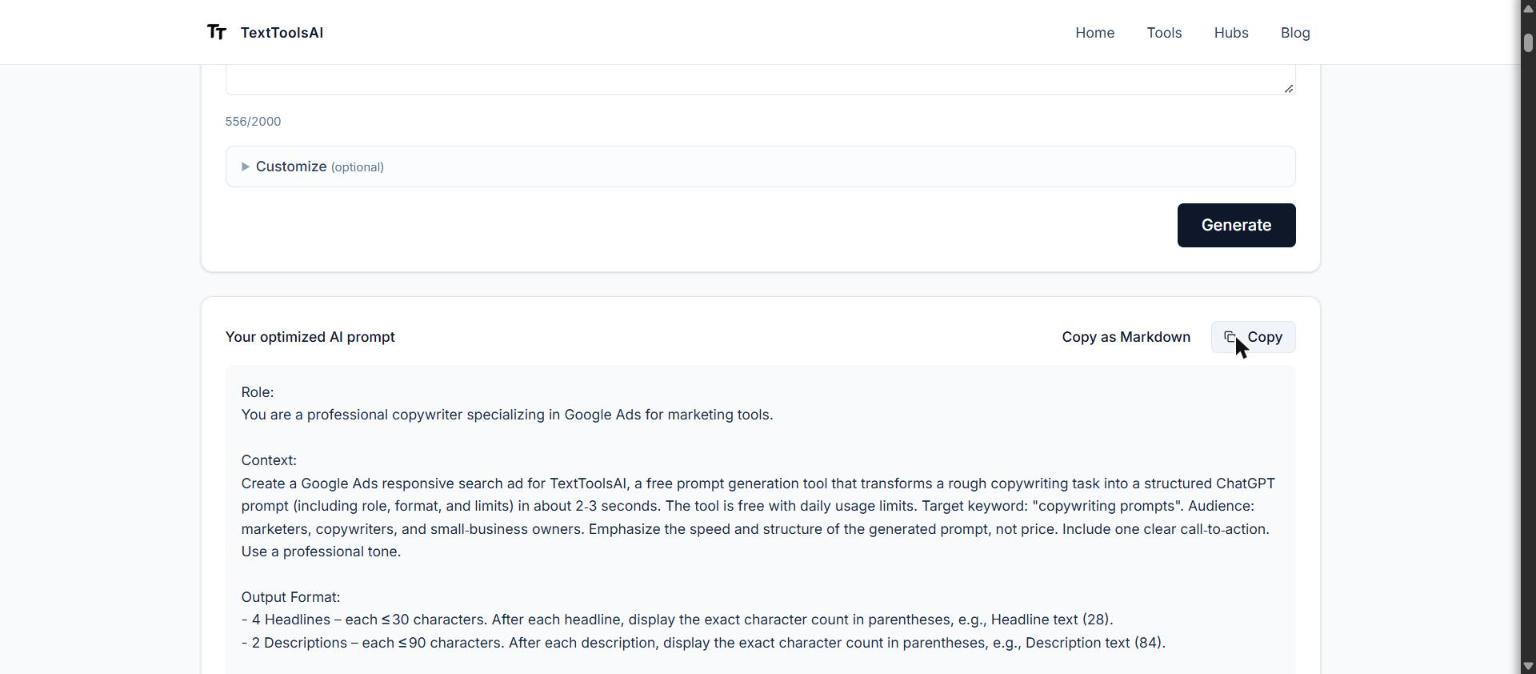
We ran prompt 8, the Google Ads responsive search ad, through our free prompt tool on October 23, 2026. Settings: category "Marketing", tone "Professional". The product is our own tool, so every fact in the input is one we can verify, and no customer data went in. The tool returned its prompt in under 5 seconds. Model: gpt-oss-120b.
Input:
Write a Google Ads responsive search ad for TextToolsAI's free prompt tool, which turns a rough copywriting task into a structured ChatGPT prompt in about 2 to 3 seconds. It is free with daily usage limits. Target keyword: "copywriting prompts". Audience: marketers, copywriters and small-business owners. Give 4 headlines of up to 30 characters each and 2 descriptions of up to 90 characters each. Build them on this differentiator, not price: a structured prompt with role, format and limits in seconds. Show the character count after each line. One CTA.Raw output (exactly as returned):
Role:
You are a professional copywriter specializing in Google Ads for marketing tools.

Context:
Create a Google Ads responsive search ad for TextToolsAI, a free prompt generation tool that transforms a rough copywriting task into a structured ChatGPT prompt (including role, format, and limits) in about 2‑3 seconds. The tool is free with daily usage limits. Target keyword: "copywriting prompts". Audience: marketers, copywriters, and small‑business owners. Emphasize the speed and structure of the generated prompt, not price. Include one clear call‑to‑action. Use a professional tone.

Output Format:
- 4 Headlines - each ≤ 30 characters. After each headline, display the exact character count in parentheses, e.g., Headline text (28).
- 2 Descriptions - each ≤ 90 characters. After each description, display the exact character count in parentheses, e.g., Description text (84).

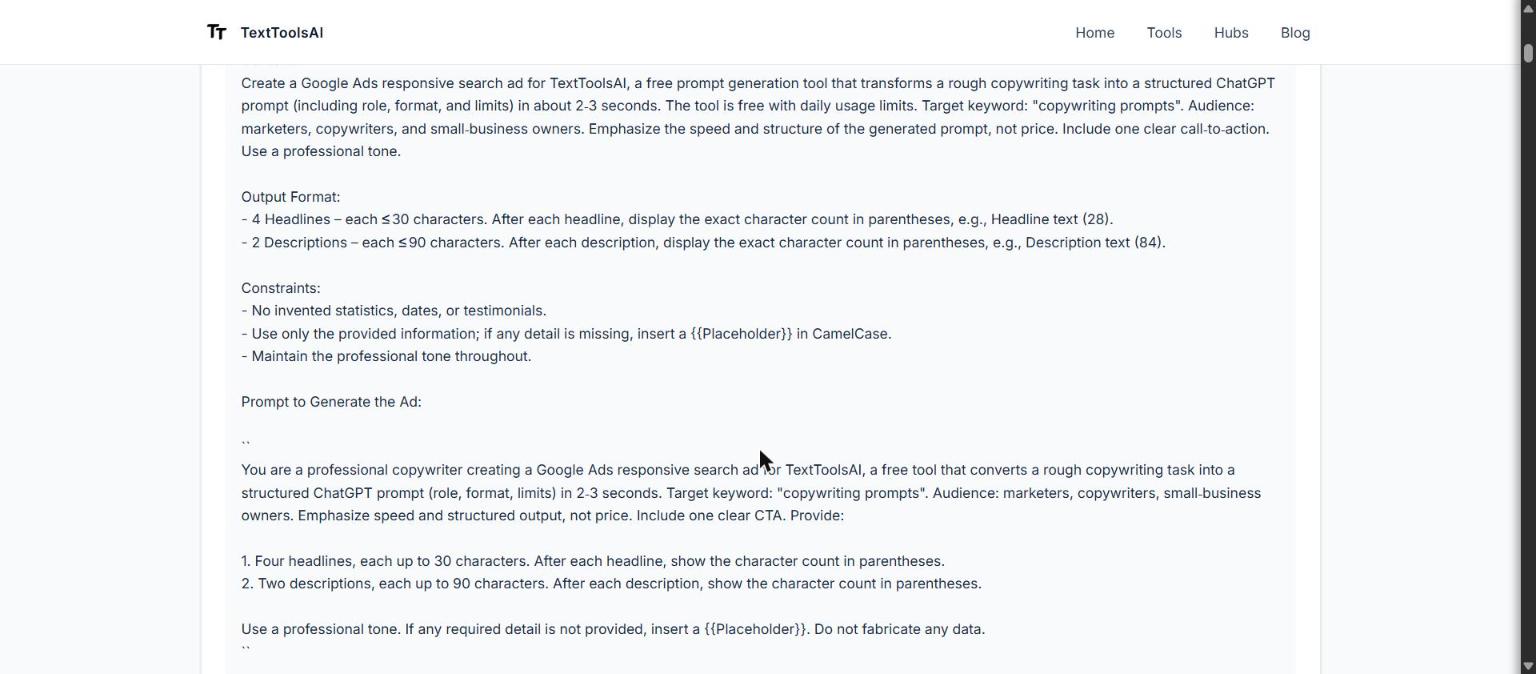
Constraints:
- No invented statistics, dates, or testimonials.
- Use only the provided information; if any detail is missing, insert a {{Placeholder}} in CamelCase.
- Maintain the professional tone throughout.

Prompt to Generate the Ad:

``
You are a professional copywriter creating a Google Ads responsive search ad for TextToolsAI, a free tool that converts a rough copywriting task into a structured ChatGPT prompt (role, format, limits) in 2‑3 seconds. Target keyword: "copywriting prompts". Audience: marketers, copywriters, small‑business owners. Emphasize speed and structured output, not price. Include one clear CTA. Provide:

1. Four headlines, each up to 30 characters. After each headline, show the character count in parentheses.
2. Two descriptions, each up to 90 characters. After each description, show the character count in parentheses.

Use a professional tone. If any required detail is not provided, insert a {{Placeholder}}. Do not fabricate any data.
``
Edited version:
Role: You are a Google Ads copywriter for TextToolsAI.

Context: The ad promotes our free prompt tool. It turns a rough copywriting task into a structured ChatGPT prompt with a role, format and limits in about 2 to 3 seconds. Free with daily usage limits. Audience: marketers, copywriters and small-business owners. Target keyword: "copywriting prompts". Landing page: {{LandingPageURL}}.

Task: Write one responsive search ad.

Format:
1. 4 headlines, up to 30 characters each. Use "copywriting prompts" in at least 2 of them. Lead on the differentiator (a structured prompt in seconds); "Free" may appear in one headline only.
2. 2 descriptions, up to 90 characters each. One CTA across the ad: "Generate a copywriting prompt".
3. After each line, show the character count including spaces, and flag any line over its limit.

Constraints: Professional, plain tone. No invented statistics, dates or testimonials. No exclamation marks.
What we changed and why: the tool got the hard part right. It kept both character limits, asked for a count after every line, and banned invented statistics. Four things still needed a person:
- It wrote the whole spec twice. The full brief appears, then a second "Prompt to Generate the Ad" that repeats it. Duplicate instructions invite duplicate output, so we kept one copy.
- The keyword never reached the headlines. "copywriting prompts" was named as the target keyword, but nothing asked for it in a headline. A search ad that never shows the searched phrase loses relevance, so we required it in at least 2 of the 4.
- "Emphasize ... not price" fights "the tool is free". The model could drop the word "Free" entirely or lead with it. We allowed it in exactly one headline.
- "One clear CTA" was left to the model, and character counting was unchecked. We named the CTA text and added a landing page placeholder. Models often miscount characters, so the edited prompt asks for counts including spaces and a flag on any line over its limit.
Before you publish: five checks
Every one of these copywriting prompts returns a draft, not finished copy. Five checks close the gap:
- Verify every claim and number. ChatGPT writes statistics, prices and results with the same confidence whether they are true or not. Check each one against the source.
- Check the placement limit. Compare the draft against the table above: characters, words, one CTA.
- Match your brand voice. Read it next to your last three approved pieces, or run it through your branded prompt (prompt 40) first.
- Remove risky claims. Competitor claims, guarantees, testimonials and anything regulated go to a person. Truth-in-advertising rules apply to AI copy as they do to any ad; see the FTC's advertising and marketing guidance.
- Keep private data out. Never paste customer names, personal data, CRM exports or confidential figures into a prompt. Anonymize first (Customer A, B, C); the copy works the same.
FAQ
What are the best ChatGPT prompts for copywriting?
The best ChatGPT prompts for copywriting name the placement, the reader, one claim you can prove, a length or character limit, and one call to action. A prompt such as "Write three hero headlines under 10 words for {{Audience}} that lead with {{Outcome}}" beats "write persuasive copy" every time. Start with prompts 1, 8 and 22 on this page, ask for several variants, and edit the strongest.
How do I use simple copywriting prompts?
Simple copywriting prompts need only four parts: who is writing, who is reading, what to write with a length, and what to avoid. Fill every placeholder with a real detail, ask for three to five variants, then change one variable at a time. Beginners can use the same prompts as practice exercises: they get you past writer's block, give your creativity a daily brief, and turn into portfolio samples.
What is a branded prompt in marketing?
In copywriting, a branded prompt is a reusable prompt that carries your brand context every time: approved messaging, voice rules, banned words and example copy (prompt 40 builds one). In AI search tracking, a branded prompt is a question that names your brand, measured separately from non-branded prompts that only describe a need.
Can ChatGPT write a landing page?
ChatGPT can draft every block of a landing page: hero headline, subheadline, benefits, social proof, objection handling and CTA (prompts 1 to 7). It cannot decide your positioning or prove your claims, so give it the offer, the audience, real proof and the next step, then edit the draft and test it before it goes live.
What prompts work for product descriptions?
Prompts that supply verified specifications, the buyer and use case, one keyword, and a fixed structure such as a headline, short intro, benefit bullets and a care or compatibility section. Tell ChatGPT to turn features into benefits and to mark missing data in brackets instead of inventing it. Prompts 22 to 27 cover this.
Sources and method: prompts written and edited by Clover Elise Winter. First-hand run: prompt 8 (Google Ads) through our free prompt tool, gpt-oss-120b, October 23, 2026. Ad limits: Google Ads Help, "About responsive search ads". Federal Trade Commission, Advertising and Marketing business guidance. Read our editorial policy.
About the author
[Clover Elise Winter](/authors/clover-elise-winter) is a Senior SEO Content Strategist and Technical Research Writer at TextToolsAI, with more than six years of experience driving organic growth for B2B SaaS, eco-technology and digital-media brands. She writes and maintains the guides on this site and ran the test on this page herself. Connect on LinkedIn.
Related
- ChatGPT prompts for SEO
- ChatGPT prompts for email marketing
- ChatGPT prompts for social media
- Back to ChatGPT prompts sorted by channel
Have copy to write today? Turn a rough brief into one of these copywriting prompts for any placement: generate a copywriting prompt →