

# Zero-Shot vs Few-Shot Prompting: The Difference and When to Use Each
Getting a large language model to do exactly what you want is a bit like giving directions. You can describe the destination, or you can point out a few landmarks on the way. Zero shot prompting is the description alone. Few shot prompting adds concrete examples so the model sees the pattern before it answers. Both are core prompting techniques in generative AI, and choosing well between them is one of the quickest ways to get reliable results and better output quality from any LLM without retraining it.
Both rest on in-context learning (ICL): the model learns from examples inside the prompt instead of relying only on pre-trained knowledge. Whether data engineers run a prompt row by row over unstructured text or a writer sends one, the instructions either lean on the model's innate abilities or include inputs paired with desired outputs. That choice is the whole difference.
Large language models generate text by autoregressive prediction, assigning probabilities to each possible next token from the context. Examples shift those probabilities, so a few lines of demonstration can change accuracy, structure and format on natural language processing (NLP tasks). This guide, part of our prompt engineering techniques hub, gives a description of each method, best practices, code and real-world applications.
What is zero shot prompting?
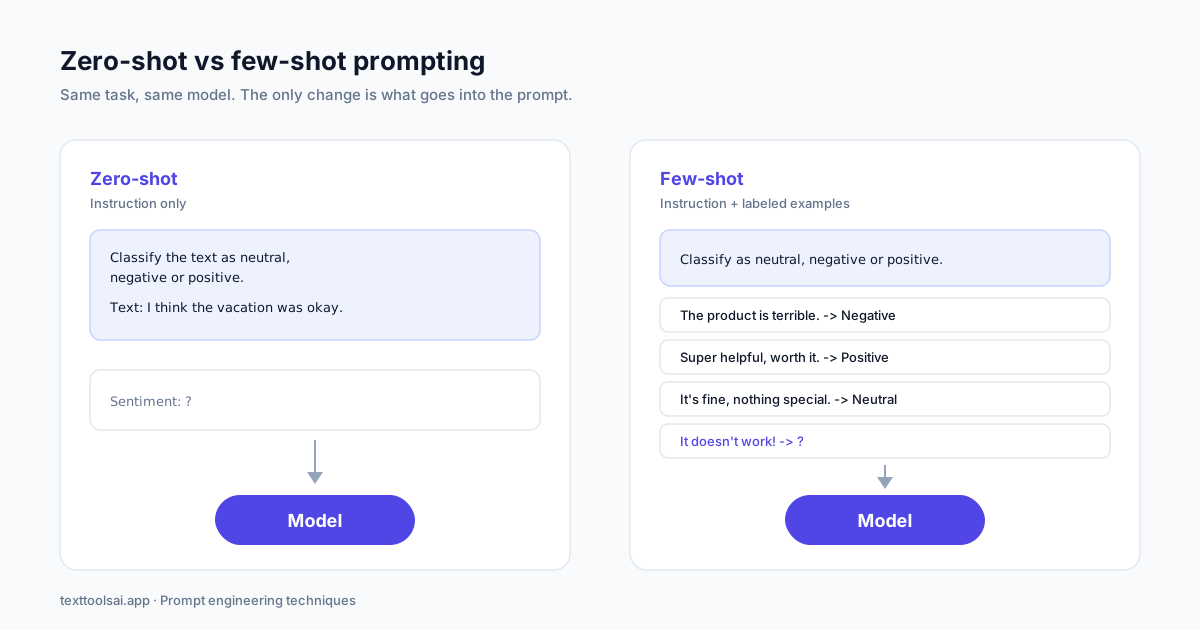
Zero-shot prompting definition: you give the model a task with no examples, and it relies entirely on its training to understand and complete it. It is also called zero-shot learning: a direct instruction and nothing else. All the instruction prompts and role prompts you have written without demonstrations are zero shot prompts.
Think of a knowledgeable colleague with general expertise doing a job they have never done for you, or a musician who knows music theory picking up a new instrument. Both transfer what they already know; for a model, that is pre-training.
A classic zero shot prompt for sentiment analysis:
Classify the text as neutral, negative or positive.
Text: I think the vacation was okay.
Sentiment:
The model answers Neutral. It already knows the concept of sentiment, so it can classify without being told how, and the response is coherent. Older models such as GPT-4 managed this; current ones like Claude Opus 5.5 and GPT-6 handle it easily.
In customer support, ask it to rate a ticket ("I can't access my account and need to submit a report by end of day") as high, medium or low priority, and it reads the urgency cues in the language and returns high priority.
Other everyday zero-shot tasks: asking for the capital of France, translating a sentence into Spanish, summarizing a paragraph, or mapping a free-text job title to a predefined list of formal titles (add an Other option so data quality holds when nothing fits). Small open models such as Mistral 7B, for example in Amazon Bedrock, can handle tasks like these.
Key traits of zero-shot prompting:
- No examples; instructions only
- Fast to set up, so it suits prototyping and quick results
- Works on simple tasks and general tasks where the standard interpretation is fine
- The default choice and the best starting point when you test what a model can do
On complex tasks, ambiguous ones, or anything that would normally need task-specific training, zero-shot results can be unpredictable. When the label depends on your internal rules, move to few-shot prompting.
What is few shot prompting?
Few-shot prompting means you include a handful of examples in the prompt; the model picks up the pattern and applies it to new inputs. It is also called few-shot learning, and the prompt itself is a few shot prompt. The examples teach your criteria for the current request only, with no extra training and no change to the model's weights. The original GPT-3 paper, Language Models are Few-Shot Learners (Brown et al., 2020), describes this as a form of metalearning: adapting from examples in the prompt rather than from retraining.
It is like onboarding a new hire with a few completed cases, or a mini-lesson where someone shows you three sushi recipes before you roll your first one.
The same support scenario as a few shot prompt, with labeled priorities:
Classify each customer issue by priority.
Issue: My password email hasn't arrived yet. -> Priority: Low
Issue: The payment system is down and customers can't check out. -> Priority: High
Issue: I have a question about last month's invoice. -> Priority: Medium
Issue: I can't access my account and need to submit a report by end of day. -> Priority:
The unlabeled final line is the test instance. The examples show how your team ranks tickets, so the model applies those criteria with more consistency.
A labeled sentiment version:
Text: The product is terrible. Sentiment: Negative
Text: Super helpful, worth it. Sentiment: Positive
Text: It doesn't work! Sentiment:
The answer is Negative, as a single word, because the examples set that desired pattern.
More few-shot prompting examples: log analysis and error detection from a logfile line, a binary classifier for job titles (Individual Contributor or Manager), one-sentence summarization in a house style, and English to French translation. Each is still a single prompt.
What is few-shot prompting in LLMs, technically?
In LLMs, few-shot prompting is a direct application of in-context learning: the examples sit in the context window beside your instructions as evidence of what a good answer looks like. It shines on specialized tasks, nuanced tasks and specific formats such as structured extraction, classification and content generation.
Few-shot prompting number of examples: how many should you use?
Most practitioners settle on 3 to 5 examples; the common range quoted is 2 to 5 examples. Two or more examples is the formal threshold, and fewer than 10 examples covers almost every real case. Past that, each example costs tokens and context window space for little gain in accuracy. Start with three examples that cover every label, check the output, and add one only when it fixes a specific mistake. Good examples take upfront effort, but far less than fine-tuning.
One-shot and multi-shot prompting: the middle ground
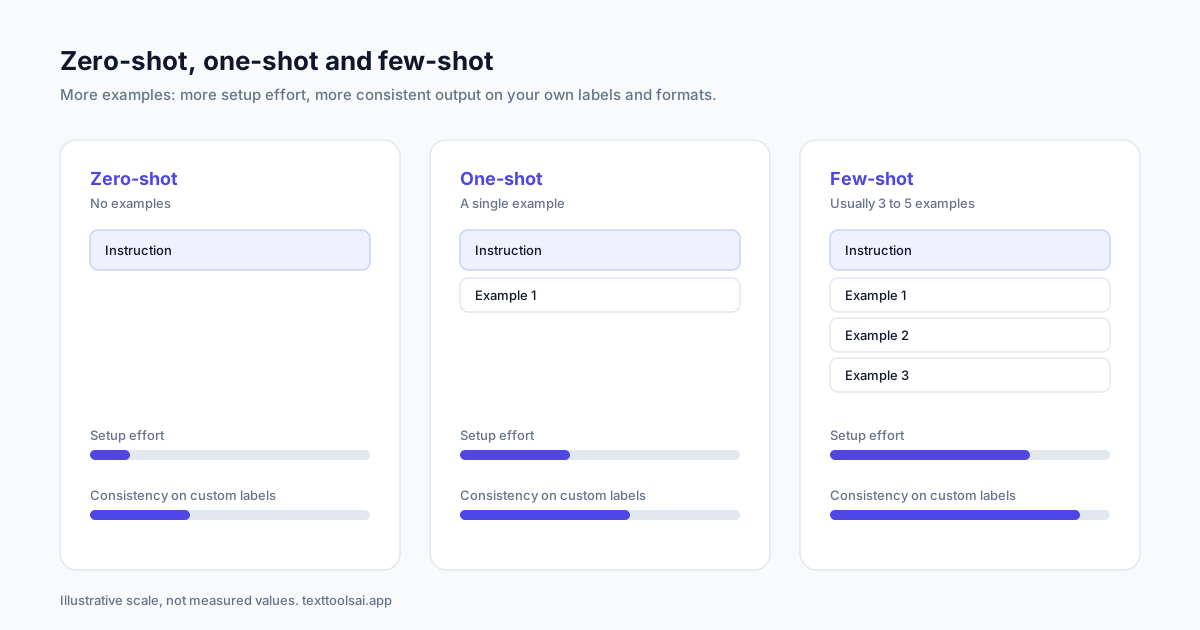
Shot-based prompting names methods by the number of examples; "shots" simply means examples.
| Method | Number of examples | Best for |
|---|---|---|
| Zero-shot | None | Simple, common tasks; quick tests |
| One-shot | A single example | Setting tone or format when the task is clear |
| Few-shot | Two or more examples (usually 3 to 5) | Custom labels, strict formats, nuanced judgment |
| Multi-shot prompting | Many examples (a synonym for few-shot at the higher end) | Varied inputs and edge cases |
One-shot prompting adds one example to set expectations:
Classify the sentiment as positive, negative or neutral.
Text: The product is terrible. Sentiment: Negative
Text: I think the vacation was okay. Sentiment:
The model returns Neutral. One example is a good starting point but carries little information about the boundaries between labels.
One shot vs few shot prompting: one-shot shows the format; few-shot shows the format and the range. One example is a single point on the label map, so nuanced tasks or complex tasks can still fail; several points show where one label ends and the next begins. Multi-shot prompting helps most when inputs vary a lot.
Zero shot vs few shot prompting: when each wins
The main difference is the amount of task-specific data in the prompt: zero-shot provides none, few-shot provides a mini-dataset of examples. The table compares the two on six dimensions plus setup, scale and cost.
| Factor | Zero-shot prompting | Few-shot prompting |
|---|---|---|
| Data requirements | None; relies on pre-training | A few example inputs with outputs |
| Accuracy and consistency | Good on general questions; varies on ambiguous tasks | Anchored to your criteria; more consistent |
| Task specificity | Broad | Tailored to your labels, tone and format |
| Generalization | Depends on the breadth of training; can be less contextually accurate or generic | Focused, but can overfit to unrepresentative examples |
| Dependency on pre-training | Total | Reduced, because examples add context |
| Flexibility vs adaptability | Very flexible across tasks, less adaptable | Less flexible (needs examples), far more adaptable |
| Scalability | Highly scalable; no setup per task | Each new task type needs new examples |
| Setup time | Immediate | Needs examples written and tested |
| Cost | Shorter prompts, fewer tokens, lower API costs | Slightly higher cost per request |
Performance consistency for few-shot depends on representative examples; poorly chosen ones make the model overfit. Few-shot prompts can also go stale: if the meaning of your labels or fields shifts over time (semantic schema drift), stored examples quietly become wrong.
When to use zero-shot
- General or well-understood tasks: basic arithmetic, general queries, common sentiment, translation, summaries
- You are exploring a model (exploration mode), prototyping, or speed matters more than consistency
- You have no training data or example data, or creating it would be too labor-intensive
When to use few-shot
- You get inconsistent output from run to run, or labels drift
- The task is domain-specific: niche tone classification, legal data extraction, nuanced classification
- Format matters: custom formats, brand tone, precise formatting for code or spreadsheets
- Inputs vary and you need higher accuracy and nuanced understanding
One-shot fits tasks that need specific guidance on format but are otherwise simple, such as basic classification. Start zero-shot, measure, and move to few-shot when inconsistent outputs appear, weighing ease of implementation and example data against task-specific accuracy. Experiment against your goal, not a general standard of performance; for a general task, a clear instruction in the right format is one of the best use cases for zero-shot.
Real-world applications of each
| Zero-shot handles well | Few-shot handles well |
|---|---|
| General content: outlines, product descriptions, captions | Domain-specific classification against a medical document taxonomy |
| Brainstorming and generative art descriptions | Industry-specific sentiment and brand-consistent content |
| Simple Q&A such as business hours or a password reset | Specialized extraction of contract clauses in financial services |
| Content categorization | Sentiment classification and topic classification |
| Language translation, including less common language pairs | Information extraction and named entity recognition |
| Sentiment analysis of reviews and social posts | Machine translation with house terms; code generation from problem/code pairs |
| Question answering over a knowledge base | QA systems, conversational scenarios and customer support chatbots |
| Text summarization and plain-language medical report summaries | |
| Creative content, educational content and quiz creation |
When few-shot is the wrong tool
Few-shot has limitations:
- Complex reasoning. For math or multi-step logic, chain-of-thought prompting usually beats examples (see the worked scenarios).
- Highly variable data. If nuanced data has more edge cases than the context window holds, consider fine-tuning, or use RAG-based few-shot prompting: store pre-labeled examples in a vector database and use retrieval to pull the most relevant examples per input.
- Overgeneralization. Examples that are too similar teach what they share, not what matters.
- Surface patterns. The model may copy wording or length instead of the logic behind the label.
Context size and example selection decide whether few-shot is versatile or brittle. Used well, it gives structured outputs zero-shot can't match.
How to pick good examples: few-shot prompting best practices
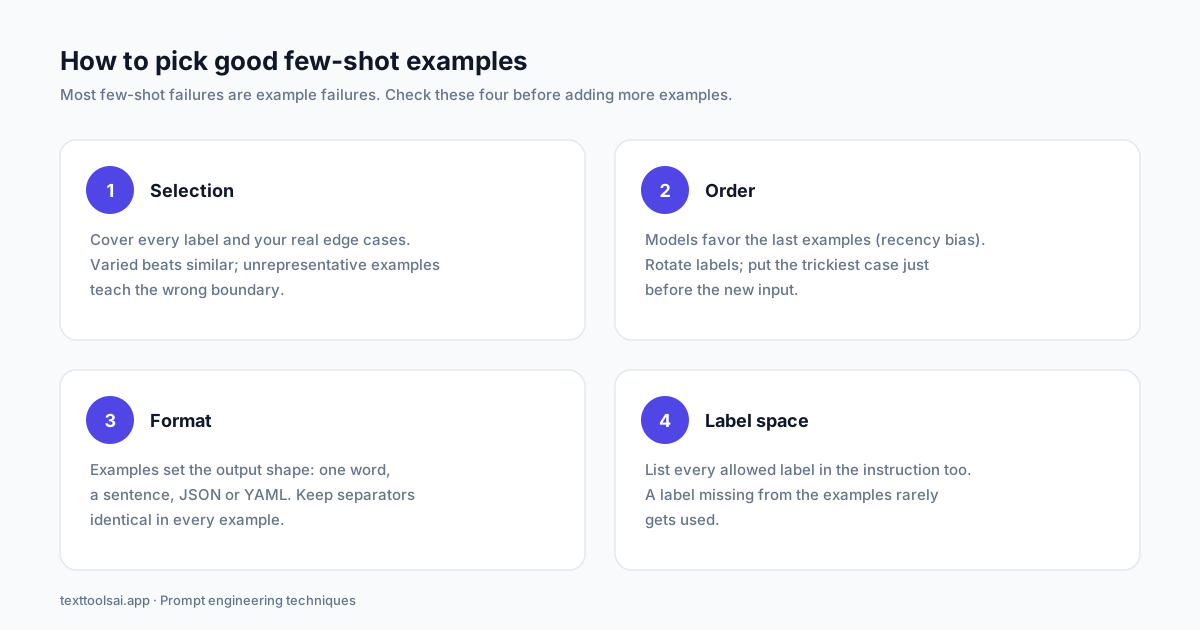
Most few-shot failures are example failures. These few-shot prompting best practices cover selection, order, format and label space.
1. Select representative examples. Cover every label and your real edge cases. Similar examples teach less than varied ones; unrepresentative examples teach the wrong boundary.
2. Mind the order. Models show a recency bias toward the last examples and can favor labels that appear more often; Calibrate Before Use (Zhao et al., 2021) measured both effects. Don't end with three examples of the same label, and put the trickiest case where it gets the most relevance: just before the new input.
3. Fix the output format. Examples define format more strongly than instructions. Structured outputs are arguably the biggest benefit of few-shot, especially when results go into spreadsheets or code does the parsing:
Great product, 10/10: positive
Didn't work very well: negative
It doesn't work!:
That input: label pattern returns a single word. Write the examples as a full sentence ("this is a negative classification") and you get full sentences. Write them as JSON, {"label": "negative"}, and you get JSON; the same works for YAML or lists. A team pulling names and occupations from local news articles can show two outputs in a First Last [OCCUPATION] format, and the model follows it more consistently than a written description of that format.
For information extraction, two job postings turned into structured fields (position, company, salary, work type, deadline) teach the model to extract a third. For creative content with two inputs, a destination and a trip type with a travel itinerary for Tokyo, Costa Rica and Rome set the voice for a New Zealand fan tour.
4. Keep the label space explicit. List the allowed labels in the instruction as well as in the examples. A label that never appears in your examples rarely gets used.
How to structure few-shot prompts. For short items, use input: output or a Q:/A: format. For longer items, an INPUT/OUTPUT format with each part on its own line helps readability. Keep separators identical in every example and start simple: number of examples, order and output format first. Our guide on how to structure AI prompts shows delimiter patterns that pair with few-shot prompts, and AI prompt frameworks shows where examples sit inside a CRISPE build.
Few-shot in code: a LangChain example
In LangChain, the few-shot prompting technique maps to a prompt template with an example block. This snippet builds a chat prompt from three labeled tickets and leaves the new ticket as the test instance (tested on langchain-core 1.7):
from langchain_core.prompts import ChatPromptTemplate, FewShotChatMessagePromptTemplate

examples = [
    {"ticket": "The app crashes every time I export a PDF.", "queue": "Technical Issue"},
    {"ticket": "Can I get my money back for unused months?", "queue": "Cancellation & Refund"},
    {"ticket": "Please add Spanish as an output language.", "queue": "Feature Request"},
]

example_prompt = ChatPromptTemplate.from_messages(
    [("human", "{ticket}"), ("ai", "{queue}")]
)

few_shot = FewShotChatMessagePromptTemplate(
    example_prompt=example_prompt,
    examples=examples,
)

prompt = ChatPromptTemplate.from_messages([
    ("system", "Classify each support ticket into exactly one queue: Billing, "
               "Technical Issue, Account Access, Feature Request, Cancellation & Refund. "
               "Reply with the queue name only."),
    few_shot,
    ("human", "{ticket}"),
])

messages = prompt.invoke(
    {"ticket": "I upgraded to annual by mistake. Can I switch back to monthly and get the difference refunded?"}
).to_messages()
print(messages)
# To run it: chain = prompt | llm, then chain.invoke({...})
Each example becomes a human turn and an AI turn. Hardcoding three examples suits a prototype; as the set grows, use an example selector backed by a vector database to retrieve the closest labeled examples per ticket, which scales better and saves context space.
Worked scenarios
Classification: support tickets
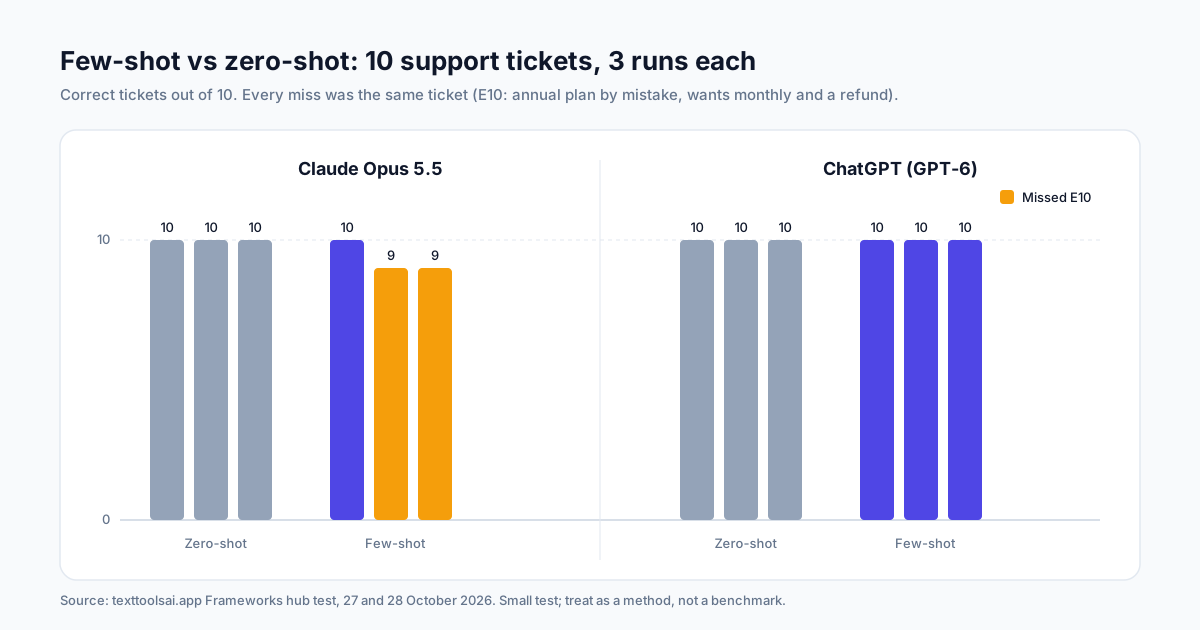
Our Frameworks hub ran one fixed task 36 times: classify 10 support emails into five queues on Claude Opus 5.5 and ChatGPT (GPT-6), three runs per technique. The few-shot prompt used three examples: a crash, a refund for unused months and a language request.
Zero-shot scored 10 out of 10 on every run. Few-shot scored 10, 9 and 9 on Claude. The miss was always the same ticket: a customer who upgraded to an annual plan by mistake and wanted to go back to monthly with a refund. The refund example covered unused months, not plan changes, so it moved the boundary between Billing and Cancellation & Refund without settling it. ChatGPT got that ticket right in every run.
The lesson: examples teach boundaries only where they sit. If an edge case isn't in your examples, write a one-line definition for it ("Cancellation & Refund = ending a plan, downgrading, money back") or add an example that covers it. The LangChain snippet above ends on exactly that ticket so you can test the fix.
Sentiment edge cases: negation and negative words
Two kinds of sentence can get misclassified with zero-shot, even though people read them easily:
- Phrase with negation: "I do not dislike horror movies." A model may read the negative words and answer Neutral or Negative; the real sentiment is Positive.
- Negative word used positively: "The final episode was surprising, with a terrible twist at the end." A model can latch onto "terrible" and answer Negative, though the viewer enjoyed it.
If these sentiment cases fail on your data, add two or three similar examples of each. Few-shot is the usual fix for edge cases like these.
Combine few-shot with chain-of-thought
For reasoning-heavy tasks, examples alone can backfire. A task is reasoning-heavy when the answer needs intermediate steps: calculations, deductions or multi-part instructions. Sentiment and formatting usually aren't; contract review and risk scoring usually are.
- Zero-shot CoT: add "Let's think step by step" with no examples. Kojima et al. (2022) showed this zero-shot chain-of-thought lifts math and logic accuracy, and it avoids copying a handful of possibly flawed steps.
- Few-shot CoT: give worked reasoning examples (question, steps, answer) before the new question, when you need the steps in a shape a reviewer can check.
Reasoning models already think step by step internally, and examples can add bias toward surface patterns. With them, prefer structured instructions and explicit chain-of-thought only where needed; keep few-shot for classification and formatting, or when you need a specific format or a narrow interpretation.
Choosing your approach
Start zero-shot, move to few-shot when outputs drift or the format must match, and add chain-of-thought only when the task needs steps. For instructions that persist across a conversation, see the system prompts hub; for filled-in templates, browse our prompt examples; and for every shot-based, reasoning, structure and chaining technique, return to the prompt engineering techniques hub.
Want examples written for you? [Build a few-shot prompt in the prompt generator](/tools/prompt-generator) and test it against your own tickets.
FAQ
What is few-shot prompting?
Few-shot prompting, also called few-shot learning, puts a small number of examples (usually 2 to 5, and under 10) inside the prompt so the model can copy the pattern. The examples act as guidance, and the model performs the task more consistently than it would with instructions alone.
What is zero-shot prompting?
Zero-shot prompting gives the model a task with no examples. The model relies on its training, its general understanding and the knowledge it picked up in pre-training. It is the fastest way to start and works well for simple, common tasks.
How many examples should a few-shot prompt have?
Start with 3 to 5 examples that cover every label or output shape you expect. Two examples is the minimum for few-shot, and more than about ten rarely helps because each example costs tokens and context space. Add an example only when it fixes a specific error.
What is one-shot prompting?
One-shot prompting adds a single example before the task. It gives the model more to go on than zero-shot but less than few-shot, which makes it useful for setting a tone or format when the task itself is simple.
When should I use zero-shot instead of few-shot?
Use zero-shot for quick adaptation to general tasks such as categorization, translation, summarization, common sentiment and question answering, or when you have no data to build examples from. Switch to few-shot when outputs drift, the labels are your own, or the format must match exactly.
Is few-shot prompting the same as fine-tuning?
No. Few-shot prompting changes only the prompt for one request; the model's weights stay the same and the examples are forgotten after the response. Fine-tuning retrains the model on many labeled examples so the behavior is built in. Fine-tune when you have more domain edge cases than fit in the context window or need consistent outputs at scale.